When building workflow automation, you often face a choice between Integration SDKs and APIs. Both tools help systems communicate, but they work differently:
- SDKs: Pre-packaged tools (libraries, methods, documentation) designed for specific platforms or languages. They simplify development but can be bulky and platform-dependent.
- APIs: Universal interfaces that allow systems to exchange data. They offer flexibility and cross-platform compatibility but require more manual setup.
Quick Overview:
- Use SDKs for faster development in specific environments (e.g., iOS, Android).
- Use APIs for lightweight, cross-platform solutions.
- Combine both for efficiency (SDKs for standard tasks, APIs for custom needs).
Quick Comparison:
| Criteria | Integration SDK | API |
|---|---|---|
| Purpose | Simplifies platform-specific tasks | Enables system communication |
| Ease of Use | Pre-built methods, less manual work | Requires manual HTTP requests |
| Platform Support | Language/platform-specific | Platform-agnostic |
| Updates | Maintainer-dependent | Immediate access to new features |
| Performance | Includes optimizations like caching | Full control over performance tuning |
| Customization | Limited to provided methods | Highly customizable |
Choosing the right tool depends on your project’s needs. SDKs save time for platform-specific development, while APIs offer flexibility across multiple systems. A hybrid approach often works best.
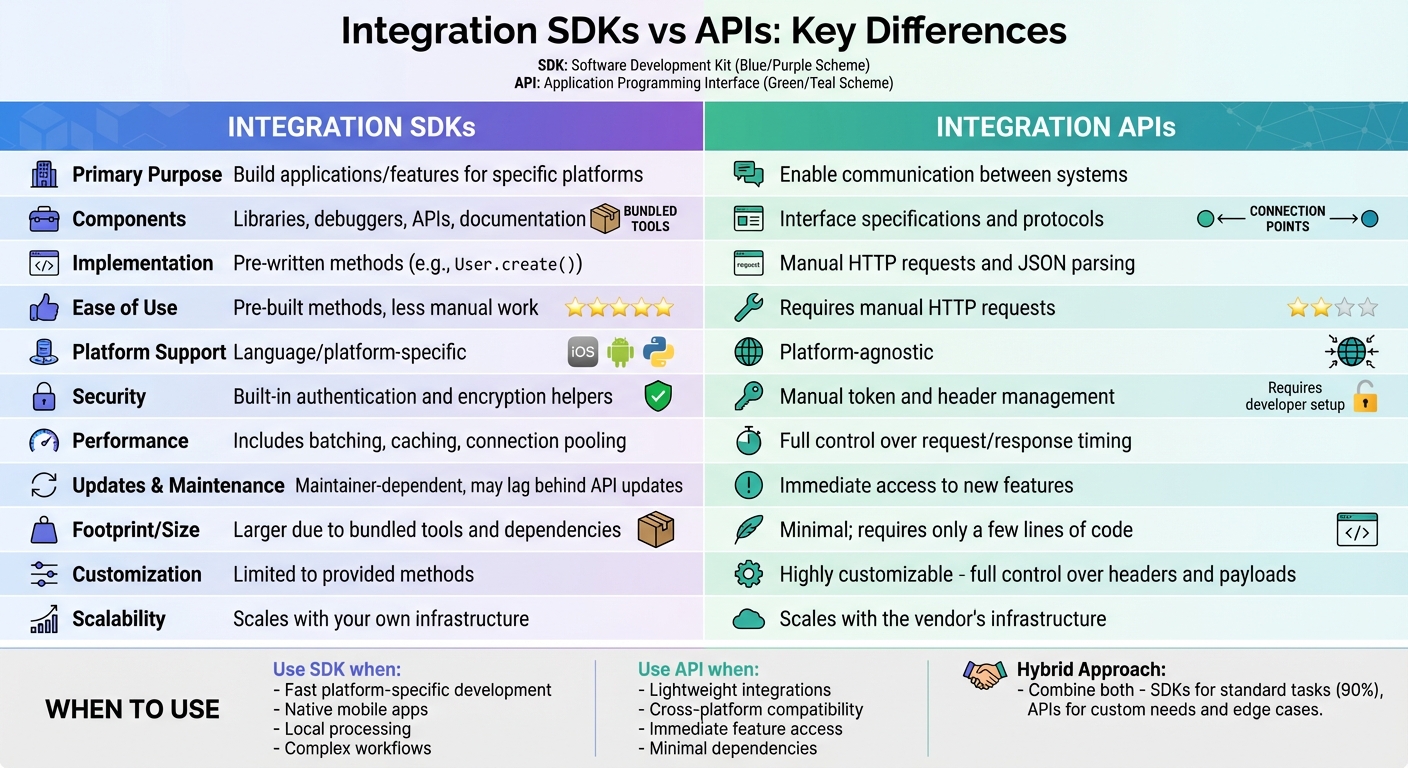
Integration SDKs vs APIs: Complete Feature Comparison Chart
Integration SDKs for Workflow Automation
How Integration SDKs Work
An integration SDK is essentially a toolkit that combines tools, libraries, and documentation into one package. Instead of manually crafting HTTP requests, developers can use ready-made methods like storage.upload() or payment.create(). This simplifies the process, letting developers focus on what their application does rather than worrying about the technical details behind the scenes.
To use an SDK, you install it through your dependency manager (such as npm, pip, or Gradle), initialize it, and call its pre-built methods. These methods take care of complex tasks like authentication, signing requests, retrying failed calls with exponential backoff, and managing rate limits – all without extra effort from the developer. Unlike APIs, which are designed to work across different environments, SDKs are tailored to specific programming languages (like Python or Java) or platforms (like iOS or Android). This platform-specific design streamlines integration and helps developers work faster and with fewer errors.
Benefits of Integration SDKs
Integration SDKs can speed up development by providing pre-built components that save developers from weeks of manual coding. Strongly typed interfaces reduce the likelihood of integration mistakes and ensure your application aligns with platform-specific standards. Plus, features like auto-completion, type hints, and inline documentation in your IDE make it easier to discover and use the SDK’s functionality without constantly referring to external guides.
As CJ Quines, Software Engineer at Stainless, explains:
“A well-designed SDK smooths over the rough edges inherent to programmatic API interaction, giving developers confidence in your product’s quality and maturity.”
This smoother experience doesn’t just make life easier – it creates more reliable, consistent applications. Developers don’t need to write custom error-handling code for every API call; the SDK takes care of that, ensuring predictable behavior across the board.
Limitations of Integration SDKs
Despite their advantages, SDKs aren’t without challenges. One common issue is their size – SDKs can increase your application’s footprint and may cause conflicts with other dependencies. Nishil Patel, CEO & Founder of BetterBugs, highlights this risk:
“Even the best SDKs have quirks, and small oversights can escalate into significant problems.”
Another drawback is version lag. SDKs often take time to catch up with updates to the underlying API, which can leave you waiting for new features. Their platform-specific nature can also complicate things if you’re building for multiple platforms like iOS, Android, and web – you might need to maintain separate implementations. Poor integration practices can lead to performance issues, such as slow load times, high latency, or even UI freezes if the SDK blocks the main thread with synchronous operations. Lastly, security concerns like hardcoded API keys or exposed sensitive data mean you need to thoroughly vet third-party SDKs before using them.
APIs for Workflow Automation
How APIs Support Automation
APIs act as the connectors between different software systems, enabling them to communicate and share data through standardized protocols – without needing to understand each other’s internal workings. They achieve this by exposing specific functionalities via endpoints, typically structured as URLs, which handle incoming requests and return data in a structured format.
When it comes to workflow automation, several architectural styles play a key role. REST leverages standard HTTP methods like GET, POST, PUT, and DELETE for resource-based interactions. GraphQL, on the other hand, allows clients to request only the exact data they need, reducing unnecessary bandwidth usage. For scenarios requiring low-latency communication, gRPC is often the go-to choice, particularly for internal microservices. Meanwhile, Webhooks stand out for enabling real-time automation by pushing data whenever specific events occur.
This flexibility, often referred to as “composability”, empowers developers to integrate best-in-class third-party services into sophisticated workflows. For example, you can combine Stripe for payment processing with Twilio for sending notifications, creating seamless, automated processes. You can also leverage DreamFactory, which provides governed API access to any data source, enabling you to securely connect enterprise applications and data systems through REST APIs without extensive backend development. This ability to mix and match services is a cornerstone of APIs’ importance in building modern, agile automation workflows.
The same composable approach applies to conversational experiences, where chatbots and voice agents rely on a voice API to connect speech recognition, text processing, and speech synthesis into one smooth, real-time interaction.
Advantages of APIs
APIs provide developers with precise control over various aspects of communication, including request timing, headers, error handling, and data transformation. One of their standout features is their loose coupling – a design principle that ensures one system can be updated internally without disrupting its connection to others, provided the API contract remains unchanged.
Another major strength of APIs is their cross-platform interoperability. A single API can support multiple programming languages – such as Java, PHP, and Python – and work seamlessly across platforms like iOS, Android, and Web. Compared to SDKs, APIs are lightweight, requiring just a few lines of code to execute, which minimizes their impact on application size. Additionally, developers gain immediate access to new or beta features through APIs, without waiting for SDK updates.
As Emre Tezisci from Speakeasy explains:
“APIs act as the bridges that allow different applications to communicate and share data, while SDKs provide developers with the toolkits they need to build upon these APIs efficiently.”
Challenges of APIs
While APIs offer flexibility, they also come with challenges. Direct integration involves manually handling HTTP requests, parsing responses, and managing complex authentication methods like OAuth, JWT, and API keys. Developers must also implement custom logic for retries, exponential backoff, and rate limiting to ensure that workflows remain reliable.
Security is another critical concern. Since developers are responsible for managing sensitive data tokens and ensuring secure implementation, any oversight can lead to vulnerabilities. This makes it essential for organizations to carefully vet API providers and enforce strict security practices. Debugging raw API integrations can also be a headache. Unlike SDKs, APIs lack conveniences like auto-completion, type hints, and inline documentation, which increases the likelihood of typos or missing parameters.
Version management adds yet another layer of complexity. APIs frequently undergo updates, including breaking changes and deprecations, requiring developers to monitor release notes and update their code to prevent workflow disruptions. Lastly, network latency can impact performance since APIs rely on HTTP/HTTPS calls over the internet. Workflow speed often depends on network conditions and the efficiency of request design, which contrasts with the more localized approach SDKs offer. These trade-offs highlight the balancing act involved in leveraging APIs for automation.
Key Differences Between SDKs and APIs
Comparison Dimensions
The main difference between SDKs and APIs lies in their roles: SDKs act as an abstraction layer, while APIs serve as an interface. As one Stack Overflow contributor aptly explained, “An API is an interface, whereas an SDK is an abstraction layer over the interface”. This distinction heavily influences how developers interact with these tools.
Development scope is another clear dividing line. SDKs offer a comprehensive toolkit, bundling compilers, debuggers, code samples, and documentation into one package. APIs, on the other hand, are more focused, providing connectivity and data exchange protocols like REST or GraphQL. For example, when building a design workflow in UXPin, an SDK might include pre-built methods for importing component libraries, while an API would provide raw endpoints to access design data, leaving you to handle parsing and integration.
SDKs also take care of low-level tasks automatically, whereas APIs require manual setup and configuration. SDKs are typically tailored to specific platforms, making them platform-dependent, while APIs are platform-agnostic and can work across multiple programming languages. This difference extends to updates and maintenance: SDKs often manage minor API changes behind the scenes but may lag in adopting new features. APIs, by contrast, give immediate access to new endpoints but require developers to handle updates manually.
Another key distinction lies in performance. SDKs often include built-in optimizations like connection pooling and caching, which simplify development but may limit flexibility. APIs provide full control over performance tuning, making them ideal for high-performance environments where customization is critical.
The table below captures these differences in a concise format.
Comparison Table
| Dimension | Integration SDK | API (Direct Access) |
|---|---|---|
| Primary Purpose | Build applications/features for specific platforms | Enable communication between systems |
| Components | Libraries, debuggers, APIs, documentation | Interface specifications and protocols |
| Implementation | Pre-written methods (e.g., User.create()) |
Manual HTTP requests and JSON parsing |
| Security | Built-in authentication and encryption helpers | Manual token and header management |
| Performance | Includes batching and connection pooling | Full control over request/response timing |
| Maintenance | Updates managed by library maintainers | Manual updates required for API changes |
| Environment | Language/platform specific | Language/platform agnostic |
| Footprint | Larger due to bundled tools and dependencies | Minimal; requires only a few lines of code |
| Customization | Limited to methods exposed by the library | High; full control over headers and payloads |
| Scalability | Scales with your own infrastructure | Scales with the vendor’s infrastructure |
sbb-itb-f6354c6
Choosing Between SDKs and APIs
When to Use an SDK
SDKs are your go-to for fast, platform-specific development. They’re especially useful for building native mobile apps that rely on device-specific features like cameras, GPS, or push notifications. By providing pre-built libraries and tools, SDKs can drastically cut down development time.
If your project involves sensitive data or requires local processing, SDKs are a smart choice. For example, in scenarios where data must remain within your infrastructure – such as air-gapped environments without internet access – SDKs allow you to process information locally. This not only boosts performance but also eliminates concerns around network latency.
SDKs also simplify complex workflows, like payment processing, by handling encryption, validation, and secure communication out of the box. For design tools like UXPin, an SDK might include ready-to-use methods for managing design tokens or importing component libraries, saving developers from writing extensive integration code.
However, if you’re aiming for lightweight, cross-platform functionality, APIs might be the better fit.
When to Use an API
APIs shine in scenarios where lightweight integrations and cross-platform compatibility are key. For instance, fetching specific data points – like weather updates or currency exchange rates – can be done efficiently with APIs, without the added overhead of an SDK. They’re also ideal for workflows that need to function uniformly across web, mobile, and backend systems, thanks to their unified communication logic.
Another big advantage of APIs is their immediacy. New features are accessible as soon as they’re deployed, whereas SDKs often require time for updates to be implemented and released. This makes APIs the best option for staying on the cutting edge without waiting for library updates.
Additionally, APIs help keep your codebase lean. Unlike SDKs, which can bring in numerous dependencies (and potential conflicts), APIs allow for direct calls that minimize bloat and make your integrations more manageable.
When to Combine SDKs and APIs
While SDKs and APIs each have their strengths, combining them can offer the best of both worlds. A hybrid approach allows you to use platform-specific SDKs for front-end development – leveraging native UI and device features – while relying on REST APIs for backend services and data integration.
This strategy works well for balancing efficiency and flexibility. SDKs can handle standard workflows, covering most of your needs (around 90% of common operations), while APIs can address edge cases, such as custom headers or beta features that the SDK doesn’t yet support. Teams can also use SDKs to create custom APIs, exposing specific functionalities to partners or internal teams. For example, UXPin might use an SDK internally to manage design components, while offering a REST API for external tools to trigger design exports or sync design tokens with development environments.
Conclusion
Summary
SDKs come packed with tools like libraries, authentication handlers, error management, and documentation, making them a go-to choice for speeding up platform-specific development. If you’re building native mobile apps or need to roll out features quickly without writing repetitive code, SDKs are your best friend.
APIs, on the other hand, provide a lean and flexible way for different components to communicate. They rely on standard protocols like REST or GraphQL, making them compatible with virtually any platform. Plus, with APIs, you gain instant access to new features as soon as they’re rolled out. This highlights a key distinction: APIs focus on communication interfaces, while SDKs provide an abstraction layer to simplify development.
Recent data emphasizes how vital these tools are in today’s digital landscape. Understanding their differences helps you choose the right approach for your project.
Making the Right Choice
When deciding, let your project’s specific needs guide you. SDKs are ideal for fast, platform-specific development – like creating iOS or Android apps with built-in security features such as automatic token refreshing. Meanwhile, APIs are better suited for cross-platform projects, offering consistency, fewer dependencies, and quick access to the latest features.
Sometimes, a mix of both works best. A hybrid approach lets you use SDKs for standard workflows while relying on APIs for edge cases or performance-critical tasks. For instance, tools like UXPin utilize SDKs to manage internal components but lean on REST APIs for external integrations. The trick is to align your integration strategy with your goals for workflow automation, security, and long-term maintainability.
SDK vs API
FAQs
What are the key benefits of using an SDK instead of an API?
Using an SDK can speed up development and streamline the process by offering a comprehensive toolkit that goes beyond the capabilities of a standard API. These toolkits often include pre-written code, libraries, detailed documentation, and platform-specific utilities like compilers or debuggers. With these resources, developers can quickly add features without the need to manually write extensive HTTP calls or tackle complex tasks like authentication and error handling from scratch.
SDKs also make onboarding smoother by handling many of the low-level technical details and providing language- or platform-specific integrations. Many SDKs come equipped with sample projects and debugging tools, allowing development teams to focus on building the core functionality of their application instead of dealing with infrastructure challenges. This approach not only speeds up implementation but also ensures consistent code quality and simplifies long-term maintenance.
What’s the difference between SDKs and APIs when it comes to platform compatibility?
SDKs are built for a specific platform and come equipped with tools like compilers, debuggers, and libraries that are tailored to a particular operating system, programming language, or hardware. This makes them perfect for building applications that run natively within that environment.
APIs, by contrast, lay out a set of rules for how software components interact. They are platform-independent, meaning they can work across different systems as long as the protocol (like HTTP) is supported. However, with APIs, developers often need to take on more of the integration work themselves.
To put it simply, SDKs offer platform-specific tools for native app development, while APIs provide cross-platform communication with added flexibility.
When should you use both SDKs and APIs in a project?
Using an SDK alongside an API can be a smart approach when you want the convenience of pre-built tools combined with the freedom to tailor specific functionalities. SDKs come with libraries, utilities, and documentation that make routine tasks like prototyping easier, ensure compatibility with platforms, and cut down on repetitive coding. Meanwhile, APIs give you the granular control needed for customization, performance tweaks, or integrating unique features.
This duo is particularly effective in multi-service workflows. For instance, you might rely on an SDK for something straightforward, like uploading files to a cloud storage service, while using APIs to connect with other platforms or implement custom logic. By blending the strengths of both, you can speed up development while still addressing edge cases or enhancing features beyond what the SDK alone offers.

