Manual design system updates waste time and create inconsistencies. Automating these processes can save hours, reduce errors, and improve workflows. Here’s how automation solves key problems:
- Token Syncing: Automates updates across tools like Figma and GitHub, avoiding misalignment.
- Documentation: Automatically generates and updates specs to match code changes, cutting update time from hours to minutes.
- Component Drift: Prevents inconsistencies by syncing design components directly with production code.
Key Tools:
- UXPin Merge: Links design tools to live React components, ensuring real-time updates and eliminating “snowflake” components.
- Cursor: AI-powered code editor that predicts changes and prevents token inconsistencies.
- Mintlify: Automates documentation updates directly from source code, with AI-powered search for quick access.
Steps to Automate:
- Connect tools like Figma to Git repositories for seamless updates.
- Use AI for real-time compliance checks and error detection.
- Automate documentation with tools like Mintlify for instant updates.
Results: Automation reduces redundant tasks by 50%, improves consistency, and ensures teams can focus on creating better products instead of fixing errors.
How to Automate your Design System with AI
Problems with Manual Design System Updates
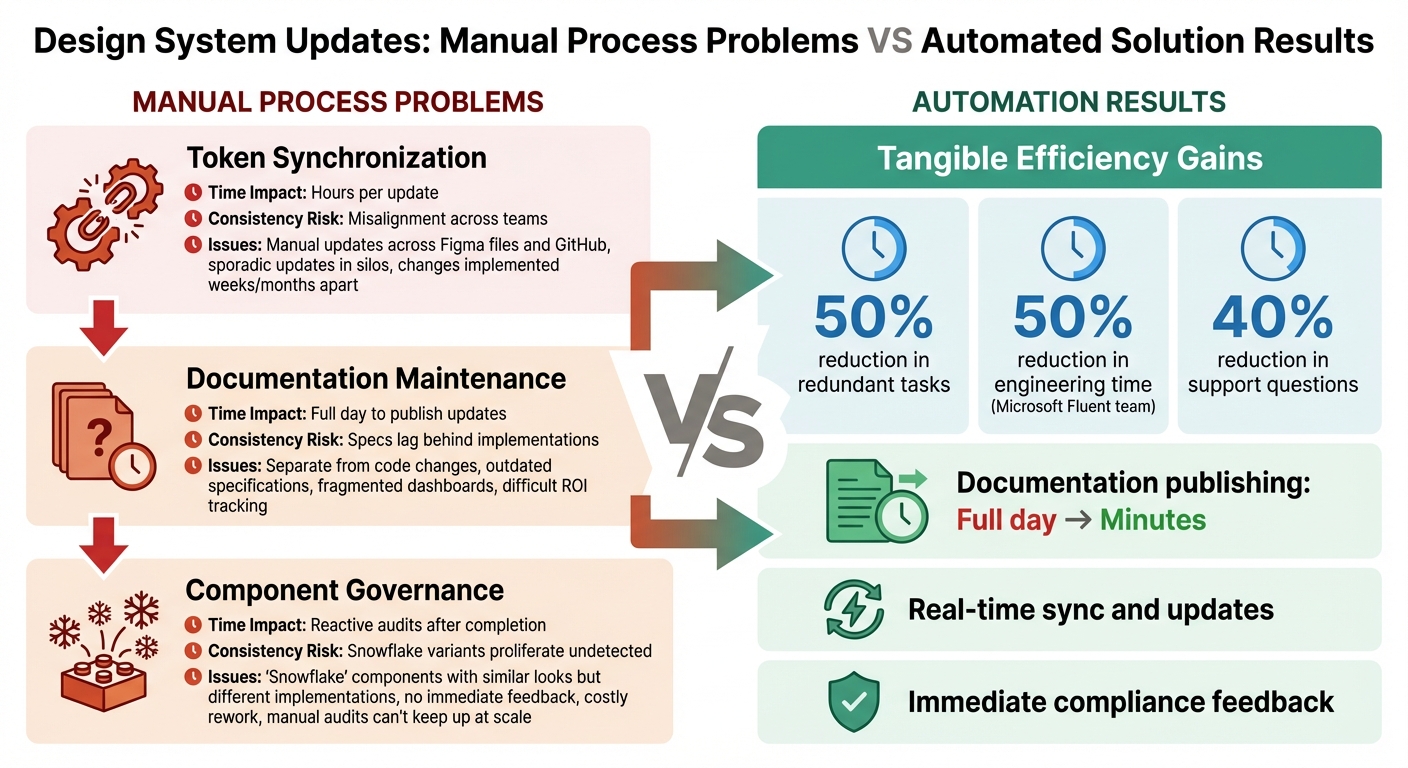
Manual vs Automated Design System Updates: Time Savings and Impact Comparison
Relying on manual processes to maintain a design system can quickly turn what should be a strategic advantage into a source of inefficiency and technical debt. These bottlenecks make it harder to scale and keep teams aligned.
Token and Component Sync Problems
Updating design tokens manually is a time-consuming process that creates a ripple effect of inefficiencies. For example, when a single token changes, designers must comb through multiple Figma files to apply updates, while developers dig through GitHub to adjust matching code values. This piecemeal approach often leads to teams working out of sync, especially as updates occur sporadically and in silos.
The problem only grows with scale. A single token change might require updates across dozens of components and files, making manual processes unmanageable for modern UI/UX design services. Teams are left constantly double-checking whether updates were applied correctly, and miscommunications can result in inconsistencies – sometimes changes are implemented in one product weeks or even months before others catch up. On top of this, outdated documentation adds yet another layer of disruption to the workflow.
Outdated Documentation and Tracking
Documentation is another area where manual processes fall short. Updating documentation can take an entire day. Because documentation updates are often handled separately from code changes, it’s common for specifications to become outdated and misaligned with actual implementations. Developers end up wasting time trying to trace decisions across fragmented dashboards, which not only slows them down but also makes it harder for design system teams to track component adoption or measure return on investment (ROI).
This lack of visibility creates additional challenges. Without clear data on how components are being used, teams struggle to make informed decisions or justify their work to stakeholders. At the same time, manual governance leaves room for components to drift away from established standards, which brings us to the next issue.
Component Drift and Governance Issues
When governance relies on manual checks, inconsistencies inevitably creep in. Teams often create “snowflake” components – elements that look similar but differ in their technical implementation. This happens because there’s no immediate feedback to alert designers or developers when they deviate from system standards while working in Figma or writing code.
These issues typically surface only after the work is done, requiring costly rework and causing delays. Worse, each variant of a drifted component demands its own documentation, maintenance, and bug fixes, adding hidden costs that erode the value of the design system. At scale, manual audits simply can’t keep up with the volume of design and code changes across multiple products. This allows violations to pile up unnoticed until they become widespread problems.
The cumulative delays and inefficiencies highlight the need for automation to ensure consistency and streamline updates.
| Challenge | Time Impact | Consistency Risk |
|---|---|---|
| Token Synchronization | Hours per update | Misalignment across teams |
| Documentation Maintenance | Full day to publish updates | Specs lag behind implementations |
| Component Governance | Reactive audits after completion | Snowflake variants proliferate undetected |
Tools for Automating Design System Updates
Automation tools can take the headache out of keeping design systems up to date. By connecting design work directly to production code, auto-generating documentation, and leveraging AI for consistency, these tools simplify what would otherwise be a tedious, manual process. They address common challenges like syncing, documentation, and governance, ensuring design systems stay efficient and reliable.
UXPin Merge for Code-Component Sync
UXPin Merge integrates React components from Git repositories (like GitHub, Bitbucket, and GitLab), Storybook, or npm packages directly into the design workspace. This means designers can work with production-ready components instead of static mockups that need to be rebuilt later.
This approach eliminates the issue of “component drift.” When developers update a component in the repository, those changes automatically sync to the design environment. UXPin Merge also recognizes React props – whether defined with prop-types or TypeScript interfaces – and converts them into UI controls in the Properties Panel. This ensures designers can modify components only within the parameters set by developers.
Microsoft’s Fluent design team shared that using UXPin Merge cut engineering time by 50% and allowed them to scale effectively, with fewer designers supporting over 1,000 developers.
Another standout feature is its automated documentation. UXPin Merge pulls component versions, properties, and descriptions directly from the source code, keeping documentation current as the codebase evolves.
AI-Assisted Code Editors
AI-powered code editors further enhance the process by making code updates faster and more precise.
Take Cursor, for example. This AI-driven editor, built on VS Code, learns your component patterns and offers tailored autocomplete suggestions to ensure updates align with your design system. Its Composer mode provides a clear view of every file impacted by a change before it’s applied, helping developers anticipate the ripple effects of their modifications. This is especially helpful for maintaining consistency when updating design tokens or components across multiple files.
Cursor also supports multiple AI models and lets teams integrate their own, offering flexibility for various workflows. Plus, tools like Figma MCP can be integrated to connect design files directly to development processes.
Automated Documentation Platforms
For documentation, tools like Mintlify make life easier by automating the process entirely. Mintlify deploys documentation from markdown files and updates automatically with GitHub merges. It also includes AI-powered search, which understands natural language queries, making it easier for developers to find what they need compared to traditional keyword searches.
On top of that, Mintlify auto-generates API documentation by reading OpenAPI specs, eliminating the need for manual input. The platform’s built-in analytics highlight which documentation pages are most used, helping teams identify gaps and prioritize updates.
Teams using Mintlify have seen support questions drop by about 40% and have reduced documentation publishing time from an entire day to just minutes. This shift allows design system teams to focus on strategy and governance rather than routine tasks.
sbb-itb-f6354c6
How to Automate Design System Updates
Automation simplifies the process of keeping design systems in sync with code, eliminating manual errors and speeding up workflows. By bridging design and development, updates become seamless and efficient.
Connecting Design Systems to Code Repositories
The first step in automating updates is linking your design system directly to your code repository. This connection establishes a single source of truth, where changes flow smoothly between design and development teams.
Tools like Figma MCP make this possible by syncing design files with GitHub, enabling automatic token updates without manual exports. For instance, when a designer modifies a color token in Figma, the update is pushed directly to the repository through webhooks, ensuring the entire codebase reflects the change. Similarly, UXPin Merge allows designers to work with live, production-ready components. Updates made by developers in the repository automatically sync back into the design workspace, enabling designers to always work with the latest components.
This approach eliminates the need for manual handoffs. By incorporating live components and Git-based semantic versioning, updates remain consistent and reliable throughout the system.
Such integration also paves the way for AI-powered compliance and real-time error detection.
Using AI for Real-Time Compliance Checks
AI takes automation a step further by actively monitoring designs and code for adherence to established rules. Instead of waiting for inconsistencies to surface during code reviews, AI flags them as soon as they occur.
For example, Cursor’s Composer mode provides a preview of affected files before changes are applied, illustrating how a token update will impact various components. AI tools also compare designs against system tokens, suggesting immediate corrections to maintain consistency.
Another benefit of AI is identifying “snowflakes” – unique components that deviate slightly from standard design elements. These variations can clutter your codebase, but AI can scan for them and recommend automated refactoring to align them with standardized components.
Tools like PostHog MCP further enhance governance by enabling natural language queries for compliance metrics. For instance, you can ask, “Which components have adoption rates below 20%?” and instantly get actionable insights, helping you focus on areas that need attention.
With design and code consistently synced and monitored, automation can also ensure documentation stays up to date.
Automating Documentation and Deployment
Writing and updating documentation manually can be a time-consuming bottleneck. Automation solves this by pulling information directly from the source code, ensuring documentation reflects the latest updates.
AI tools like Claude Code can generate markdown documentation from component specs, props, and tokens. Once pushed to GitHub, platforms like Mintlify automatically deploy these docs with built-in AI search capabilities. This means that when developers merge changes, the documentation updates automatically, keeping everything aligned.
To streamline deployment, tools like GitHub Actions or n8n can trigger updates whenever changes are merged. For teams that need different scalability models, hosted options, or simpler setup, n8n alternatives can also provide flexible automation workflows while maintaining strong integration and customization capabilities. For design systems, this ensures that Figma variables sync with code via MCP, while documentation updates occur without extra effort. Built-in analytics on these platforms also provide insights into which documentation pages receive the most traffic, helping teams identify gaps and focus on areas that need improvement. Teams using these methods have reported a 40% reduction in support questions.
Automation Best Practices for 2026
As we look ahead to 2026, automation strategies are becoming more refined, focusing on smarter governance and AI-enhanced updates to design systems. With tools evolving rapidly, the emphasis now is on ensuring these systems operate seamlessly and efficiently.
Real-Time Linting and Governance
Gone are the days of waiting until code reviews to spot issues. AI agents now monitor workflows in real time, stepping in to suggest the correct design tokens when non-system colors are chosen in Figma or when spacing inconsistencies arise in code. This level of proactive oversight helps stop design drift before it even begins. On top of that, real-time linting uses advanced pattern recognition to detect subtle component inconsistencies across codebases, prompting immediate refactoring when needed.
These instant corrections are laying the groundwork for even more advanced component creation processes.
AI-Driven Component Generation
Design systems have taken a leap forward with platforms that automatically generate production-ready components. For instance, UXPin Merge ensures every component it generates meets system standards and is ready for immediate use – no additional tweaking required. By 2026, effective strategies combine these specialized tools for governance and component creation with general-purpose AI to handle tasks like research, documentation, and strategic planning.
Measuring Automation ROI
To gauge the impact of automation, track metrics like a 50% reduction in redundant tasks, faster time-to-market, and a 40% decrease in support queries. Beyond these numbers, dive deeper by monitoring system usage rates (the percentage of UI surfaces using approved components), override rates (how often tokens or properties deviate from guidelines), and variant sprawl rates (the monthly increase in new variants). These metrics offer a clearer picture of whether automation is truly improving governance and efficiency.
Conclusion
Automating updates to your design system can completely change how your design and development teams work together. By cutting out tedious tasks like manual token syncing, dealing with outdated documentation, or fixing component drift, your team can shift its focus to creating better products instead of constantly chasing consistency. The result? Clear, measurable improvements in your workflow.
Features like real-time linting help catch problems early, preventing them from becoming bigger issues. Automated documentation ensures everything stays up-to-date without adding extra work. Tools like UXPin Merge take it a step further by seamlessly syncing production-ready components into your design process, closing the gap between design and code.
To get started, focus on small, manageable integrations that deliver proven results. Use AI-powered editors and direct repository connections to handle repetitive tasks automatically. Keep an eye on metrics like how often components are adopted, how frequently overrides occur, and how much variant sprawl exists. These insights will help you track progress and fine-tune your approach as you go.
FAQs
How can automating design system updates boost team productivity?
Automating updates within a design system can significantly boost team efficiency by cutting down on tedious manual tasks and simplifying workflows. Tasks like versioning, syncing design tokens, and maintaining components become quicker and more precise with automation, reducing the chances of errors or inconsistencies.
By eliminating repetitive updates, teams can dedicate more energy to creative and strategic efforts, which not only accelerates product development but also strengthens collaboration between designers and developers. Plus, automation helps maintain consistency across projects, making it easier to scale and deliver polished, high-quality digital experiences.
What tools can help automate updates to a design system?
Automating updates to design systems is all about efficiency and consistency, and having the right tools makes all the difference. UXPin stands out as a go-to platform for this task, offering capabilities like design system management, interactive components backed by code, and smooth workflows that bridge the gap between design and development. One of its standout features, UXPin Merge, allows teams to sync design and development seamlessly, ensuring that components are always current.
Other helpful features include centralized libraries, automated version control to track changes, and AI-assisted updates that minimize manual work and reduce errors. By integrating automation into their workflow, teams can keep their design systems consistent, adaptable, and aligned with the demands of development.
How does AI help maintain consistency in design systems?
AI plays a key role in keeping design systems consistent by automating tasks like spotting inconsistencies, auditing designs, and checking for accessibility compliance. This not only cuts down on manual effort but also reduces the chance of errors, helping ensure that designs stay in sync with the underlying code.
Using structured data such as design tokens and metadata, AI applies design rules across user interface elements to maintain uniformity. It also simplifies workflows by automating updates and syncing changes, which is crucial for building scalable and well-organized design systems. With these capabilities, AI boosts efficiency and dependability, freeing teams to concentrate on crafting smooth and engaging user experiences.

