Want to improve your prototyping process? Real-time feedback is the game changer. Here’s why:
- Save time and money: Early feedback catches issues before they snowball into costly problems.
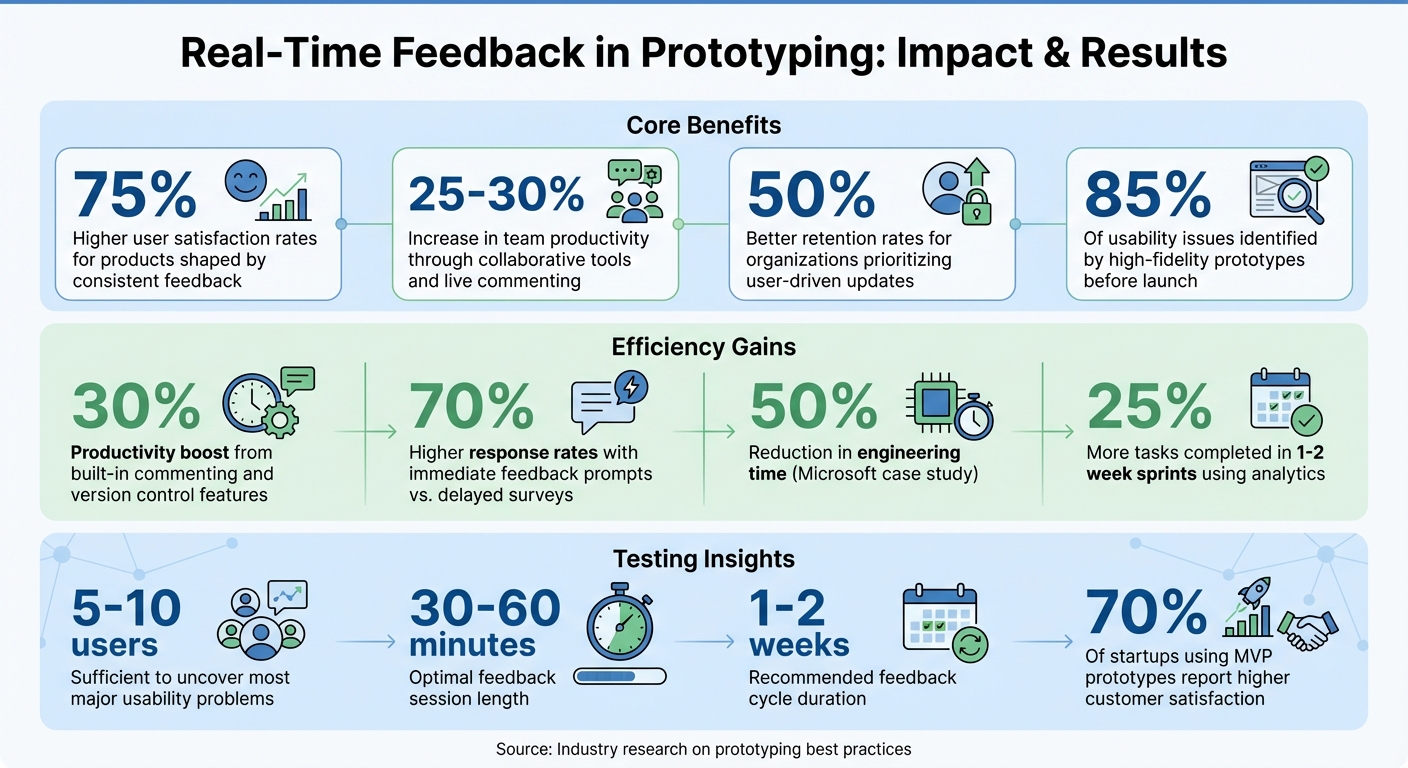
- Boost user satisfaction: Products shaped by consistent feedback see up to 75% higher satisfaction rates.
- Increase team productivity: Collaborative tools and live commenting cut delays, improving task completion by 25-30%.
To make it work:
- Define clear goals for feedback (e.g., usability, design, or functionality).
- Use tools like UXPin for live collaboration and in-context comments.
- Set short feedback cycles (1-2 weeks) and test prototypes regularly with real users.
- Combine direct feedback with behavioral analytics to prioritize changes effectively.
Real-Time Feedback in Prototyping: Key Statistics and Benefits
How to Get Feedback on a Product Idea or Prototype
Requirements for Effective Real-Time Feedback
To make the most of real-time feedback, it’s crucial to start with a solid foundation. Without clear goals, the right tools, and a structured approach, feedback can quickly turn into unhelpful noise instead of actionable insights. Before jumping into prototyping or testing, teams need to establish a framework that ensures feedback is purposeful and drives meaningful improvements. Let’s break this down into three key areas: defining goals, selecting tools, and structuring feedback cycles.
Define Your Feedback Goals
The first step is identifying what exactly you’re trying to evaluate. Are you testing a specific feature, gauging overall usability, or gathering impressions on visual design? Each of these objectives requires a tailored approach. For instance, focusing on functionality might involve different testing methods than assessing user flow or aesthetic appeal. Having a clear goal upfront ensures that feedback sessions address the most critical questions and don’t waste time on irrelevant details.
Wafaa Maresh, a UX/UI Designer, highlights the role of early validation in the design process:
"Prototyping is an essential part of the product development process. It allows you to test your ideas early and often, and to get feedback from users before you invest a lot of time and money into development."
This underscores the importance of being intentional about what you’re testing right from the start.
Choose the Right Tools
The tools you use can make or break your feedback process. Interactive prototyping platforms like UXPin are great for capturing feedback directly within the design itself, cutting down on scattered email threads or manual notes. Look for features like in-context commenting, version control, and seamless collaboration between team members. These capabilities make it easier to gather, organize, and act on feedback without unnecessary friction.
When tools are intuitive and easy to use, more people are likely to participate. On the flip side, if the process feels clunky, engagement drops – and so does the quality of the feedback. Once you’ve chosen a tool that fits your needs, focus on structuring sessions in a way that encourages meaningful input.
Set Up Feedback Cycles
Effective feedback cycles move from broad to specific. Start with low-fidelity prototypes to test big-picture ideas and concepts, then gradually refine these into high-fidelity versions for more detailed evaluations. This approach helps catch major issues early, avoiding expensive fixes down the line.
Keep feedback sessions short – 30 to 60 minutes is usually enough to stay focused. Testing with just 5 to 10 users is often sufficient to uncover most major usability problems. To make the feedback actionable, categorize it into buckets like usability issues, feature requests, and positive experiences. This organization helps teams prioritize changes based on their impact and urgency.
Best Practices for Real-Time Feedback in Prototyping
Once you’ve set clear goals, chosen the right tools, and established feedback cycles, it’s time to put theory into practice. These actionable methods help transform feedback into meaningful design improvements. From capturing stakeholder insights to analyzing user behavior, each approach plays a unique role in refining your prototype.
Use Built-In Commenting Features
On-screen commenting keeps feedback organized and directly linked to specific design elements. Instead of juggling endless email threads, stakeholders can leave comments right on the prototype screens. This eliminates confusion and ensures everyone knows exactly what needs attention.
Platforms like UXPin make this process seamless with real-time collaboration tools, including built-in commenting and version control. These features keep teams aligned and can increase productivity by as much as 30%. When stakeholders can pinpoint issues – whether it’s a button, form field, or navigation element – they provide more actionable feedback. This reduces unnecessary back-and-forth and speeds up revisions.
To maximize these tools, involve all key stakeholders early in the process. Encourage frequent interactions with the prototype and prioritize feedback based on how often an issue is flagged and its impact on the user experience. This approach is particularly valuable for teams working on tight deadlines. By addressing these comments early, you’ll set the stage for validating fixes during live testing.
Conduct Live Usability Testing
Live usability testing with real users uncovers issues that internal teams may overlook. Watching users interact with your prototype in real-time can highlight both pain points and features that work well, offering immediate insights without waiting for delayed feedback.
Start by recruiting participants who reflect your target audience. Design realistic scenarios that mimic how users would engage with your product, providing clear but unbiased instructions. During these sessions, observe closely and ask open-ended questions to understand the reasoning behind their actions. High-fidelity prototypes used in live sessions can uncover up to 85% of usability issues before launch, saving both time and resources.
Here’s a quick breakdown of testing types:
| Testing Type | Role | Pros | Cons |
|---|---|---|---|
| Moderated | Active Guide | Offers real-time support and deeper insights | Can be time-intensive and prone to facilitator bias |
| Unmoderated | Silent Observer | Cost-effective with larger sample sizes | No chance to clarify user confusion |
| Remote | Virtual Presence | Geographically flexible and convenient | Limited control over user environments |
After testing, review findings as a team and brainstorm solutions. Techniques like "I Like, I Wish, What If" encourage open dialogue and help participants go beyond identifying problems to suggesting improvements. Plan to test interactive prototypes every two to three weeks, incorporating feedback into each new version. Once you’ve gathered qualitative insights, move on to analyzing behavioral data for a more complete picture.
Track Behavioral Analytics
While direct feedback is valuable, quantitative data adds another layer of insight to your design process. Tracking user behavior – like clicks, navigation paths, session recordings, and event interactions – can reveal patterns that users might not articulate during testing.
For example, users might say they like a feature, but analytics could show they rarely use it. Or, they might struggle with a component without mentioning it during live sessions. Products that consistently incorporate analytics into their feedback loops report up to 75% higher user satisfaction and a 50% boost in retention. Tools that prompt immediate feedback often see response rates 70% higher than delayed surveys.
Analyze navigation paths to identify where users drop off or encounter friction, then prioritize fixes that have the greatest impact on usability. Teams that use short sprints of one to two weeks, combined with analytics, complete 25% more tasks. This data-driven approach ensures your decisions are based on actual user behavior – not assumptions – making your prototype stronger with every iteration.
sbb-itb-f6354c6
How UXPin Merge Supports Real-Time Feedback
Design with Production-Ready Components
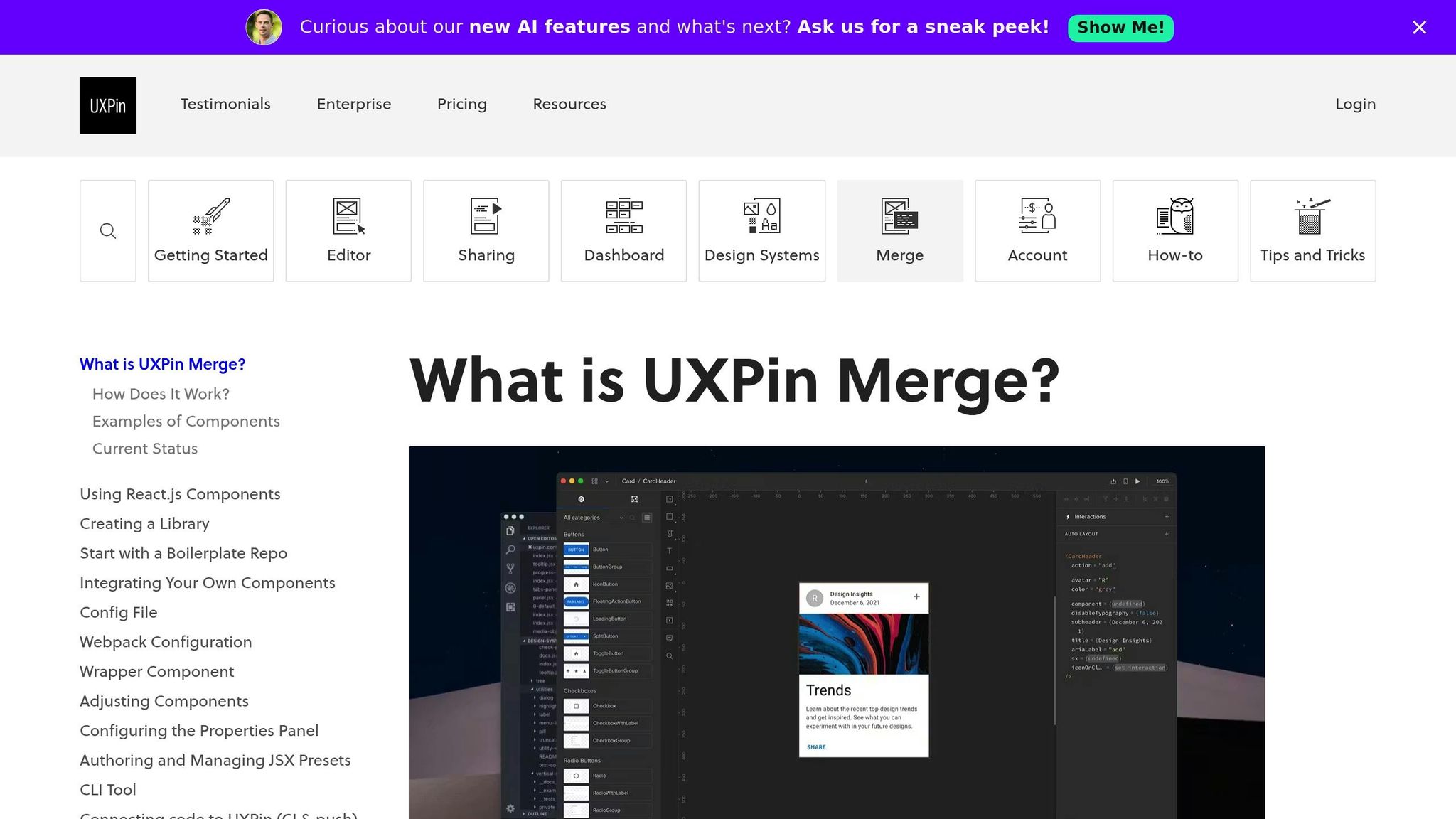
UXPin Merge bridges the gap between design and development by allowing teams to prototype using production-ready components. Instead of creating static mockups that developers need to rebuild, designers can pull components directly from established repositories into the UXPin editor. These components are identical to those used in production, ensuring that behavior, interactions, and constraints remain consistent.
This method changes how feedback is gathered. When stakeholders interact with a prototype built using real components, they’re engaging with elements that mirror the final product. Features like sortable tables, date pickers, or form validations work exactly as they would in production. This eliminates the guesswork often associated with static designs, ensuring that feedback focuses on genuine usability issues.
Take Microsoft as an example: a team of just three designers managed to support 60 internal products and over 1,000 developers by syncing their Fluent design system with UXPin Merge. Larry Sawyer, Lead UX Designer, shared:
"When I used UXPin Merge, our engineering time was reduced by around 50%."
By using real components, teams not only improve the quality of feedback but also foster smoother collaboration between design and development.
Collaborate with Built-In Tools
UXPin’s collaboration tools take this production-level accuracy even further, making feedback sessions more efficient. Stakeholders can leave comments directly on specific elements – like buttons, forms, or navigation menus – without needing to jump between emails or external project management platforms. This ensures that feedback is clear, actionable, and tied to the exact design element in question.
Spec Mode adds another layer of efficiency by generating production-ready JSX and CSS for every design component. Developers can inspect these elements during reviews and copy the code directly, reducing handoff challenges and ensuring the final product matches the prototype. Features like version control and real-time multiplayer editing also allow teams to address feedback immediately. These tools have been shown to boost productivity by up to 30% and increase task completion rates by 25% during short 1- to 2-week sprints.
Conclusion
Key Takeaways
Incorporating real-time feedback into your prototyping process transforms it into a more efficient and data-driven effort. High-fidelity prototypes are particularly effective, identifying up to 85% of usability issues before launch. Products developed with consistent user input see a 75% increase in satisfaction, while organizations that prioritize user-driven updates enjoy 50% better retention rates. Teams adopting shorter sprints also experience a 30% boost in productivity.
Features like built-in commenting, live testing, behavioral analytics, and structured feedback cycles streamline workflows by reducing rework, speeding up iterations, and enhancing team collaboration. These strategies not only save time but also lead to better design outcomes. Consider these insights as you refine your processes moving forward.
Next Steps for Teams
Take these lessons and apply them to your design process. Start by setting clear feedback goals for your next sprint and identifying key usability questions and feature validations. Plan for 1–2 week cycles that end with structured feedback reviews. Methods like the Feedback Capture Grid or "I Like, I Wish, What If" can help prioritize changes effectively.
Choose tools that enhance collaboration and provide features like production-ready components and analytics tracking. Platforms like UXPin offer a comprehensive solution, with real React components that mimic production behavior and integrated commenting tools that connect feedback directly to specific design elements. This approach ensures smoother handoffs, fewer revisions, and prototypes that stakeholders can confidently engage with.
Within 2–3 weeks, aim to launch an interactive prototype. Test it with representative users and iterate based on their behaviors. Interestingly, 70% of startups using minimum viable prototypes report higher customer satisfaction. Testing early and often not only aligns your prototypes with user needs but also keeps them in sync with your business goals. This agile, real-time approach ensures your designs stay relevant and impactful.
FAQs
What are the benefits of using real-time feedback during prototyping?
Real-time feedback transforms the prototyping process by helping teams spot and fix issues on the spot. This means faster adjustments and smoother iterations, without the need to wait for scheduled reviews or delayed email responses. The result? Projects stay on track, and unnecessary delays are avoided.
It also boosts teamwork by giving everyone involved – designers, developers, and stakeholders – a clear, updated view of the prototype. This shared perspective reduces confusion and keeps everyone aligned on the same goals. Plus, real-time feedback supports continuous testing and fine-tuning, which leads to designs that better meet user needs and deliver stronger results. In short, it simplifies workflows and speeds up product development.
What are the best ways to gather real-time feedback during prototyping?
Collecting real-time feedback during prototyping plays a key role in refining designs. A highly effective way to gather input is by using in-app feedback tools like embedded widgets, pop-ups, or screenshot annotation features. These tools let users provide quick, contextual feedback while interacting with the prototype, keeping the process smooth and non-intrusive.
Another method worth considering is remote user testing, where participants explore prototypes on their own. This approach allows designers to observe user behavior, gather large-scale feedback, and uncover usability issues. By combining these techniques, you can make informed, user-centered improvements that elevate the design’s quality.
How can teams structure feedback cycles to improve prototyping outcomes?
To get better results from prototyping, teams should organize feedback cycles into clear, step-by-step stages that promote ongoing improvement. A straightforward approach involves focusing on three key elements: action, effect, and feedback. This method helps teams test their ideas, gauge user reactions, and fine-tune designs in a more efficient way. Holding frequent, smaller feedback sessions can help identify problems early, make quick adjustments, and prevent expensive redesigns later on.
Leveraging tools that enable real-time collaboration can centralize feedback, simplify communication, and eliminate delays caused by scattered input or manual workflows. It’s also crucial to focus on feedback that is specific, actionable, and aligned with both user needs and project goals. Avoid vague or unhelpful comments that don’t add value. By gathering feedback at critical points – like early feature testing or detailed user evaluations – teams can turn insights into meaningful design improvements and speed up the development process.

