Design handoff is the process of transferring design details to developers. There are two main approaches: manual handoff and automated handoff. Manual handoff relies on static files, detailed documentation, and meetings, but it often leads to errors, delays, and miscommunication. Automated handoff, on the other hand, integrates design tools with real-time collaboration, enabling developers to access up-to-date specs, export assets, and even use production-ready components directly from design files.
Key Takeaways:
- Manual handoff is time-consuming and prone to errors.
- Automated handoff simplifies workflows, reduces mistakes, and improves collaboration.
- Tools like UXPin allow teams to work with live, code-backed prototypes for better alignment.
Quick Comparison:
| Feature | Manual Handoff | Automated Handoff |
|---|---|---|
| Timing | After design is finalized | Continuous throughout lifecycle |
| Documentation | Static files, often outdated | Dynamic, tool-generated specs |
| Error Risk | High (manual steps, miscommunication) | Low (real-time updates) |
| Collaboration | Minimal, siloed processes | Integrated, iterative workflows |
| Developer Role | Rebuilds UI from scratch | Uses synced components or code |
Automated handoff offers a more efficient way to bridge the gap between design and development, helping teams deliver products faster and with fewer issues.
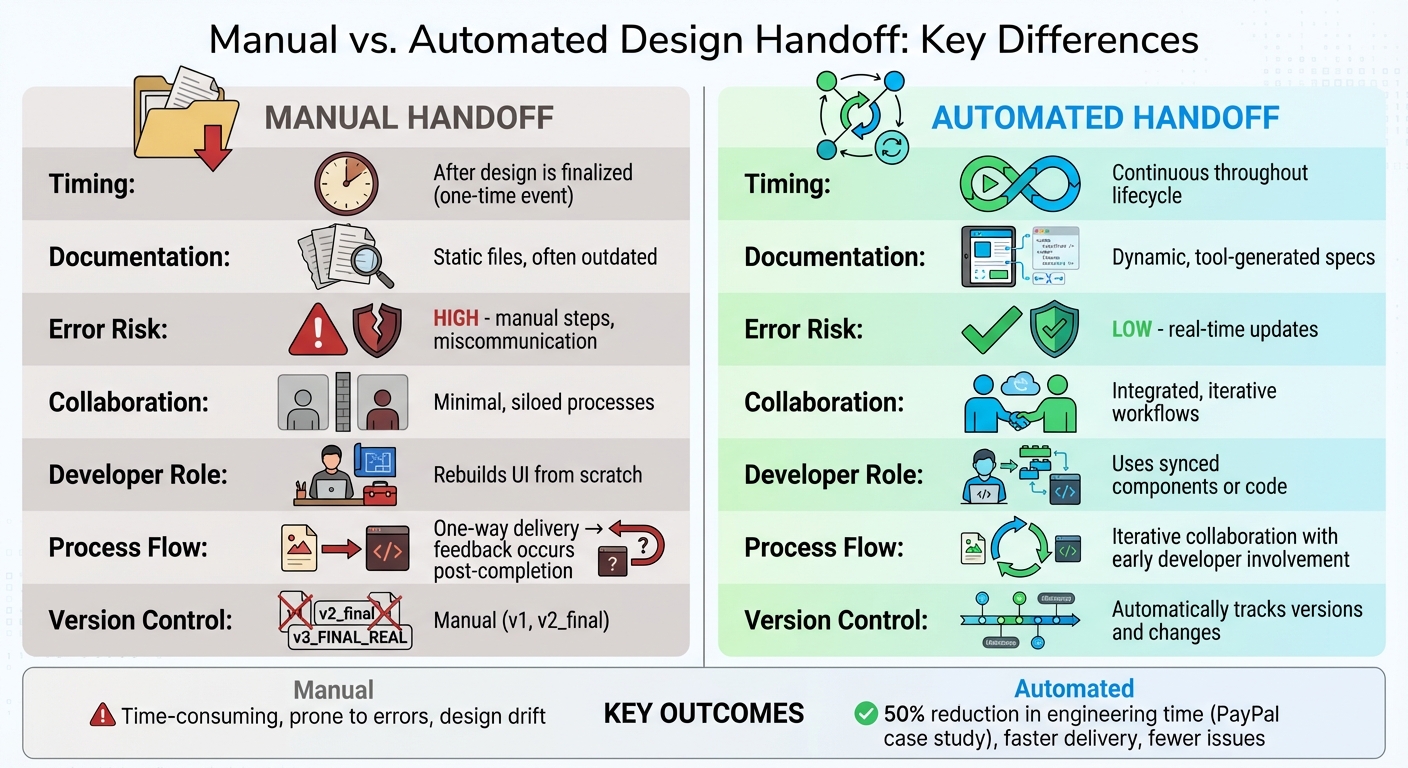
Manual vs Automated Design Handoff: Key Differences Comparison
Manual Handoff: How It Works and Common Problems
How Manual Handoff Works
Manual handoff is essentially a one-way street where designers finalize their work, package it up, and pass it along to developers. This process relies heavily on static, non-interactive files like mockups, PDFs, locked design files, and detailed documentation. The documentation often includes manually added redlines that outline dimensions, spacing, and other specifications. Alongside these files, developers also receive separate folders filled with assets such as icons, fonts, and image exports. From there, developers must recreate everything in code – starting from scratch.
This method keeps design and development in separate silos, with minimal collaboration between the two. Take one e-commerce project as an example: the team spent an entire year producing a 150-page handoff document, only for the design to be outdated by the time it was ready for implementation.
This static, isolated process often leads to several recurring challenges.
Problems with Manual Handoff
Manual handoff is plagued by miscommunication and loss of context. Developers are often handed complex files without enough information about the design’s purpose or intent. Naturally, this leaves them with unanswered questions like, "Is this the final version?", "Am I working with the right file?", or "What’s changed since the last update?".
"What designers experienced is that they worked really hard to understand the user goals and to build a wonderful design that somehow, miraculously, also managed to get the client’s OK. Then – in their eyes – the developers would mess it all up." – Shamsi Brinn, UX Designer/Manager
"What developers experienced was that they would be handed this complicated artifact with little context, not enough specification, a looming deadline they had no control or say over, and an emphasis from the design team on pixel perfection which was the least of their worries." – Shamsi Brinn, UX Designer/Manager
On top of that, human error and outdated documentation make things worse. Since the process relies on manual steps like data entry, file sharing, and approvals, mistakes are inevitable. Teams often struggle with conflicting file versions scattered across emails or chat threads, making it hard to pinpoint which design is up-to-date. And as designs evolve, redlines and documentation quickly fall out of sync, leaving developers to work with outdated specs.
Another major issue is incomplete documentation. Designers often hand over screens but leave out crucial details, such as how components should behave in different states – like error messages, loading indicators, or success notifications. This forces developers to fill in the blanks, leading to "design drift." This happens when the final product deviates from the original design due to issues like browser rendering quirks, color inconsistencies, or technical limitations that weren’t accounted for during the design phase.
How to Hand-off UI Designs to Developers (Figma vs Zeplin)
Automated Design Handoff: A Modern Approach
Manual design handoffs can be a headache, but automated design handoff simplifies the process by embedding all the necessary details directly into design files.
What Is Automated Design Handoff?
Automated design handoff changes the game by automatically generating specs, assets, and interaction details right from design tools. Instead of spending hours manually documenting measurements or creating redlines, these details – like dimensions and spacing – are built into the design files themselves. Developers can inspect these details, export assets, and even preview interactions without needing separate documentation. Plus, since the design files update in real time, they become a living source of truth.
This method treats handoff as a continuous collaboration rather than a one-time transfer of files. Designers and developers work from the same interactive prototypes and shared design tokens, ensuring everyone is on the same page about how components should behave in different states. The result? The final product aligns with the original design vision, without the endless back-and-forth of "Did you mean this?"
Main Features of Automated Handoff
Automated handoff comes with features that eliminate tedious manual work. For example:
- Auto-generated specs: CSS values, dimensions, and color codes are pulled directly from the design files, so developers don’t need to measure or guess.
- Design system integration: Shared component libraries ensure consistency across projects, reducing the chance of visual mismatches.
- Real-time collaboration: Teams can share prototypes and leave feedback directly within the tools, avoiding the need for extra meetings or app-switching.
Platforms like UXPin take this approach further by enabling workflows that connect design to code. Using code-backed components, designers can create interactive prototypes with libraries like MUI or Tailwind UI. This means what designers build is already production-ready code, eliminating the need to translate designs into vector graphics.
These features not only make the handoff process smoother but also encourage ongoing teamwork.
Collaboration and Iteration Benefits
With automated handoff, the relationship between designers and developers becomes iterative, not linear. Teams can share wireframes and prototypes early in the process, gathering feedback while designs are still flexible. This component-based workflow allows developers to start building parts of the product while designers continue refining other areas, keeping the project moving forward.
This approach also minimizes rework. Developers no longer have to guess about hover states, loading animations, or error messages – they can simply refer to the interactive prototype. AI-powered tools enhance this further by generating real-time specs and sending updates when designs change, ensuring everyone stays in sync without constant check-ins. By catching potential issues early, teams avoid costly mistakes and reduce the miscommunication that often leads to design drift.
sbb-itb-f6354c6
Manual vs. Automated Design Handoff: Key Differences
When comparing manual and automated design handoff, the differences in workflow, documentation, and error management become evident. The divide isn’t just about tools – it’s about how teams collaborate and share information. Manual handoff treats the transition from design to development as a one-time event, whereas automated handoff fosters an ongoing exchange. This fundamental shift leads to distinct variations in how processes are executed, how documentation is handled, and how teams work together.
Process and Timing
Manual handoff follows a one-and-done approach. Designers complete their work and pass it to developers in a single package. This linear process often delays feedback until it’s too late to make changes without reworking everything. In contrast, automated handoff integrates collaboration throughout the design lifecycle. Developers can review designs, ask questions, and flag technical challenges while the design is still being fine-tuned.
| Feature | Manual Handoff | Automated Handoff |
|---|---|---|
| Timing | Happens after design is "final" | Continuous, throughout the lifecycle |
| Process Flow | One-way delivery; feedback occurs post-completion | Iterative collaboration with early developer involvement |
| Version Control | Manual (e.g., v1, v2_final) | Automatically tracks versions and changes |
| Developer Role | Manually builds UI from static files | Uses synced components or copies/pastes generated code |
Artifacts and Documentation
Manual handoff depends on static files that quickly become outdated as designs evolve. Teams often scramble to locate the latest version, which can lead to confusion and delays.
Automated workflows replace static files with dynamic, tool-generated specifications. Developers can click on design elements to view CSS properties, export assets in the required resolution, and access centralized component libraries that stay synced with design files. For example, in March 2023, PayPal’s product teams adopted UXPin Merge, cutting the time to build a one-page interface from over an hour to under 10 minutes. Engineering time was reduced by about 50% as developers could directly copy JSX code instead of interpreting static images.
Accuracy and Error Risk
Manual handoff increases the likelihood of mistakes. A designer might forget to document a hover state, or a developer might misread a spacing measurement. These small errors can lead to "design drift", where the final product strays from the original intent.
Automated tools minimize these risks by relying on production-ready components as the single source of truth. When designers work with code-backed elements, developers receive specs that match what will appear in the browser. Real-time updates ensure everyone is aligned, reducing the need for clarification.
"Design specs are generated in the tool, helping to avoid misunderstandings. Thanks to that, designers and developers have a space to work together without friction."
This alignment not only improves accuracy but also enhances team efficiency and collaboration.
Efficiency and Collaboration
Manual handoff often creates bottlenecks. Designers and developers frequently wait on each other, and meetings are scheduled to clarify details that should have been documented upfront. This back-and-forth wastes time that could be better spent on actual development.
Automated handoff removes these hurdles with features like contextual comments, auto-generated documentation, and instant access to specifications. Developers can start building components while designers continue refining other areas. By working from live prototypes instead of static files, teams reduce repetitive questions and cut down on rework. This streamlined approach enables teams to focus more on progress and less on resolving misunderstandings.
How to Transition to Automated Handoff
Evaluating Your Current Workflow
If you’re still relying on manual handoff, it’s time to take a closer look at your workflow. Start by identifying signs of inefficiency, like "design drift", where the final product doesn’t match the original designs. Another warning sign is when developers spend more time converting mockups into HTML and CSS than tackling technical challenges.
Frequent calls between designers and developers to clarify hover states, animations, or spacing are another clue that your process is wasting valuable time. And if your design system has separate versions for designers and developers, you’re likely creating unnecessary friction and inconsistencies.
To pinpoint where things are going wrong, compare your current builds with prototypes and tally the discrepancies. Are there recurring issues with spacing, typography, or how components behave? These gaps often stem from manual processes. Automation can solve these problems by creating a single source of truth, reducing errors, miscommunication, and production delays.
Steps to Implement Automation
Once you’ve identified the problem areas, it’s time to bring in automation. Start by standardizing your naming conventions – something like BEM notation can help ensure that design layers align seamlessly with developer modules.
Then, test the waters with a small-scale project. Pick a tool that integrates well with your tech stack. For example, UXPin is great for teams working with React components because it allows designers to use code-backed elements that developers can immediately implement. Train a small group on the new process, gather their feedback, and fine-tune things before rolling it out across the entire team.
Make collaboration a priority during this transition. Set up regular review sessions where designers and developers can discuss updates and stay aligned. Incorporate your design system into the new tool so everyone is working from the same set of components. Finally, track your progress. Monitor metrics like handoff time, error rates, and developer productivity to gauge whether the new system is making a difference. If the numbers don’t show improvement, tweak your approach until they do.
Conclusion: Choosing the Right Handoff Method
Manual design handoff methods can bog teams down with outdated, error-prone processes. Deciding between manual and automated approaches comes down to how much your team values speed, precision, and seamless collaboration. Manual handoffs rely on static files and scattered documentation, often leading to delays caused by constant back-and-forth communication. On the other hand, automated handoffs provide a shared, code-backed workspace, reducing translation errors and keeping designs consistent.
The move away from rigid, one-time handoffs toward collaborative, iterative workflows is no longer just a trend – it’s becoming the norm for teams that want to deliver faster without sacrificing quality. By adopting this approach, handoff evolves into a continuous dialogue, keeping everyone aligned in real time. Tools offering features like embedded specs and auto-generated CSS free developers from tedious tasks, letting them focus on solving technical challenges instead of interpreting design files.
If your team spends more time converting mockups into code than building actual features, it might be time to rethink your workflow. Look for patterns of inconsistency – whether it’s in typography, spacing, or component behavior – that could be causing friction. Start small with a pilot project and measure outcomes like handoff time, error rates, and developer efficiency. If you see improvements, scale the process; if not, tweak and refine. The goal isn’t just to modernize – it’s to ensure your products stay true to your vision without adding extra work.
For teams looking to streamline their design-to-code process, automated handoff tools like UXPin offer an all-in-one solution with code-backed prototyping and real-time collaboration to keep everyone on the same page.
FAQs
What are the key advantages of automated design handoff compared to manual methods?
Automated design handoff simplifies the shift from design to development by automatically generating specs, CSS, and style guides straight from the design file. This removes the need for tedious manual documentation, cutting down on errors and ensuring everyone works with a single source of truth. It allows teams to dedicate more time to tackling creative challenges rather than repetitive, time-consuming tasks.
These tools give developers immediate access to ready-to-use code, live updates, and smoother collaboration, eliminating delays caused by constant back-and-forth communication. With AI-driven automation, the process becomes even faster, significantly reducing development time while ensuring the design and code remain perfectly aligned.
In short, automated handoff increases efficiency, strengthens teamwork, and speeds up product delivery, enabling teams to launch high-quality products faster with fewer costly revisions.
How does automated design handoff enhance teamwork between designers and developers?
Automated design handoff changes the game by creating a shared, real-time workspace where designers and developers can collaborate effortlessly. Gone are the days of juggling static files – automated tools keep specs, CSS, and style guides constantly updated and easily accessible to everyone. This approach cuts down on guesswork and helps avoid miscommunication.
By syncing designs, interactive elements, and code-based specs, developers can access production-ready assets directly, while designers get a clear view of how their creations translate into code. This smooth workflow removes the hassle of endless file exchanges, letting teams focus on creative problem-solving, speeding up delivery, and enhancing precision.
How can teams switch from manual to automated design handoff?
Switching from manual to automated design handoff can make your workflow faster, more precise, and much smoother for everyone involved. Start by setting up a shared design system. This system should include reusable UI components and consistent naming conventions. Think of it as the go-to resource for both designers and developers – a single, reliable source that keeps everyone on the same page and cuts down on repetitive tasks.
Next, consider using a tool like UXPin. It lets you sync production-ready components directly into your design workspace. This means designers can create interactive prototypes that are not just visually accurate but also backed by real code. These prototypes automatically generate specs and CSS, removing the need for time-consuming manual redlining. Plus, when you connect your design tools with development platforms, any updates happen in real time. This ensures that style guides and specifications are always current and accurate.
Lastly, don’t forget to train your team on the new workflow. Schedule regular check-ins to troubleshoot any issues and fine-tune the process as needed. By following these steps, you can replace the old, manual handoff approach with a streamlined workflow that minimizes errors and maximizes efficiency.

