Component versioning and design system versioning are two key strategies for managing updates in design systems. Both approaches help teams maintain consistency, reduce errors, and streamline collaboration between design and development. But they serve different purposes and come with unique advantages and challenges.
- Component versioning focuses on assigning version numbers to individual UI elements (e.g., Button v3.2.1). This allows for targeted updates, flexibility, and faster iteration but requires careful oversight to avoid version sprawl or compatibility issues.
- Design system versioning applies a single version number to the entire library. This ensures consistency across products and simplifies updates but can be slower to implement and less flexible for individual teams.
Quick Comparison
| Factor | Component Versioning | Design System Versioning |
|---|---|---|
| Granularity | Individual components | Entire library |
| Consistency | Moderate (risk of fragmentation) | High (coordinated updates) |
| Complexity | Higher (multiple versions) | Lower (single version tracking) |
| Testing | Per component | Full system testing |
| Governance | Decentralized | Centralized |
Choosing the right strategy depends on your organization’s needs. For flexibility in updating specific components, component versioning works well. For ensuring consistency across teams and products, design system versioning is the better choice. A hybrid approach can balance both methods effectively.
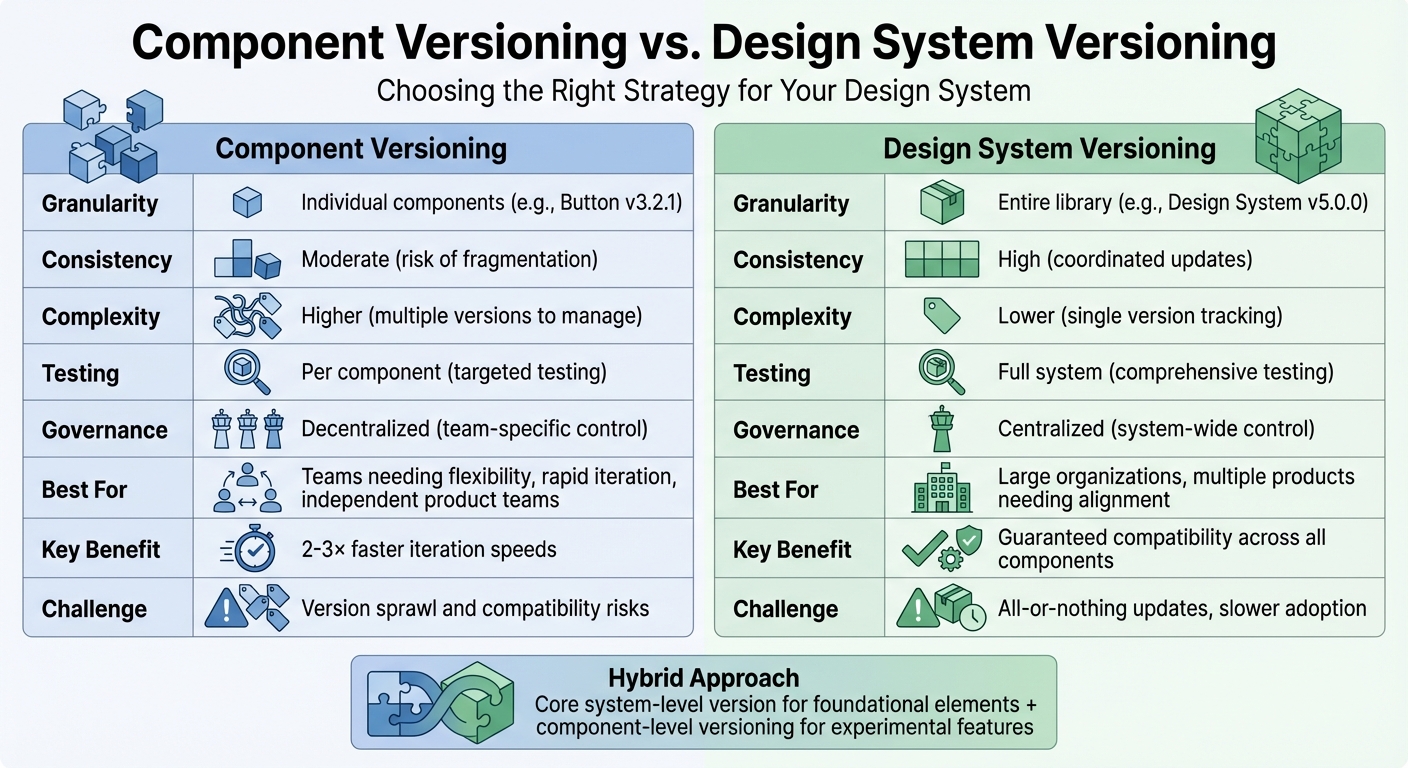
Component Versioning vs Design System Versioning Comparison Chart
design systems wtf #23: How should we version design systems?
Component Versioning: How It Works and What to Expect
Building on the earlier definition of component versioning, let’s dive into how it operates, its advantages, and the challenges it presents.
How Component Versioning Works
At its core, component versioning assigns a unique version number to each UI element in a design system. For instance, a button might be at version 3.2.1, while a navigation component could sit at version 1.5.0. This follows the Semantic Versioning (SemVer) system, where:
- Major updates introduce breaking changes.
- Minor updates add features without breaking existing functionality.
- Patch updates address bugs.
The process is supported by tools like package managers (e.g., npm or yarn) for dependency management, Git for tracking changes, and platforms like Storybook for maintaining version histories. This setup allows teams to mix and match different component versions, updating only what’s necessary while letting other parts of the system evolve. This flexibility is a cornerstone of efficient and stable development workflows.
Benefits of Component Versioning
One of the standout advantages is granular control, which allows teams to fix bugs or make updates without disrupting the entire system. For example, Twilio’s Paste design system empowers product teams to update specific components independently, ensuring that changes don’t ripple across unrelated applications. As a result, iteration cycles become much faster.
Another key benefit is team autonomy. Designers and developers can select the component versions that fit their project requirements. Atlassian, for example, provides detailed changelogs for each component, giving teams the transparency they need to plan updates without unnecessary risks. This approach minimizes the chance of system-wide disruptions and helps avoid breaking functionality. In fact, industry reports suggest that iteration speeds can increase by 2–3× with this method.
Drawbacks of Component Versioning
Despite its strengths, component versioning isn’t without challenges. Maintenance overhead is a significant concern. Managing multiple versions of each component requires extensive changelogs, clear deprecation schedules, and thorough documentation to ensure compatibility. Without careful planning, teams can face "version sprawl", where developers encounter an overwhelming number of variations – imagine finding 10 different button versions scattered across the codebase.
Another issue is compatibility risks. Mixing incompatible component versions can lead to inconsistencies. For instance, one product might use Button v1.2 with rounded corners, while another relies on Button v2.0 with sharp edges, creating a fragmented brand experience. Dependencies between components can also become problematic if APIs change subtly during minor updates. Atlassian has noted that beta components often accumulate long version histories, which can lead to fragmentation if teams fail to migrate to newer versions consistently. Without strict governance and automated checks for dependencies, a design system risks breaking apart, undermining its purpose of providing a unified framework.
Design System Versioning: How It Works and What to Expect
Expanding beyond the narrower focus of individual component versioning, design system versioning takes a broader approach. It introduces a unified method of managing updates, offering a different set of advantages and challenges that suit specific organizational needs and workflows.
How Design System Versioning Works
Design system versioning assigns a single version number to the entire design library, encompassing all components, tokens, and guidelines. For instance, when IBM’s Carbon Design System launched v11 in 2022, every element – buttons, tokens, guidelines – was updated as part of a cohesive package. This approach typically follows Semantic Versioning (SemVer) to label release types (e.g., major, minor, or patch updates).
The process revolves around centralized changelogs, which document every modification in one place, and thorough testing to ensure compatibility across the system. When a new version is released, all components, themes, and interactions are tested together. This ensures that everything – from navigation menus to form fields – works seamlessly within the same version. This coordinated approach eliminates guesswork for designers and developers, as they can trust that the elements are designed to function as a unified whole.
Benefits of Design System Versioning
One of the biggest advantages is consistency and guaranteed compatibility. By updating everything together, this method ensures a uniform brand experience across all products that rely on the same version. It prevents fragmentation, a common issue with component-by-component updates, and reduces the risk of mismatched elements causing functional or visual inconsistencies.
Another key benefit is simplified updates. Instead of juggling numerous individual component versions, teams can align with a single system version. Major releases often come with detailed migration guides, making the transition process smoother and more straightforward. This clarity helps teams stay aligned without getting bogged down in the complexities of piecemeal updates.
Drawbacks of Design System Versioning
However, there are trade-offs. One major challenge is the all-or-nothing update model. If a team needs a fix for just one component, they must adopt the entire system version that includes it. This can be cumbersome for teams that operate on different release schedules.
Another drawback is slower adoption of updates. Since updates require full migrations, teams may delay implementation to accommodate the time and effort needed for testing and transitioning their entire setup – even if only a few components are affected.
Lastly, this approach offers less flexibility for teams. Product teams can’t selectively update specific elements; they must either upgrade to the new version entirely or stick with their current one. For organizations with multiple independent teams working at varying speeds, this limitation can create bottlenecks and slow down progress.
Understanding these pros and cons can help organizations decide whether design system versioning aligns with their operational needs or if a more flexible, component-based approach might be a better fit.
sbb-itb-f6354c6
Component Versioning vs. Design System Versioning: Direct Comparison
Comparison Factors
Deciding between component versioning and system versioning depends on several important factors. Let’s break them down:
Granularity: Component versioning gives you precise control. You can update individual elements like Button v3.2.1 or Modal v1.4.0 without affecting the rest of the library. On the other hand, system versioning operates at a higher level, bundling everything under a single release, such as Design System v5.0.0.
Design Consistency: System versioning ensures a unified look and feel across products because all teams adopt the same package. This reduces the risk of visual or functional inconsistencies. With component versioning, there’s a higher chance of teams using different versions of the same component, which can lead to fragmentation unless strict guidelines and deprecation policies are in place.
Complexity and Testing: Component versioning means managing multiple versions at once, which can increase overhead but allows for targeted testing of individual elements. System versioning simplifies version tracking but requires comprehensive testing of the entire library before each release.
Governance: System-level versioning centralizes decision-making, with coordinated updates managed by a central team. In contrast, component-level versioning decentralizes control, giving individual teams more flexibility but requiring robust oversight to maintain cohesion.
Here’s a quick summary of the key differences:
| Factor | Component Versioning | Design System Versioning |
|---|---|---|
| Granularity | High (individual components) | Low (entire library) |
| Consistency | Moderate (version mixing risk) | High (coordinated updates) |
| Complexity | High (multiple versions) | Moderate (simpler tracking) |
| Testing | Targeted (per component) | Comprehensive (full system) |
| Governance | Decentralized (team-specific) | Centralized (system-wide) |
These factors should guide your decision based on your organization’s structure and the pace at which it operates.
When to Use Each Strategy
System versioning is a better fit for large organizations managing multiple products that need to stay visually and functionally aligned. Centralized governance ensures smoother communication and compatibility, making this approach ideal for companies that prioritize consistency across their design and development efforts.
Component versioning, on the other hand, works well for organizations where products adopt the design system at different speeds or in unique ways. Teams can make targeted updates or experiment with specific components without waiting for a full system release. This flexibility is especially useful for organizations with independent product teams or rapidly changing systems, as it allows for quicker iterations and incremental adoption.
Hybrid Approaches and Best Practices
A hybrid approach strikes a balance by combining the strengths of both strategies. For example, you can maintain a core system-level version for foundational elements like tokens and stable components, while allowing experimental or specialized components to follow their own versioning paths. This way, you get the consistency of a centralized system without sacrificing the agility to iterate quickly on new or high-priority components.
To keep versioning manageable, follow these best practices:
- Clear Ownership and Governance: Define who approves major changes, how deprecations are communicated, and when older versions are retired.
- Integrated Tools: Align versioning across design tools, code repositories, and documentation to ensure consistency. For example, UI kits, code packages, and guidelines should share the same versioning structure or mapping.
- Gradual Rollouts: Test updates with a subset of products before a full release to monitor their impact and gather feedback.
- Regular Reviews: Track metrics like upgrade adoption rates and defect occurrences to refine your versioning approach over time.
Tools like UXPin can simplify this process by syncing Git component repositories with design tools, ensuring everyone works from a single source of truth.
How to Implement Versioning in Component-Based Workflows
Aligning Design, Code, and Documentation
One of the toughest challenges with component versioning is keeping design files, codebases, and documentation in sync. When these elements drift apart, it leads to wasted time and inconsistencies. The solution? Establish a single source of truth that every team can rely on.
By syncing Git repositories with design tools, you can eliminate manual handoffs and ensure both teams are working from the same components. Mark Figueiredo, Sr. UX Team Lead at T.RowePrice, shared how this approach transformed their workflow:
"What used to take days to gather feedback now takes hours. Add in the time we’ve saved from not emailing back-and-forth and manually redlining, and we’ve probably shaved months off timelines."
Tools like UXPin take this a step further by allowing designers to work directly with production code. Whether you’re using custom React components or popular libraries like MUI, Tailwind UI, or Ant Design, UXPin Merge integrates these into the design environment. Brian Demchak, Sr. UX Designer at AAA Digital & Creative Services, highlighted the benefits of this integration:
"We have fully integrated our custom-built React Design System and can design with our coded components. It has increased our productivity, quality, and consistency, streamlining our testing of layouts and the developer handoff process."
This synchronization ensures that when a component is updated to version 2.0 in Git, designers automatically have access to the same version. Larry Sawyer, Lead UX Designer, quantified the impact of this approach:
"When I used UXPin Merge, our engineering time was reduced by around 50%. Imagine how much money that saves across an enterprise-level organization with dozens of designers and hundreds of engineers."
The next step in versioning is planning for changes while managing transitions smoothly.
Managing Breaking Changes and Migrations
Breaking changes are inevitable, but they don’t have to disrupt workflows if handled thoughtfully. Start by implementing Semantic Versioning (SemVer): major updates indicate breaking changes, minor updates add features, and patches fix bugs. This system makes it clear whether a migration is required.
When introducing breaking changes, avoid abrupt transitions. Instead, deprecate old versions gradually. Mark components as deprecated in both design libraries and code repositories, and provide clear warnings. Announce end-of-life (EOL) dates so teams can incorporate migrations into their schedules.
IBM’s Carbon Design System provides a great example. In 2023, they released major updates that bundled system-wide changes with detailed migration guides. This approach minimized errors and ensured consistency across their enterprise applications.
For a more flexible approach, Twilio’s Paste Design System allows teams to update individual components without overhauling entire codebases. By 2023, this granular versioning enabled faster iteration and reduced side effects, making it easier to respond to user feedback.
To simplify migrations, offer automated tools like codemods for code updates and migration guides for design assets. Document every breaking change in release notes, specifying affected components and providing step-by-step instructions. Before rolling out updates organization-wide, test them on a smaller scale to catch potential issues early.
Tracking and Improving Your Versioning Strategy
To refine your versioning process, track key metrics such as upgrade times (how quickly teams adopt new versions), consistency issues (mismatched versions across products), maintenance overhead (time spent managing versions), and adoption rates (percentage of teams using the latest versions).
Atlassian’s Design System adopted per-component SemVer by 2023, maintaining detailed histories that highlighted older components with extensive changelogs versus newer beta components. This transparency helped teams plan updates and reduced friction during collaboration.
Monitor metrics like time to feedback and engineering hours per sprint to identify whether your versioning strategy is streamlining workflows or creating delays. Regularly audit component dependencies to prevent migration conflicts, and survey designers and developers quarterly to uncover pain points that metrics might miss.
Establish a cross-functional working group to oversee versioning rules and governance. Host regular review meetings to prioritize updates and set a release cadence. Use shared roadmaps and RFC (request for comments) documents for major changes, and maintain a centralized changelog and status dashboard so everyone knows what’s current, deprecated, or upcoming.
Analyze adoption trends to identify components for retirement. If a version sees less than 5% adoption after six months, consider fast-tracking its deprecation. On the flip side, if adoption is slow, investigate whether migration complexity or unclear documentation is the cause and make adjustments. As your organization and products grow, your versioning strategy should evolve to keep pace.
Conclusion
Selecting a versioning strategy that aligns with your organization’s structure, goals, and level of maturity is crucial. For teams focused on updating specific elements, component-level versioning offers flexibility. On the other hand, design system versioning provides consistency and ensures coordinated rollouts – especially valuable for larger enterprises.
The sweet spot often lies in combining these strategies. Many advanced design systems adopt hybrid models, applying system-level versioning to foundational elements like tokens and primitives while allowing component-level updates for individual UI elements. This approach balances stability in core areas with the agility to make quick updates when needed. Such models allow organizations to adapt their approach as their needs evolve.
Centralized teams often benefit from synchronized releases and consistent quality assurance across the library. Meanwhile, distributed or multi-product teams gain flexibility with independent updates. As your organization grows, your versioning strategy should grow with it – starting with basic semantic versioning and advancing to more nuanced methods as adoption and complexity increase.
Modern tools can also simplify versioning workflows. For example, UXPin integrates Git repositories with the design environment, reducing inefficiencies and preventing version drift. This code-backed approach ensures alignment between design and development. Larry Sawyer, Lead UX Designer, shared his experience:
"When I used UXPin Merge, our engineering time was reduced by around 50%. Imagine the savings in time and resources across a large organization."
Whatever strategy you choose, the ultimate goal is to maintain a single source of truth between design and code. By tracking key metrics and establishing clear governance, you can ensure that design files, codebases, and documentation remain in sync. A well-executed versioning strategy doesn’t just support your workflow – it becomes a competitive edge.
FAQs
What’s the difference between versioning individual components and an entire design system?
Component versioning is all about handling updates to individual UI elements. This method makes it simpler to tweak or reuse specific components without disrupting the entire product. It’s a great way to stay flexible and tackle smaller, more focused changes.
On the flip side, design system versioning deals with tracking updates to the whole package – components, styles, and guidelines. This ensures everything stays consistent and aligned across teams and products, which is key to maintaining a cohesive design language.
In essence, component versioning focuses on fine-tuning the details, while design system versioning keeps the bigger picture in sync.
What are the benefits of using a hybrid approach to versioning?
A hybrid versioning approach blends the benefits of component-level and design system-level versioning. This strategy enables teams to make swift updates to individual components, speeding up iterations, while also ensuring the design system remains consistent and unified.
By striking a balance between adaptability and structure, this approach minimizes inconsistencies, enhances team collaboration, and simplifies workflows. It ensures that updates to specific components fit seamlessly within the larger design system, promoting a cohesive and efficient product development process.
What challenges can arise when managing component versioning?
Handling component versioning can be a bit of a balancing act. Teams often need to juggle multiple versions simultaneously while ensuring everything stays backward compatible. This requires meticulous planning to avoid introducing changes that could break existing workflows or interfere with other components.
On top of that, managing dependencies between components adds another layer of complexity. A change in one component can ripple through others, potentially causing unexpected issues. To keep things running smoothly, open communication and close collaboration between teams are absolutely critical. It’s the best way to prevent conflicts and maintain a smooth development process.

