UXPin Merge redefines how design and development teams work together. Instead of relying on static visuals, UXPin uses real, production-ready code components, ensuring that what you design is exactly what gets delivered. This approach eliminates the need for manual handoffs, reduces design inconsistencies, and streamlines workflows.
Key takeaways:
- Code-based design: UXPin leverages HTML, CSS, and JavaScript components, syncing directly with libraries like MUI, Ant Design, or custom repositories.
- Efficiency: Teams save time by working with pre-coded components, reducing errors and speeding up production.
- Enterprise scalability: A single source of truth ensures designs stay aligned with production, even as systems grow.
Visual-only platforms, by contrast, rely on static mockups that developers must manually translate into code. This process introduces inefficiencies, risks of errors, and challenges in maintaining consistency across products.
Quick Comparison
| Feature | Visual-Only Platforms | UXPin Merge |
|---|---|---|
| Foundation | Static graphics (PNG/SVG) | Production-ready code (HTML/JS) |
| Interactivity | Limited | High – real logic and states |
| Handoff Process | Manual | Direct, copyable JSX code |
| Design Consistency | High risk of drift | Maintained with code props |
| Setup Effort | Low | High – requires integration |
For teams managing complex projects, UXPin’s approach offers faster timelines and better alignment between design and development. While visual-only tools are easier to start with, they often lead to inefficiencies down the line.
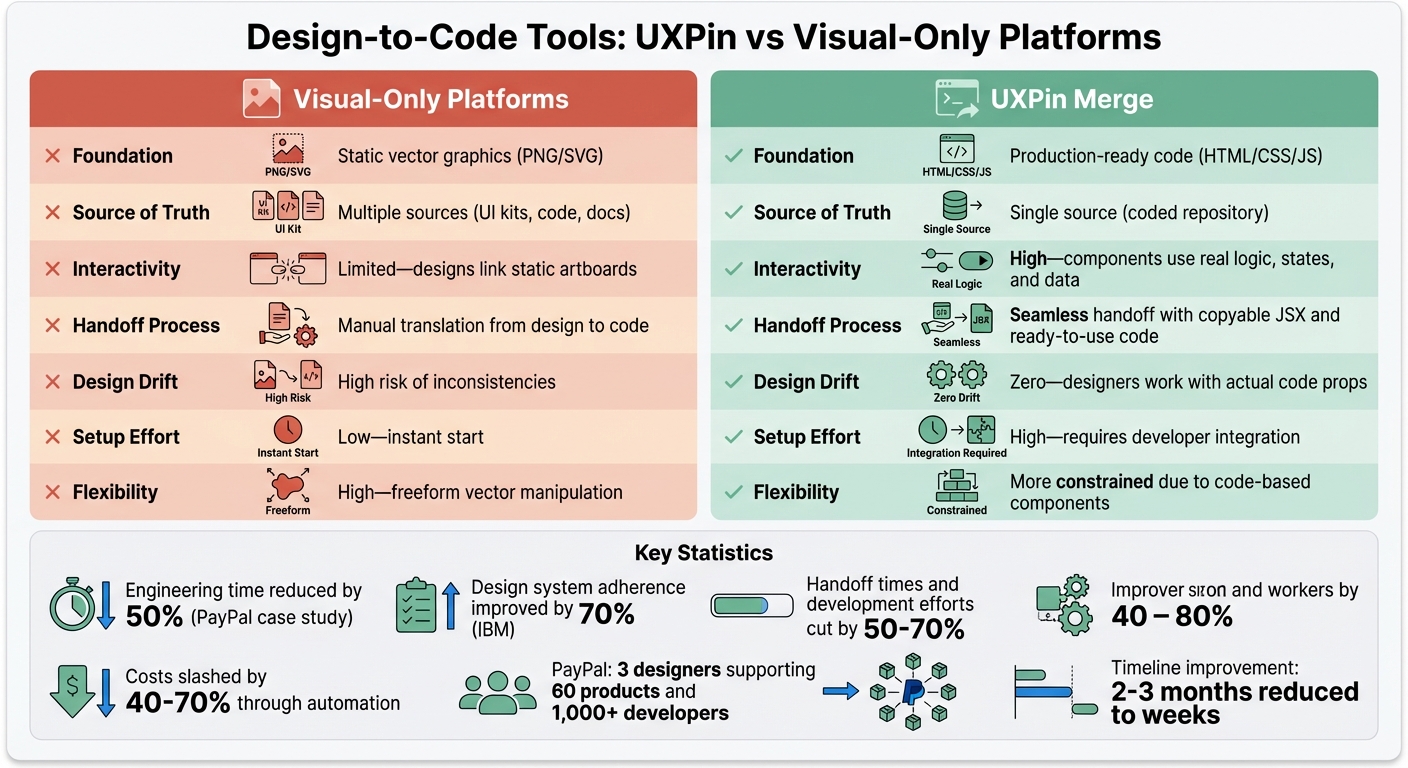
UXPin Merge vs Visual-Only Design Platforms: Feature Comparison
1. UXPin
Design-to-Code Capabilities
UXPin stands out by operating on a code-based framework, meaning it uses real HTML, CSS, and JavaScript rather than relying on static visual mockups. Designers work with the same production code developers use, creating a seamless bridge between design and development from the very beginning.
Its Merge technology takes this a step further by integrating directly with Git repositories, Storybook, or npm packages. This allows teams to import and sync React.js components effortlessly. It also supports Vue, Angular, Web Components, and Ember through Storybook. Designers can tweak interactive properties using the Properties Panel or by editing JSX directly. Since every design references actual JSX, developers can simply copy and paste the code instead of interpreting static designs.
This approach not only simplifies workflows but also ensures that what’s designed is production-ready.
Workflow Efficiency
UXPin eliminates the traditional gap between design and development. Designers can drag and drop pre-coded components directly from a shared repository, avoiding the need to recreate or simulate elements manually.
Because these components are code-backed with predefined properties, designers can’t accidentally create off-spec variations. This reduces the need for design audits and minimizes technical debt. Additionally, when integrated with Storybook, updates to documentation, the codebase, and the design tool occur simultaneously with every release.
"When I used UXPin Merge, our engineering time was reduced by around 50%. Imagine how much money that saves across an enterprise-level organization with dozens of designers and hundreds of engineers." – Larry Sawyer, Lead UX Designer
This streamlined workflow is particularly valuable for larger organizations.
Enterprise Scalability
UXPin’s scalability lies in its ability to serve as a single source of truth. Both designers and developers pull from the same repository of components, ensuring that designs perfectly match the production code in appearance, behavior, and functionality. Updates made to the code repository are automatically reflected in the design tool, eliminating the need for manual updates and keeping everyone on the same page.
sbb-itb-f6354c6
2. Visual-Only Platforms
Design-to-Code Capabilities
Visual-only platforms often leave teams with static mockups that need to be manually translated into code. This process not only takes time but also opens the door to human error. While some plugins can export code from visual tools, the results are usually far from ideal – producing bloated, messy HTML and CSS that require extensive cleanup.
This creates a disconnect between designers and developers. Developers are left to interpret and rebuild designs, often guessing how to handle responsive behaviors or browser-specific quirks. The result? A workflow riddled with inefficiencies and potential missteps.
Workflow Efficiency
The challenges don’t stop with messy code. The manual handoff process between design and development slows everything down. Constant feedback loops – adjusting designs, tweaking code, and reworking assets – become the norm, dragging out timelines. Developers end up spending hours on repetitive tasks like extracting assets, recreating buttons, and coding transitions, instead of focusing on higher-value work like optimizing features.
Studies show that automating the design-to-code process can cut handoff times and development efforts by 50–70%, while also slashing costs by 40–70%. Yet, visual-only platforms keep teams stuck in outdated workflows, robbing them of these potential gains.
Enterprise Scalability
Static designs pose serious challenges when it comes to scaling. Updating static files across a growing system becomes a labor-intensive task, making it harder to maintain consistency. Without automatic synchronization, teams struggle to keep designs aligned as products expand. For example, IBM improved design system adherence by 70% after moving away from manual handoff processes.
Another issue is technical debt. Without code-backed components, every handoff phase introduces inconsistencies that pile up over time. These rewrites and fixes make scalability increasingly difficult, creating long-term headaches for development teams.
Pros and Cons
When you compare UXPin’s code-backed approach with visual-only platforms, the differences in how they operate and the benefits they offer become clear. Here’s a side-by-side look at what each option brings to the table – and where they may fall short.
| Feature | Visual-Only Platforms | UXPin Merge |
|---|---|---|
| Foundation | Static vector graphics (PNG/SVG) | Production-ready code (HTML/CSS/JS) |
| Source of Truth | Multiple sources (UI kits, code, docs) | Single source (coded repository) |
| Interactivity | Limited – designs link static artboards | High – components use real logic, states, and data |
| Handoff Process | Manual translation from design to code | Seamless handoff with copyable JSX and ready-to-use code |
| Design Drift | High risk of inconsistencies | Zero – designers work with actual code props |
| Setup Effort | Low – instant start | High – requires developer integration |
| Flexibility | High – freeform vector manipulation | More constrained due to code-based components |
This comparison underscores critical workflow differences that impact not just efficiency but also the overall quality of the design-to-development process.
Visual-only platforms are appealing for their ease of use and quick start, but they come with trade-offs. Manual handoffs, risks of design drift, and limited interactivity can lead to bottlenecks and errors in the workflow.
On the other hand, UXPin’s Merge technology removes much of the friction. It eliminates the need for a "translation layer" between design and development. Take PayPal as an example: their team of just three designers managed to support 60 internal products and over 1,000 developers by leveraging the Merge-synced Microsoft Fluent design system. Achieving this level of efficiency with static mockups would be virtually impossible.
That said, UXPin does require upfront effort to integrate your component library or connect with built-in systems like MUI, Ant Design, Bootstrap, or ShadCN. While this setup demands more initial work, the long-term benefits are hard to ignore – greater consistency, scalable workflows, and no added technical debt. This approach aligns with design system best practices used by top enterprise companies to maintain long-term health. As of December 2025, UXPin has taken things further with Merge AI 2.0, a tool that uses AI to design directly with your coded components instead of generic shapes.
Conclusion
Choosing between visual-only platforms and UXPin’s code-backed approach boils down to a trade-off: quick starts versus long-term efficiency. While visual-only tools let you hit the ground running, they often lead to challenges later – manual handoffs, design inconsistencies, and limited interactivity that slow down deployment and introduce errors.
UXPin’s Merge technology eliminates these hurdles by directly linking design to production-ready code. The benefits of this approach are clear in real-world applications. As Erica Rider, Senior Manager for UX at PayPal, noted:
"It used to take us two to three months just to do the design. Now, with UXPin Merge, teams can design, test, and deliver in the same timeframe".
Although initial integration requires some effort, the results are undeniable. Enterprise teams like PayPal and T. Rowe Price have dramatically shortened their timelines – tasks that once took days for feedback now take hours. This shift replaces fragmented workflows with a unified, code-backed system.
For teams managing complex products across multiple platforms, UXPin’s design-to-code approach offers more than speed. It delivers accuracy, scalability, and alignment with modern development practices. The upfront setup quickly pays off when you’re delivering projects in weeks instead of months, with minimal design drift and almost no technical debt from translation errors. This seamless integration redefines workflows, perfectly syncing design and production.
If you’re ready to move beyond static mockups and manual handoffs, discover how UXPin Merge can reshape your process at uxpin.com/pricing.
FAQs
What does “code-based design” mean in UXPin Merge?
In UXPin Merge, code-based design refers to building user interfaces with real, production-ready React.js components. These components are backed by actual code, meaning designers work with the exact same elements developers use. This ensures a high level of fidelity and keeps designs consistent with the final product.
With this approach, coded components are imported from repositories like GIT directly into UXPin. This allows designers to create prototypes that closely resemble real applications, making workflows smoother and improving collaboration between design and development teams.
What is required to integrate our component library with Merge?
To connect your component library with Merge, you’ll need a React.js repository running version ^16.0.0 or higher. Each component should be organized in its own directory and use export default. Merge supports JavaScript, Flow, and TypeScript, giving you flexibility in your coding style.
Your project must also use webpack version ^4.6.0 or newer for bundling. Integration can be done with a boilerplate repository or your existing components. Depending on the complexity, this process can take anywhere from 30 minutes to several days.
How does Merge prevent design drift at scale?
Merge helps keep designs consistent, even in large-scale projects, by syncing design components directly with production code. This connection ensures there’s no gap between how something is designed and how it’s built. By tying design systems to real code, teams can stay aligned and simplify workflows throughout the product development process.

