Design teams are moving away from tools like Figma and adopting code-based design systems. Why?
Code-based systems eliminate the inefficiencies of static mockups by embedding design directly into production-ready components. This approach ensures alignment between design and development, reduces errors, and speeds up iteration cycles. For large organizations, it saves time and money while improving scalability.
Key Takeaways:
- Code-based design systems (e.g., UXPin Merge) use live components, reducing engineering time by up to 50%.
- Figma creates static visuals that require manual translation into code, leading to inconsistencies and delays.
- Enterprises benefit from design tokens for global updates and integration with UI libraries like React and Tailwind.
- Code-based workflows reduce maintenance overhead and streamline collaboration, especially for large-scale projects.
Quick Comparison:
| Feature | Code-Based Design (e.g., UXPin Merge) | Figma |
|---|---|---|
| Source of Truth | Single (production repository) | Separate design/code |
| Interactivity | Fully functional components | Limited to visuals |
| Scalability | Handles enterprise needs | Slows with large files |
| Handoff | Production-ready code | Relies on documentation |
The choice depends on your team’s needs. Figma excels in early-stage ideation, while code-based systems dominate for deployment-ready workflows.
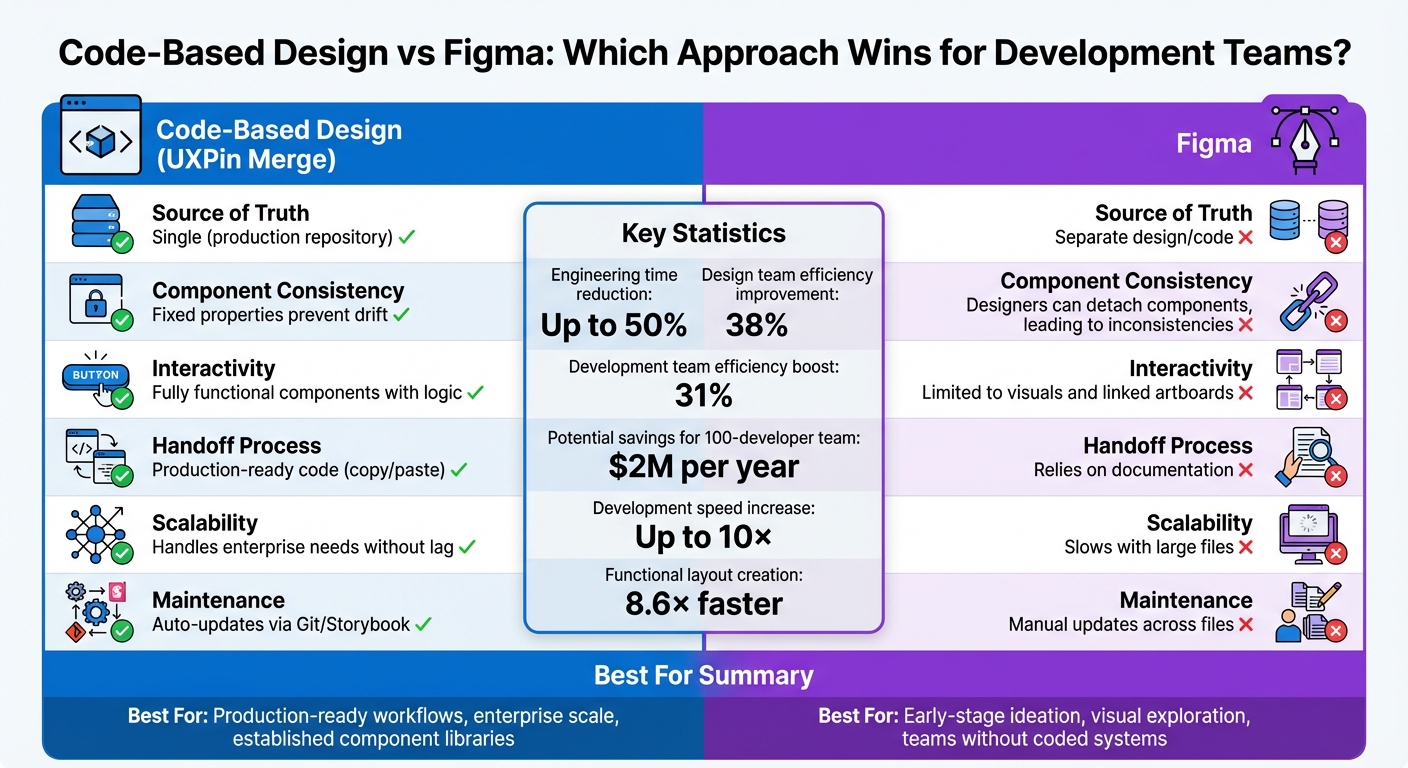
Code-Based Design vs Figma: Feature Comparison for Development Teams
UXPin Webinar: Code-based design: the workflow revolution
sbb-itb-f6354c6
1. Code-Based Design Systems (e.g., UXPin Merge)
Code-based design systems are changing the game by bridging the gap between design and development. Instead of creating static mockups that developers later translate into code, designers now work with production-ready components – the same ones used in the final product. This approach eliminates the need for manual translation, ensuring that what designers create is exactly what developers deploy through a streamlined design handoff process.
Design-to-Development Alignment
The standout feature here is functional fidelity. Traditional design tools produce static visuals that developers interpret and code. In contrast, code-based systems use the same live components from the codebase, leaving no room for misinterpretation. For instance, when a designer adds a button, it behaves exactly as it would in production – complete with hover effects, validation, and accessibility features.
This approach ensures seamless alignment between design and development. A great example of this is Microsoft’s integration of its Fluent design system with UXPin Merge. Erica Rider, UX Architect and Design Leader at Microsoft, highlighted the benefits:
"We synced our Microsoft Fluent design system with UXPin’s design editor via Merge technology. It was so efficient that our 3 designers were able to support 60 internal products and over 1000 developers." – Erica Rider, UX Architect and Design Leader
Faster Iterations
By working with functional components, designers can create and test prototypes that mimic real-world behavior without waiting for developers to build interactions. This drastically reduces iteration time. In fact, code-based design systems can speed up product development by up to 10×, with functional layouts being created 8.6× faster.
This efficiency is especially critical in enterprise environments, where scalability and time-to-market are constant challenges.
Scalability for Enterprises
For organizations managing multiple products, design tokens are a game-changer. These tokens act as variables for elements like color, typography, and spacing. Updating a single token automatically applies changes across all platforms – web, mobile, and even sub-brands. Chris Levine, Creative Technologist at Centric Consulting, explained:
"Design updates that would normally have taken weeks or even months can sometimes be done in minutes, if designed properly." – Chris Levine, Creative Technologist, Centric Consulting
Companies leveraging design systems report a 30–50% reduction in time spent on design tasks. On average, design team efficiency improves by 38%, while development teams see a 31% boost. Drew Loomer, Managing Architect at projekt202, quantified the financial impact: "If you had a team of 100 developers this could mean a savings of $2M per year."
Seamless Integration with UI Libraries
Another advantage lies in the seamless integration with popular UI libraries like MUI, Ant Design, React Bootstrap, and Tailwind UI. Designers can simply drag and drop components that already include interactivity, responsiveness, and logic. There’s no need to recreate components or maintain separate design files – everything is pulled directly from the same repository developers use. This shared source of truth ensures that updates happen once and automatically propagate across the entire system.
2. Figma
Figma is a widely-used design tool, but it functions quite differently from systems that are rooted in code. Instead of generating code-ready designs, Figma produces static visuals that need to be manually translated into code. While this works well for visual collaboration, it creates challenges when turning designs into functional products.
Design-to-Development Alignment
One of Figma’s biggest hurdles is the translation gap between design and development. For example, when a designer creates a button in Figma, it’s just a visual mockup. Developers must then manually recreate it, interpreting details like spacing, colors, and interactions. This often leads to discrepancies between the original design and the final product. Dylan Field, Figma’s CEO, has addressed this issue:
"The mismatch between design and code can result in miscommunication that delays development."
Scalability for Enterprises
As projects expand, Figma users often experience performance slowdowns. Large files take longer to load, and the platform can become less responsive over time. Additionally, Figma’s folder system struggles to handle the complexity of large-scale projects, forcing designers to spend unnecessary time organizing files instead of focusing on creative work. Roboto Studio highlighted this issue:
"Figma file management remains one of Figma’s most significant challenges."
Another pain point is updating text styles. Changes must be made manually, one at a time – editing 60 styles means performing 60 separate actions. On top of that, Figma’s constant internet requirement can be a barrier for remote work or projects with strict confidentiality needs. These limitations make it harder to bridge the gap between design files and production-ready components, especially when integrating UI libraries.
Integration with UI Libraries
Unlike code-based tools that directly connect with production libraries, Figma’s component libraries exist in isolation from the live codebase. Designers can create and manage component libraries in Figma, but these are purely visual and don’t align with the actual components developers use in production. This separation forces teams to maintain two parallel versions of the same system – one in Figma and one in code. The result? Inconsistencies creep in, and teams must invest extra effort to keep everything synchronized.
Pros and Cons
When it comes to aligning design and development workflows, the tools you choose can significantly impact efficiency and collaboration. Code-based systems rely on production components as the single source of truth, while Figma focuses on visuals that require manual translation into code. This fundamental difference influences everything from day-to-day tasks to long-term upkeep.
Here’s a breakdown of how these approaches stack up across key criteria for development teams:
| Criterion | Code-Based Design (e.g., UXPin Merge) | Figma |
|---|---|---|
| Source of Truth | Single (production repository) | Two sources (UI kit and code repository) |
| Component Consistency | Fixed properties prevent drift | Designers can detach components, leading to inconsistencies |
| Maintenance Overhead | Updates automatically via Git/Storybook | Requires manual updates across design files, code, and documentation |
| Handoff Process | Copy/paste production-ready code | Relies on documentation and developer interpretation |
| Interactivity | Full functionality with logic and states | Limited to linked artboards and overlays |
| Scalability | Handles enterprise projects without performance lag | Slows down with large files; manual text style updates needed |
This comparison highlights the strength of code-based systems in ensuring seamless handoffs and maintaining functional interactivity throughout the design process.
As industry expert Jim Gulsen, a Product Designer and Design Systems Manager, puts it:
"The solution isn’t more components or stricter rules – it’s building systems that speak the same language across disciplines."
While Figma offers unmatched visual flexibility, it comes with the added burden of maintaining separate design and code libraries. For instance, one global organization using Figma’s Code Connect managed to save 98 minutes per developer per week by linking design files to code snippets. However, they still faced the challenge of maintaining parallel systems for design and code.
Ultimately, the trade-off is clear. Code-based systems may limit creative exploration, but they ensure consistency, faster deployments, and reduced maintenance overhead. For teams that prioritize alignment with production code, having a single source of truth is a game-changer, directly translating into fewer errors and smoother workflows.
Conclusion
Deciding between code-based design and Figma largely depends on your team’s stage in the product development process and what priorities guide your workflow. Figma shines during early ideation, where creativity and exploration take center stage, free from the constraints of technical implementation. If your team lacks a fully developed coded component library or needs quick visual prototypes, Figma’s adaptability is a strong advantage. However, as projects progress toward deployment, shifting to a code-based design system becomes increasingly important.
For technical design teams with established, code-backed systems, the benefits are clear. Industry data shows that code-integrated workflows significantly cut down on engineering time and streamline large-scale deployments. Automated syncing eliminates the hassle of maintaining separate design and development assets, a common issue in static design workflows.
The real factor here isn’t the size of your team but how prepared you are technically. Whether you’re a lean startup or a large enterprise, success hinges on having a mature coded design system – whether built in React, Vue, Angular, or another framework. This system acts as the single source of truth, ensuring consistency and scalability. Without such a foundation, starting with vector-based tools like Figma to create initial components remains an essential first step.
While adopting a code-based approach may limit some early creative flexibility, the payoff is a streamlined, scalable, and production-ready design process that boosts collaboration and speeds up deployment.
FAQs
When should a team switch from Figma to code-based design?
Teams should consider moving to a code-based design workflow when static tools like Figma start to hinder collaboration, scalability, or the speed of iterations. With code-backed processes, design and development stay more aligned, prototypes more accurately reflect the final product, and rework is minimized by using the same components developers will implement. This shift is particularly effective for enterprise-level projects, where maintaining efficiency, consistency, and faster delivery timelines is crucial.
What do we need in place to adopt a code-based design system?
To implement a code-based design system, start with a shared component library that connects directly to your design tool. This ensures alignment between what designers create and what developers build. You’ll also need a workflow that supports both code-to-design and design-to-code processes, bridging the gap between these two disciplines.
Collaboration is key – designers and developers must work closely to maintain consistency and efficiency. Tools like version control systems and automation software can further simplify the process by converting designs into production-ready code, making the transition smoother and more efficient.
How do design tokens actually speed up enterprise-wide updates?
Design tokens serve as a centralized system for managing styles such as colors, spacing, and typography. By providing a single source of truth, they make updates across an entire enterprise faster and more consistent. This approach minimizes manual work, reduces errors, and ensures a uniform look and feel across all products and platforms.

