Choosing the right prototyping tool in 2026 comes down to your team’s needs. UXPin, Figma, and Adobe XD each bring unique strengths to the table:
- UXPin: Best for enterprise teams needing production-ready prototypes with real code components, strong governance, and AI-powered workflows.
- Figma: Ideal for agile teams focused on real-time collaboration and quick iterations, with an extensive plugin ecosystem.
- Adobe XD: A solid choice for designers already using Adobe Creative Cloud, but its "maintenance mode" status limits future updates.
Quick Comparison
| Feature | UXPin | Figma | Adobe XD |
|---|---|---|---|
| Prototyping Basis | Code-based (HTML/JS) | Vector-based | Vector-based |
| Advanced Logic | Yes (Variables, Logic) | Limited | No |
| Collaboration | Real-time editing/comments | Industry-leading | Real-time editing |
| Handoff | Code-to-design (Merge) | Design-to-code | Static specs/assets |
| Best For | Enterprise workflows | Agile collaboration | Creative Cloud users |
UXPin leads in bridging design and development with real code, while Figma excels in team collaboration. Adobe XD remains relevant for Creative Cloud users but lags behind in advanced features.
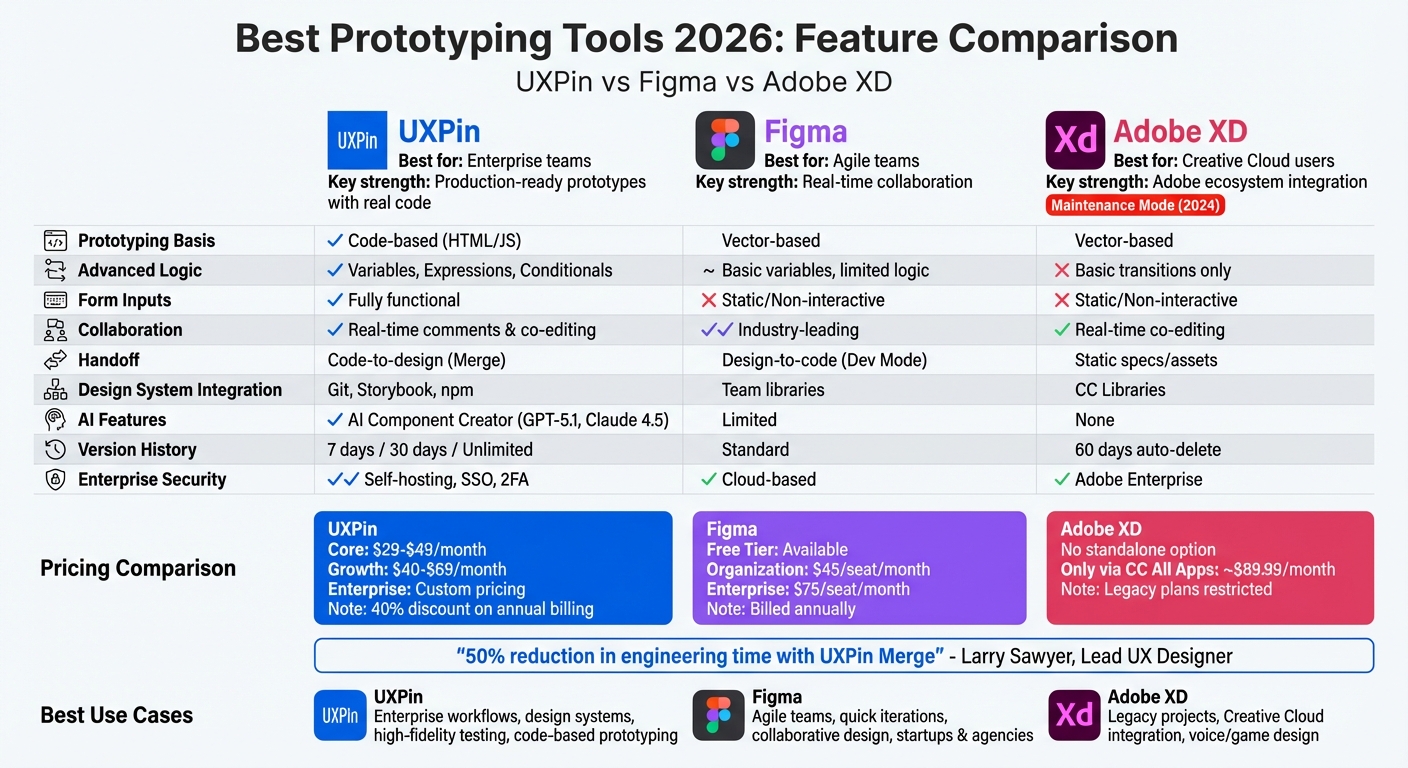
UXPin vs Figma vs Adobe XD: Feature Comparison 2026
UXPin: Code-Based Prototyping for Enterprise Teams
UXPin takes prototyping to the next level by using real code components from frameworks like React, Vue, or Angular. It connects seamlessly with Git repositories, Storybook, or npm libraries, allowing teams to work with production-ready components from the start. This streamlined approach helps eliminate errors and reduces the rework typically needed between design and development.
Pre-integrated libraries like MUI, Ant Design, Bootstrap, Tailwind UI, and ShadCN are available. For teams with custom design systems, UXPin’s Merge feature syncs directly with your codebase, creating a single, reliable source for both designers and developers.
"When I used UXPin Merge, our engineering time was reduced by around 50%. Imagine how much money that saves across an enterprise-level organization with dozens of designers and hundreds of engineers." – Larry Sawyer, Lead UX Designer
Below, we’ll explore UXPin’s standout features, enterprise-grade governance tools, and pricing options.
Main Features of UXPin
At its heart, UXPin empowers designers to build prototypes using real code. These prototypes include functional elements like form fields, dropdowns, and conditional logic. Designers can define variables, expressions, and interactions that behave just like the final product, making user testing feel close to interacting with a live application.
In 2026, UXPin introduced AI-powered workflows via its AI Component Creator. Using advanced models like GPT-5.1 and Claude Sonnet 4.5, the AI works within your design system’s constraints, suggesting only trusted components. This ensures that designs remain reliable and aligned with your developers’ standards. The Growth plan includes 500 AI credits per month, while Enterprise users can enjoy custom credit limits.
UXPin also integrates with popular tools like Jira for automating workflows, Slack for team notifications, and FullStory for user analytics. Storybook integration allows teams to pull component documentation directly into their design work, further simplifying the process.
"As a full stack design team, UXPin Merge is our primary tool… It has increased our productivity, quality, and consistency, streamlining our testing of layouts and the developer handoff process." – Brian Demchak, Sr. UX Designer, AAA Digital & Creative Services
When it’s time for handoff, developers can copy React code – complete with all dependencies – straight from the design.
"What used to take days to gather feedback now takes hours. Add in the time we’ve saved from not emailing back-and-forth and manually redlining, and we’ve probably shaved months off timelines." – Mark Figueiredo, Sr. UX Team Lead, T. Rowe Price
Enterprise Features and System Governance
Large organizations need more than collaboration – they need governance tools to maintain control and security. UXPin addresses this with features like Single Sign-On (SSO), Two-Factor Authentication (2FA), and custom Roles & Permissions to manage access. The platform’s Git integration (available in the Enterprise plan) ensures version control for design systems alongside code, helping teams maintain consistency and compliance. Audit capabilities further enhance quality assurance by tracking every modification.
Version history varies by plan: the Core plan offers 7 days, Growth extends this to 30 days, and Enterprise provides unlimited history.
Merge components come with built-in documentation, assets, and usage guidelines, ensuring consistent design practices across distributed teams. UXPin also prioritizes security with encryption and GDPR compliance, making it a reliable choice for regulated industries. Prototypes run directly in browsers, speeding up iterations and removing the need to build custom libraries from scratch.
With these enterprise-focused features, UXPin ensures that large teams can operate efficiently while maintaining high standards.
Pricing Tiers
UXPin offers three pricing plans, all of which now include Merge technology. Annual billing comes with a 40% discount:
- Core ($29–$49/month): Geared toward individuals and small teams, this plan includes basic AI models (GPT-4.1 and Claude 3.7), 200 AI credits per month, unlimited prototypes, conditional logic, variables, expressions, and password-protected previews. Version history is limited to 7 days.
- Growth ($40–$69/month): Designed for mid-sized teams, this plan adds advanced AI models (GPT-5.1 and Claude 4.5), 500 AI credits per month, Design Systems, Patterns, Roles & Permissions, Storybook integration, and SSO & 2FA. It also extends version history to 30 days.
- Enterprise (custom pricing): Tailored for large organizations, this plan includes unlimited AI credits, Git integration, custom library AI integration, dedicated support, security reviews, a private Slack channel, and unlimited version history. For pricing details, contact sales@uxpin.com.
For those interested in testing the platform, UXPin also offers a free version with limited features, making it easy to explore its potential before committing. With its focus on reducing friction between design and development, UXPin positions itself as a top choice for teams looking to streamline their workflows.
sbb-itb-f6354c6
Figma: Real-Time Collaboration for Agile Teams
Figma has become a go-to tool for cross-functional teams by making file sharing and commenting seamless for designers, product managers, and engineers. Since it runs entirely in the browser, there’s no need for downloads or worrying about version conflicts, which can slow down workflows.
"Figma helps us paint the north star for the whole company. It keeps everyone aligned and excited." – Henry Modisett, Head of Design
One of Figma’s standout features is its real-time multiplayer editing. This capability allows teams to collaborate simultaneously, making it particularly useful for agile ceremonies like sprint planning, daily stand-ups, and retrospectives [10,12].
Main Features of Figma
Figma’s real-time updates are complemented by its Dev Mode, which bridges the gap between design and development. Dev Mode, available on select plans ($25–$35 per month), gives developers instant access to CSS and asset details, as well as tools for asset inspection and measurement.
The platform’s plugin ecosystem further enhances its functionality, offering tools for accessibility checks, content generation, and workflow automation. Its intuitive interface allows even non-designers, such as product managers and developers, to navigate files easily and provide feedback with minimal learning curve.
Figma also includes FigJam, a whiteboarding tool with templates designed for sprint planning and retrospectives. Features like branching and merging make it easy for designers to work independently on feature updates [11,14]. Additionally, integrations with tools like Jira, Asana, and GitHub provide immediate task context, streamlining workflows [12,13].
"Nearly everything that designers and developers need is available in Figma." – Diana Mounter, Head of Design
A practical example of Figma’s adaptability comes from Cede Labs, a startup with fewer than 20 team members. In August 2023, they restructured their Figma workflow to align better with agile development for their product, cede.store. By creating separate "Dev Space" and "Design Space" pages and integrating Jira tickets into Figma’s Dev Panel via the Storybook plugin, they reduced miscommunication and maintained design consistency throughout their sprints.
Gaps in Advanced Prototyping
While Figma shines in collaborative design, it falls short in offering production-ready prototyping capabilities. Its vector-based prototypes, which rely on basic transitions and Smart Animate, are great for low- to mid-fidelity concepts but lack the complexity needed for advanced logic like form validation or state management.
The handoff process relies heavily on Dev Mode, which provides CSS and asset inspection but doesn’t generate production-ready code. This often requires developers to rebuild components, which can lead to discrepancies between the design and final implementation. For larger organizations, Figma’s enterprise features, such as Single Sign-On (SSO) and role-based permissions, are helpful but lack the depth in version control and auditing that some enterprises require.
Pricing and Best Fit
Figma offers a Free Tier for individuals or small projects, making it an accessible option for teams just getting started. For larger teams, the Organization Plan costs $45 per full seat per month (billed annually) and includes features like organization-wide libraries, branching/merging, and design system analytics. The Enterprise Plan, at $75 per full seat per month (billed annually), adds advanced administration tools, guest access controls, and SCIM-based role assignments.
Figma is best suited for startups, agencies, and small-to-medium teams that value speed and collaboration over advanced prototyping. It’s an ideal choice for agile teams focused on quick iteration and stakeholder alignment rather than creating pixel-perfect, high-fidelity interactions. For teams using prototypes to guide decisions rather than execute detailed interactions, Figma offers a practical balance of simplicity and features.
To get the most out of Figma, teams should agree on standardized file structures and naming conventions, while maintaining a “release notes” section to track component changes. Establishing a clear design handoff process – where every screen has a linkable source of truth and all interactions are documented – can help bridge the gap between design and development. Additionally, applying the "Two Pizza Rule" (limiting the number of editors to keep teams manageable) can ensure smoother collaboration and governance.
Next, we’ll explore Adobe XD’s integration with Creative Cloud and how it supports a distinct workflow.
Adobe XD: Creative Cloud Integration for Adobe Users
Adobe XD holds a distinct place as a desktop-based prototyping tool tailored for teams already immersed in Adobe’s Creative Cloud ecosystem. It seamlessly transfers assets from tools like Photoshop, Illustrator, and InDesign, ensuring asset integrity with support for both SVG and bitmap formats. Creative Cloud Libraries act as a central resource, keeping colors, components, and character styles consistent across Adobe applications.
For teams focused on maintaining brand consistency across projects, linked assets are a game-changer. When a source asset in a CC Library is updated, those changes automatically reflect across all linked files. Plus, XD integrates with After Effects, allowing designers to export assets for more advanced animations beyond the basic Auto-Animate feature.
"Adobe XD helps us change the focus from the toolset to the experience, resulting in much more productive conversations." – Michael Adamson, Client Services Director, Perficient Digital
Some notable examples include DICE using Adobe XD to design Battlefield V’s interface and WestJet refining its user flows. These use cases showcase how XD fits into larger design workflows.
Main Features of Adobe XD
One standout feature of Adobe XD is its coediting capability, enabling multiple designers to work on the same cloud document simultaneously. Each collaborator’s position is marked with colored avatars, making teamwork intuitive and efficient. The Document History feature offers the ability to bookmark specific design versions, though autosaved versions are automatically removed after 60 days.
"Coediting lets you work right alongside with your team and empowers you to work better. Together." – Dani Beaumont, Principal Product Manager, Adobe XD
XD also leverages Illustrator’s vector engine for creating detailed assets and includes the Repeat Grid feature to streamline repetitive design tasks. It supports both macOS and Windows, while integrating with tools like Creative Cloud for Microsoft Teams and Slack. This allows teams to preview designs and gather feedback directly within their communication platforms.
Where Adobe XD Excels and Falls Short
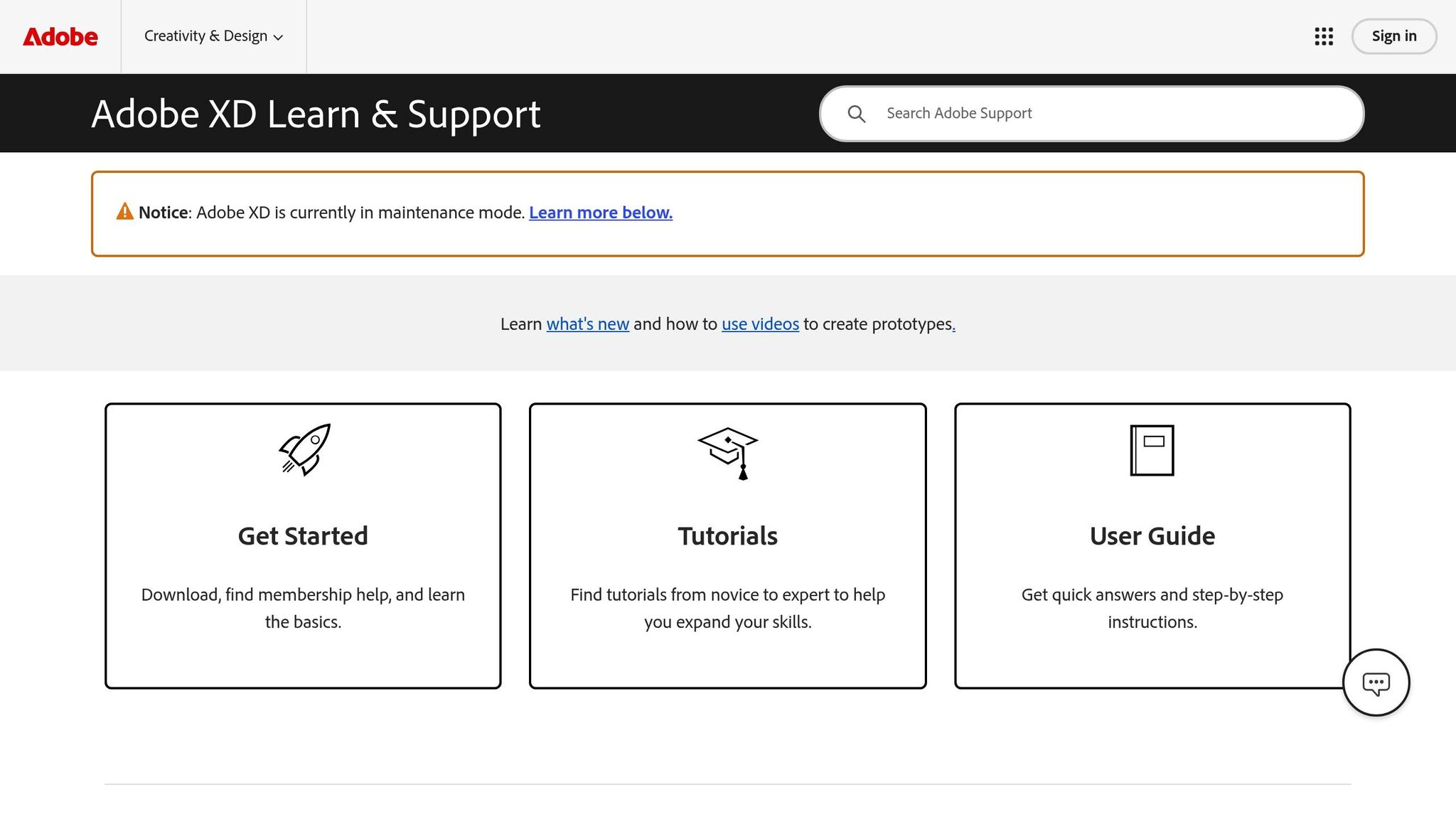
Adobe XD received a 4.5/5 rating from PCMag, largely due to its integration with Creative Cloud and responsive design tools. However, as of 2024, Adobe announced that XD is in "maintenance mode", halting all new feature development and discontinuing its standalone sales.
"Adobe XD is in ‘maintenance mode.’ Adobe has officially stopped all new feature development as of 2024. It is no longer a viable tool for new projects." – Elinor Rozenvasser
Collaboration features in XD have drawn criticism for their limitations. For example, only the original creator of a file can update shared presentation or development links, as the platform doesn’t allow multiple owners for a single file. Developer handoff is also constrained by static "Share for Development" links, which only provide web pages with specs and assets. Additionally, XD lacks advanced prototyping features like variables, conditional logic, or form validation, which are essential for creating high-fidelity prototypes.
These limitations make Adobe XD a better fit for teams already tied to Creative Cloud and reliant on legacy workflows, rather than those looking to adopt cutting-edge tools.
Pricing and Target Users
Adobe XD is no longer sold as a standalone product. As of 2026, it is only available through the Creative Cloud "All Apps" plan, costing approximately $89.99 per month. The previously available Starter Plan has been discontinued, and legacy plans restrict each user to a single active shared link. This pricing reflects Adobe’s shift toward supporting existing users rather than attracting new ones.
XD remains a practical choice for teams already invested in Creative Cloud, particularly those maintaining legacy projects, voice and game designers needing specific triggers, or teams working across macOS and Windows. However, starting new projects with XD in 2026 poses challenges, especially in terms of collaboration, hiring, and ensuring compatibility with future workflows.
For teams still using XD, leveraging CC Libraries is essential for maintaining brand consistency. At the same time, planning for a transition to other tools is crucial, as XD’s stagnation may limit its ability to meet evolving design and prototyping needs.
Side-by-Side Tool Comparison
Choosing the right prototyping tool depends on how well each platform supports core needs: prototyping, collaboration, and transitioning to development. These tools differ significantly, especially in how they connect design and development workflows. Based on our in-depth reviews, here’s a breakdown of key differences in these areas.
Feature Comparison Table
| Feature | UXPin | Figma | Adobe XD |
|---|---|---|---|
| Prototyping Basis | Code-based (HTML/JS) | Vector-based | Vector-based |
| Advanced Logic | Variables, Expressions, Conditionals | Basic Variables, limited logic | Basic transitions, Auto-Animate |
| Form Inputs | Fully functional/interactive | Static/Non-interactive | Static/Non-interactive |
| Collaboration | Real-time comments & co-editing | Industry-leading real-time co-editing | Real-time co-editing |
| Handoff | Code-to-design (Merge) | Design-to-code (Dev Mode) | Design-to-code |
| Ease of Use | Moderate learning curve | Easy to learn | Easy for Adobe users |
The standout difference lies in prototyping approaches. UXPin uses actual code components, allowing for more realistic prototypes, while Figma and Adobe XD rely on vector-based designs that need further translation into production-ready code.
Efficient workflows are equally important. Tools that streamline the transition from design to development can help teams execute projects faster and more effectively.
Speed and Design-to-Development Workflows
Streamlining the design-to-development process is critical for reducing delays. Teams that cut design review cycles from 5 days to 2 days can deliver projects more consistently because decisions are made faster.
UXPin’s Merge technology allows designers to work directly with the same code components developers use. This eliminates the need for rebuilding designs during development – what you design is exactly what gets shipped. For teams managing multiple integrations, Integrate.io offers a complementary solution by handling data integration workflows, allowing teams to connect design and backend data systems through fixed-price ETL and reverse ETL pipelines without heavy engineering overhead.
In contrast, Figma and Adobe XD require manual coding to convert designs into production-ready components.
"Nearly everything that designers and developers need is available in Figma".
By minimizing delays in decision-making, teams can reduce rework and lower costs for custom UI. UXPin’s code-based approach enables stakeholders to test real functionality – like form validation and conditional logic – before development starts. This seamless workflow aligns with broader goals of speed, consistency, and scalability.
Enterprise Capabilities Table
For large organizations, features like governance and security are just as important as design tools.
| Capability | UXPin | Figma | Adobe XD |
|---|---|---|---|
| Scalability | High (Merge technology) | High (Team libraries) | Moderate (CC ecosystem) |
| Governance | Design System Libraries & Spec Mode | Dev Mode & Version History | Document History |
| Security | Enterprise-grade, self-hosting options | Cloud-based security | Adobe Enterprise security |
| Source of Truth | Single source (Shared code components) | Design-centric libraries | Asset-centric (CC Libraries) |
For enterprise teams, governance and security are critical. UXPin stands out with self-hosting options, ideal for organizations with strict data residency policies. It also ensures a single source of truth by using shared code components across design and development. In comparison, Figma offers robust team libraries and version history, while Adobe XD relies on document history for governance.
Which Tool to Choose
Choosing the right design tool depends heavily on the structure and needs of your team. Here’s a breakdown of which tools work best for different team types and why.
Best Tool by Team Type
| Team Type | Recommended Tool | Key Benefit |
|---|---|---|
| Enterprise / Product Teams | UXPin | Code-to-design workflow (Merge) and strong system governance. |
| Agile / Creative Agencies | Figma | Real-time collaboration and a wide range of plugins. |
| Adobe-Centric Designers | Adobe XD | Smooth integration with Photoshop and Illustrator (Legacy). |
| High-Fidelity Testers | UXPin | Functional inputs and logic for precise usability testing. |
Each tool aligns with specific team workflows, offering unique advantages. Let’s explore these benefits further.
For enterprise teams managing intricate design systems, UXPin simplifies the process and reduces handoff delays. At T. Rowe Price, Sr. UX Team Lead Mark Figueiredo shared:
"What used to take days to gather feedback now takes hours. Add in the time we’ve saved from not emailing back-and-forth and manually redlining, and we’ve probably shaved months off timelines."
This efficiency boost has been a game-changer for enterprise teams, particularly when using UXPin Merge to integrate custom design systems. The result? Better consistency and faster collaboration between designers and developers.
For teams focused on quick iterations and brainstorming, Figma’s collaborative tools stand out. Meanwhile, Adobe XD remains a go-to for designers deeply integrated into the Creative Cloud ecosystem, though it’s worth noting that Adobe XD is no longer sold as a standalone product for new users.
Key Points to Remember
Here’s a quick recap of the critical distinctions between these tools:
- UXPin enables functional, production-ready prototypes by using actual HTML and JavaScript components. This means prototypes behave like the final product, complete with working form fields, variables, and logic. Larry Sawyer, a Lead UX Designer, highlighted its impact:
"When I used UXPin Merge, our engineering time was reduced by around 50%. Imagine how much money that saves across an enterprise-level organization with dozens of designers and hundreds of engineers."
- Figma and Adobe XD rely on vector-based designs, which require manual coding to transition into production. Figma excels in collaborative visual design, while Adobe XD integrates seamlessly with other Creative Cloud tools.
For teams that need scalability, governance, and closer alignment with development, UXPin’s Merge technology is a standout. By utilizing the same React, Vue, or Angular components that developers use in production, it creates a shared source of truth. This not only streamlines workflows but also redefines how design and development collaborate effectively.
FAQs
When should we choose UXPin over a vector-based prototyping tool?
Choose UXPin for projects that demand realistic, highly interactive prototypes that function like the final product. By using a code-based approach, UXPin allows for advanced interactions, logic, and states with production-ready components. This not only improves testing accuracy but also creates a smoother connection between design and development. It’s a perfect fit for teams looking to simplify workflows, avoid manual handoffs, and build prototypes that mirror the behavior of the finished product – especially for complex or enterprise-level projects.
What do we need to set up UXPin Merge with our existing code components?
To get UXPin Merge working with your code components, you’ll need to integrate your production code repositories – whether that’s React, MUI, or custom libraries – directly into UXPin. This integration links UXPin to your codebase, allowing you to use production-ready components to maintain design consistency. Designers can tweak props, test out interactions, and even export JSX code, making it easier for design and development teams to work together efficiently.
How do AI credits work in UXPin, and what happens if we run out?
AI credits in UXPin vary depending on your subscription plan. Core plans come with 200 credits per month, while Growth plans include 500 credits each month. These credits automatically reset at the start of every month.
If you use up all your credits, they won’t replenish automatically before the next cycle. To continue accessing AI features, you’ll need to either upgrade your plan or buy additional credits separately.

