Want to speed up UX design while ensuring consistency? Combining Claude Haiku 4.5 with UXPin Merge allows enterprise teams to create scalable, production-ready UX faster. Claude Haiku 4.5 generates structured UX outputs like user flows and component trees, while UXPin Merge turns them into interactive prototypes using real production components. Together, these tools eliminate inefficiencies, reduce rework, and align design with development.
Key Takeaways:
- Claude Haiku 4.5: AI-driven tool for generating UX artifacts (flows, layouts, copy) tailored to design systems.
- UXPin Merge: Prototyping tool that uses live code components for accurate, developer-ready designs.
- Custom Design Systems: Ensure consistency, accessibility (WCAG 2.1 AA), and compliance across products.
Why It Works:
- AI Efficiency: Claude Haiku 4.5 integrates compliance and accessibility into UX outputs.
- Component-Driven Prototypes: UXPin Merge ensures designs mirror production code.
- Seamless Workflow: Outputs from Claude feed directly into UXPin for faster prototyping.
This approach addresses common enterprise challenges: inconsistent UX, slow workflows, and design-development misalignment. By integrating AI with design systems, teams can deliver high-quality, compliant UX at scale.
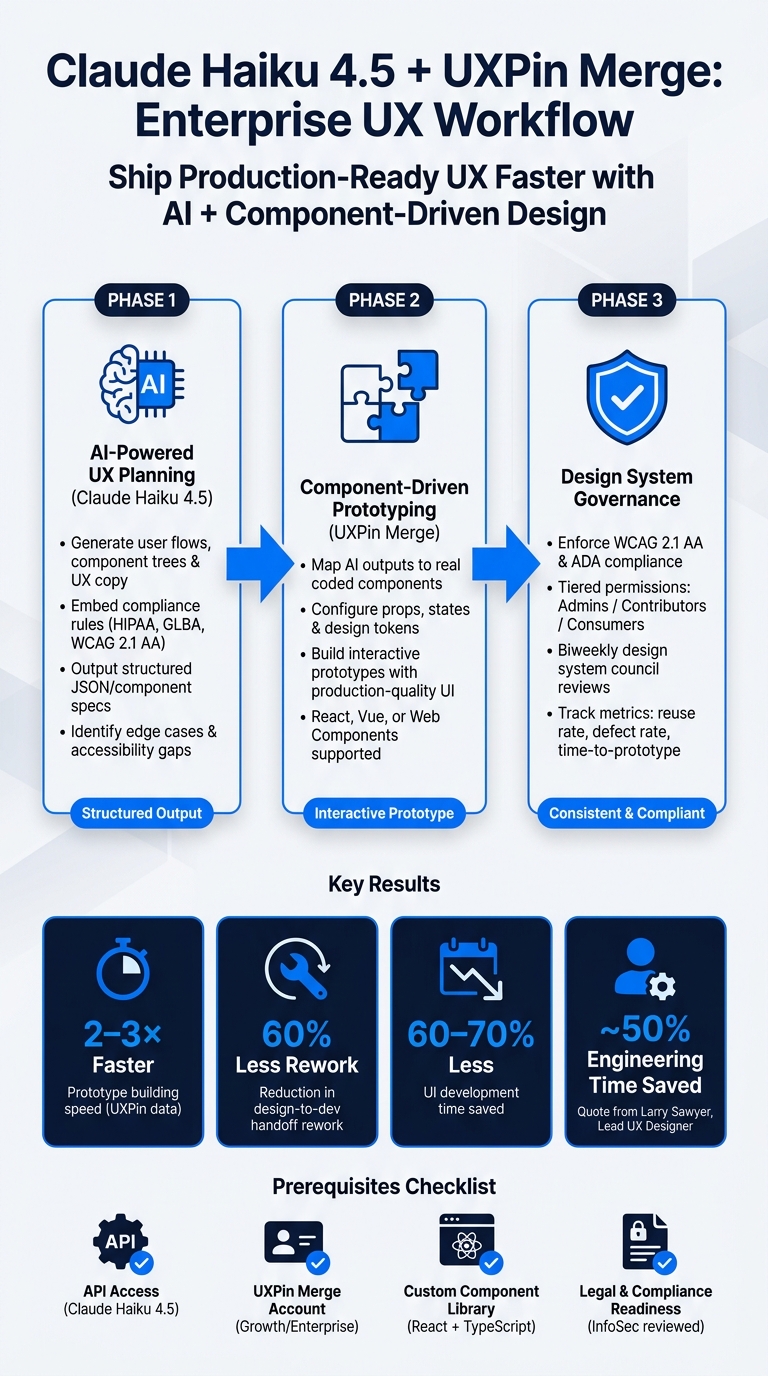
Claude Haiku 4.5 + UXPin Merge: Enterprise UX Workflow
UXPin Merge AI: Smarter UI Generation That Follows Your Design System
The Tools: Claude Haiku 4.5, UXPin Merge, and Custom Design Systems
Each of these tools plays a distinct role in creating a smooth and efficient UX workflow. Before diving into how they work together, let’s break down what each tool does and why they complement one another so effectively.
What Claude Haiku 4.5 Brings to UX Teams
Claude Haiku 4.5 is a fast and lightweight model designed to handle structured tasks at scale. Its key strengths – hybrid reasoning, coding support, and structured output generation – make it a powerful ally for UX teams.
With hybrid reasoning, Claude Haiku can analyze complex user journeys step by step. It identifies edge cases, branching paths, and interaction gaps before a single component is even placed on the canvas. Its coding support allows designers and engineers to generate lightweight code artifacts, such as React props schemas or JSON structures, that align directly with design system components. The structured output generation feature creates formatted tables, user flow outlines, acceptance criteria, or UX copy variants that are ready to plug into design specs or prototypes.
For U.S. enterprise teams, this tool is especially valuable because it allows compliance requirements to be embedded directly into prompts. Whether you’re designing a consent dialog that aligns with HIPAA or a financial disclosure flow that meets GLBA standards, Claude Haiku ensures these constraints are consistently reflected in its outputs.
Next, let’s look at how UXPin Merge takes these outputs and turns them into production-ready prototypes.
How UXPin Merge Powers Component-Driven Design
UXPin Merge bridges the gap between the design canvas and live code components, ensuring that every element – buttons, form fields, data tables, modals – matches production-quality React, Vue, or Web Components.
Instead of creating UI elements from scratch, designers use real components with their actual props, states, and behaviors. They can configure variants such as size, color, and error states directly, while design tokens for spacing, typography, color, and border radius are centrally defined and automatically applied. This approach removes the need for a translation layer between design and development.
According to UXPin’s own data, teams using Merge can build prototypes 2–3× faster because they assemble screens from pre-built, code-based components rather than redrawing or redlining UI elements. Merge-based prototypes also reduce design-to-development handoff rework by up to 60%, making the workflow more efficient and less error-prone.
With these capabilities, UXPin Merge seamlessly integrates with custom design systems to create scalable and compliant UX solutions.
The Role of Custom Design Systems
A custom design system is a company-specific library of reusable UI components, interaction patterns, design tokens, and guidelines tailored to your brand, products, and regulatory needs. For U.S. enterprises, this is a critical distinction. Existing systems like IBM Carbon, Microsoft Fluent, and Salesforce Lightning are built to address enterprise requirements, including complex data tables, multi-step forms, and dashboards. These systems ensure that components meet WCAG 2.1 AA and ADA standards, with features like keyboard accessibility, focus management, ARIA labels, and proper color contrast.
This focus on accessibility is more important than ever. WebAIM’s 2024 analysis of the top 1 million homepages found that 96.3% had detectable WCAG violations, and digital accessibility lawsuits have steadily increased over the last decade, according to the U.S. Department of Justice.
When Claude Haiku 4.5, UXPin Merge, and a custom design system are used together, they create a seamless workflow: AI generates structured, constraint-aware UX artifacts → designers turn those artifacts into realistic, production-ready prototypes → the design system ensures consistency and compliance at every stage. This closed-loop process is what makes the combination of these tools so effective for enterprise UX teams.
Setting Up Claude Haiku 4.5 and UXPin Merge for Your Team
Laying the groundwork is crucial before diving into writing prompts. Skipping steps can lead to delays and complications mid-project.
What U.S.-Based Teams Need Before Starting
To ensure a smooth workflow, there are four key prerequisites:
- API Access to Claude Haiku 4.5: Start by securing an active Anthropic account with billing set up in USD. Store API keys securely in a secrets manager – never hard-code them into prompts or scripts. Configure environment variables separately for development, staging, and production environments.
- UXPin Account with Merge Enabled: You’ll need to be on a Growth or Enterprise plan with at least one Merge source connected. This could be a Git repository, Storybook, or an NPM package. For Enterprise teams, setting up SSO (like SAML with Okta) is essential to meet U.S. enterprise security standards. Plan details can be reviewed at uxpin.com/pricing.
- Custom Component Library: Build this using a modern framework, typically React with TypeScript, that mirrors your production UI. Ensure components are documented with clear props, states, and variants. Store them in a version-controlled repository with protected branches to maintain integrity.
- Legal and Compliance Readiness: Develop a data handling policy that explicitly prohibits sending sensitive data like PHI or PCI through prompts. This policy should pass an InfoSec review and include any necessary DPA or BAA addenda for industries like healthcare or finance.
How to Structure Prompts and Documentation
Effective documentation is key to success. Maintain two layers of documentation:
- Full Design System Document: Host this in a tool like Confluence or Notion for detailed reference.
- AI-Facing Spec: A condensed, one-to-two-page version designed to fit within a prompt’s context window.
Your AI-facing spec should include a token reference for your 20–50 most-used tokens (e.g., color.background.surface, spacing.lg) and a plain-language component reference. Each component entry should briefly describe its purpose, list required props with allowed values, and note constraints, such as "Button text: 1–30 characters" or "Must be used inside LayoutGrid."
For U.S.-specific conventions, always include formatting rules directly in your prompts – dates as MM/DD/YYYY, times in 12-hour format with AM/PM, and currency as $1,000.00 with a comma as the thousands separator.
When creating prompt templates, include:
- Context Block: Briefly describe the product, target audience, and device focus.
- Constraints Block: Specify that only listed components and tokens should be used.
- Desired Output Format: Define how the output should look, such as numbered steps or a JSON-like component tree.
Store these templates in a shared prompt library, adding notes about what works well and potential pitfalls. This shared resource transforms individual learning into a team-wide advantage.
Team Roles and Responsibilities
With strong documentation and a solid technical setup in place, assigning clear team roles ensures smooth collaboration. Here’s how tasks are typically divided:
| Role | Primary Responsibilities |
|---|---|
| Designers / UX | Write prompts for flows and screens, translate Claude outputs into Merge prototypes, and validate AI suggestions against accessibility and brand standards. |
| Developers / Front-End Engineers | Build and maintain the component library, manage the Merge integration (e.g., Git/Storybook connections, build issues, updates), and evaluate the technical feasibility of AI recommendations. |
| Design System Owners / Design Ops | Define and enforce token and component standards, maintain AI-facing documentation, and update AI usage guidelines. |
| Product Managers | Provide requirements, personas, and scenario descriptions for prompts, ensuring outputs align with business goals and compliance needs. |
Using a RACI framework (Responsible, Accountable, Consulted, Informed) for tasks like prompt creation, AI review, Merge implementation, and production handoff keeps roles clear and minimizes rework as your workflow scales.
How to Use Claude Haiku 4.5 to Drive UX Decisions in UXPin Merge
Once your team structure and documentation are set, it’s time to put Claude Haiku 4.5 to work. The process is simple: you "teach" Claude about your Merge component library, then ask it to create UX artifacts – like flows, layouts, and copy – that directly reference those components. These outputs integrate seamlessly into UXPin Merge, enabling actionable design decisions that align with your component-driven prototypes.
How to Write Effective Prompts for Claude Haiku
One common mistake is writing prompts that are too vague. For example, a prompt like "Design an approval screen for our enterprise app" will generate generic suggestions that don’t align with your Merge library. To get actionable results, your prompts need to be more specific and system-aware.
A good prompt includes four key elements:
- Context block: Specify the product type, user role, and target device.
- Design system block: Name your Merge library and list the components Claude should use.
- Constraints block: Define requirements like WCAG 2.1 AA compliance, U.S. formatting standards, or maximum steps in a flow.
- Desired output format: Specify how results should be structured, such as a component tree, numbered steps, or a JSON-like format.
Here’s a comparison to clarify:
Vague prompt: "Create a job requisition form for HR."
System-aware prompt:
"You are assisting with UX design for an enterprise HR web app. Use only components from our UXPin Merge library, which wraps MUI v5: PageLayout, Form, FormField, Select, Button, Alert. Propose a screen-level layout for ‘Create New Job Requisition’ with exact component names and key props. Follow WCAG 2.1 AA, use U.S. English copy, USD currency formatted as $1,250.00, and MM/DD/YYYY dates. Output as a hierarchical component tree."
The second prompt produces actionable outputs like FormField {label: "Hiring Manager", type: "text", required: true} or Button {variant: "primary", label: "Submit for Approval", disabled: false} – ready for immediate use in Merge.
For complex workflows, like a 3-step budget approval process involving amounts such as $50,000.00, you can be even more specific. For instance, instruct Claude to use Stepper {currentStep: 2}, DataTable {columns: [...], sortable: true}, and Modal {role: "dialog", ariaLabelledBy: "approval-title"}. The more detail you provide, the more actionable the results.
Using Claude Haiku for UX Planning
Claude Haiku supports UX planning across three main areas, all of which directly feed into UXPin Merge:
- User flows: Claude can generate detailed end-to-end flows tailored to U.S. personas, such as an HR manager or finance approver. These flows can include decision points, error paths, and edge cases like role-based restrictions or high-dollar approvals. By requesting numbered steps, you ensure each step maps clearly to a page or state in UXPin.
- Information architecture: Quickly generate navigation options – flat or nested – that align with typical U.S. enterprise mental models. For example, sections like Admin, Billing, Compliance, and Reports can be mapped to specific Merge layouts or templates, giving stakeholders pre-structured options to review.
- UX copy: Claude can draft en-US microcopy, error messages, and empty states that fit your brand’s tone. For regulated industries, it can also create compliance-ready consent notices and audit disclosures. However, always have a human legal expert review any final language.
By ensuring every output directly references Merge components, you reduce back-and-forth and make the design process more efficient.
Checking and Refining AI Outputs
Once Claude generates the initial outputs, review and refine them carefully. AI outputs are starting points, not final specs. Skipping this step can lead to serious issues – especially for enterprise teams. For instance, U.S. federal ADA website lawsuits exceeded 4,000 in 2023, highlighting the risks of neglecting accessibility.
Review the outputs, annotate any issues, and prompt Claude for revisions while staying within your Merge component constraints.
During accessibility checks, guide Claude with a prompt like:
"Audit the design above against WCAG 2.1 AA. Flag color contrast issues, missing ARIA labels, keyboard navigation gaps, and any focus state problems. Output a checklist of required changes using only our Merge component library."
Claude can also identify fields that may expose PII or PHI, suggest minimizing data collection, and recommend where consent notices are necessary. However, for industries like healthcare and finance, a human compliance reviewer must approve all final language. This iterative process ensures AI outputs meet U.S. enterprise standards and are ready for prototype implementation.
sbb-itb-f6354c6
Turning Claude Haiku Outputs into Designs in UXPin Merge
Once Claude’s outputs are refined, you can transform them into functional designs using UXPin Merge. This tool bridges the gap between AI-generated ideas and production-ready interfaces, making the process both efficient and accurate.
Mapping AI Outputs to UXPin Merge Components
To ensure consistency, map Claude’s suggested outputs directly to your design system’s components in UXPin Merge. Create a reference document – like a spreadsheet – that links AI terms to their corresponding component names. Here’s an example:
| AI Output Term | UXPin Merge Component |
|---|---|
| "search box" | SearchInput |
| "notification banner" | AlertBanner |
| "data grid" | DataTable |
| "side panel with form" | SidePanel + UserForm |
| "step indicator" | Stepper |
For any UI elements that Claude suggests but aren’t part of your library, try building them using existing components. For instance, a "summary card" could be created by combining a Container, Icon, Heading, Text, and Button. Keep track of these gaps, as they can inform future updates to your design system.
When it comes to styling, translate Claude’s descriptive phrases – like "brand blue" or "large heading" – into your design tokens (e.g., color.primary.600, space.200, fontSize.xl). This ensures that your designs stay aligned with the system and avoid deviations over time.
Step-by-Step: Building an Enterprise Feature
Let’s break down how to build a specific feature – like a User Access Management screen – using Claude’s outputs and UXPin Merge components.
- Define the Feature Brief: Start by prompting Claude with a clear description of the feature. For example, an admin interface where users can invite, edit, and revoke roles, adhering to role-based access control (RBAC) and a desktop-first layout.
- Organize the Output: Request Claude to provide a structured table with details like
screen_id,screen_name,components,variants, andstates. For example:- "UM-01 / User list /
TopNav,PageHeader,FilterPanel,DataTable,Pagination/Table.row.selected/ loading, no_results."
- "UM-01 / User list /
- Start in UXPin Merge: Use a "Data table page" template as your base. Add the components specified by Claude and configure their props accordingly. For example:
- Clicking "Invite user" should open a
SidePanelcontaining aUserForm. - Submitting the form triggers a
ToastNotificationsuccess message and refreshes theDataTable.
- Clicking "Invite user" should open a
- Iterate with Claude: Share your prototype with Claude for feedback. Provide screenshots or detailed descriptions and ask for a heuristics review. Use this feedback to refine the design while sticking to your existing components and tokens – no creating new patterns or exceptions.
This method ensures that AI-generated ideas translate effectively into enterprise-grade designs.
Keeping Design and Development in Sync
One of the biggest advantages of UXPin Merge is how it eliminates the traditional design-to-development handoff. Designers and developers work with the same coded components, ensuring that what’s designed is exactly what gets shipped.
Here’s how it works:
- Developers can inspect UXPin prototypes to view component props, states, and data bindings, allowing them to start building immediately.
- During design reviews, invite engineers into UXPin to validate component usage in real time. This removes the need for separate spec documents and reduces the risk of misinterpretation.
- Any updates developers make to the codebase are automatically reflected in UXPin, ensuring that both teams stay aligned.
According to UXPin, this process can reduce UI development time by 60–70% and cut handoff cycles from weeks to just days. By working in this unified system, you maintain consistency and speed across the entire design and development workflow.
Scaling and Governing Enterprise UX with Claude Haiku 4.5 and UXPin Merge
Creating one solid feature is manageable, but ensuring consistency across dozens of features, products, and teams? That’s where things get tricky. Tools like Claude Haiku 4.5 and UXPin Merge provide a structured way to streamline feature delivery while maintaining consistency on an enterprise scale.
Governance Practices for U.S. Enterprise Teams
A scalable design system starts with clear ownership. UXPin Merge offers a tiered permission model with three roles:
- Admins: Manage library updates and component versioning.
- Contributors: Designers and front-end engineers who can propose changes but can’t publish them.
- Consumers: Product designers, PMs, and developers who work only with approved components.
Admins should exclusively handle core design tokens like colors, typography, and spacing, as well as any changes to the Git connection tied to the Merge library. This ensures no unauthorized adjustments sneak in.
Accessibility governance deserves equal attention. U.S. enterprises face increasing legal risks, with over 3,000 web accessibility lawsuits filed annually in federal courts in recent years. To mitigate these risks, build WCAG 2.1 AA compliance directly into your coded components. This means addressing focus states, ARIA attributes, and color contrast upfront. For industries like government, healthcare, or finance, include Section 508 requirements in your governance documentation. Claude Haiku can assist by generating accessibility acceptance criteria for new features and flagging WCAG 2.1 AA gaps in user flows.
However, it’s important to treat Claude Haiku as a starting point, not the final say. Any component spec or pattern it generates should go through a human review process. A biweekly design system council – comprising design, engineering, product, and accessibility experts – can review proposals, approve deprecations, and prioritize fixes. This collaborative approach ensures quality and alignment across teams.
How to Measure Progress
To gauge the effectiveness of your governance practices, rely on clear metrics:
| Metric | What It Tells You |
|---|---|
| Component reuse rate | Percentage of prototype screens built with approved Merge components versus custom elements. |
| Time-to-first-prototype | Hours from initial requirements to an interactive prototype in UXPin Merge. |
| Design change requests post-handoff | Frequency of developers seeking clarification after design approval. |
| UX defect rate | Bugs in QA or production caused by inconsistent UI patterns. |
For U.S.-based teams, these metrics can translate time savings into cost savings. For example, if a five-person team saves 8 hours per feature at $90/hour, that’s $3,600 saved per feature – compelling evidence to justify further investment.
Claude Haiku can also help with this analysis. By analyzing exports from Jira, UXPin, or your Git repository, it can identify trends like teams using deprecated components or areas where rework tickets are piling up.
Using Claude Haiku to Grow Your Design System
Governance and measurement are crucial, but continuous growth is what keeps a design system relevant. Design systems often stagnate when teams lack the time to identify missing elements. Claude Haiku can help by analyzing product UIs – whether through descriptions or screenshots – and spotting recurring patterns that haven’t been formalized. It can cluster similar elements and draft a component spec, giving your team a clear starting point instead of a blank slate.
Keeping documentation up to date is another common challenge. Claude Haiku can simplify this by analyzing commit messages and pull request descriptions from your repository, then generating clear, human-readable release notes for designers and product managers. As Larry Sawyer, Lead UX Designer, shared about using UXPin Merge:
"When I used UXPin Merge, our engineering time was reduced by around 50%. Imagine how much money that saves across an enterprise-level organization with dozens of designers and hundreds of engineers."
Additionally, Claude can process usability findings, support tickets, or NPS feedback to summarize recurring UX complaints. These insights can highlight missing or broken components, ensuring updates are driven by real user needs.
Conclusion: Ship Better UX Faster with Claude Haiku 4.5 and UXPin Merge
Claude Haiku 4.5 helps you turn requirements into actionable designs, while UXPin Merge ensures those designs translate into production-ready interfaces. Haiku simplifies complex tasks like creating user flows, defining edge cases, and structuring content. Merge takes it from there, enabling teams to build interfaces using trusted, developer-approved components.
What sets this combination apart for U.S. enterprise teams is the closed loop it establishes. AI directs what needs to be designed, and Merge defines how it should be implemented. This synergy reduces rework, minimizes handoff issues, and ensures consistent UX across teams, time zones, and product lines.
Maintaining this workflow requires strong governance. Standardized prompt templates, clear ownership of design systems, and regular cross-functional reviews are essential to avoid chaos as teams grow. While the tools speed up processes, human judgment remains vital for maintaining quality.
To get started, focus on a small, manageable feature – like a billing settings page using USD pricing and MM/DD/YYYY date formats. Create a targeted Haiku prompt, match the output to existing Merge components, and conduct a quick review with your design, engineering, and product teams. Learn from the process, refine your prompts, and iterate.
This integrated approach connects design and development, making scalable UX a reality. Designers gain the freedom to explore ideas without redoing foundational work, developers work with aligned specifications, and executives see measurable improvements in cycle times and reduced rework costs.
FAQs
How do I safely use Claude Haiku 4.5 without sending sensitive data?
To use Claude Haiku 4.5 securely, make sure your organization allows the integration of external tools with your codebase. When working with private repositories, rely on secure, read-only connections using access tokens or SSH keys. Be cautious with API keys – remember, they’re visible only once during generation, so store them securely. For enterprise-level projects, double-check that your setup aligns with your company’s security policies, including those for AI tools, internal design systems, and proprietary code.
What should be in an AI-facing design system spec for Claude?
To create an AI-friendly design system spec for Claude, you’ll want to include a few key elements to ensure clarity and usability. Here’s how you can structure it:
Design Tokens
Design tokens are the building blocks of your design system. These include colors, typography, spacing, and more. Represent these as JSON or CSS variables for easy integration. For example:
{ "colors": { "primary": "#4A90E2", "secondary": "#50E3C2", "background": "#FFFFFF", "text": "#333333" }, "typography": { "fontFamily": "Arial, sans-serif", "fontSize": { "small": "12px", "medium": "16px", "large": "24px" } }, "spacing": { "small": "8px", "medium": "16px", "large": "32px" } } These tokens provide a single source of truth for your design elements.
Component Library
Document your components in detail, covering their states, props, and usage guidelines. Each component should include examples of different states like hover, focus, and disabled. For instance:
Button Component
- States: Default, Hover, Active, Disabled
- Props:
type: Defines the button type (primary,secondary,tertiary)size: Specifies button size (small,medium,large)onClick: Function triggered on click
Usage Example:
<Button type="primary" size="medium" onClick={handleClick}> Submit </Button> Accessibility Standards
Ensure the design system adheres to WCAG 2.1 AA and Section 508 compliance. This includes:
- Sufficient color contrast (e.g., a minimum contrast ratio of 4.5:1 for text)
- Keyboard navigability for all interactive elements
- Proper ARIA roles for components
- Descriptive alt text for images
Localization Formats
Define formats for currency, dates, and units to support global users. For the United States:
- Currency:
$1,234.56 - Date:
MM/DD/YYYY - Units: Use imperial measurements (e.g., inches, pounds)
By organizing the spec with structured tags like <design_tokens> and <components>, you’ll create a clear and maintainable hierarchy for your design system. This approach ensures consistency, accessibility, and adaptability for AI-driven applications.
How do I map Claude’s outputs into UXPin Merge components quickly?
To connect Claude’s outputs to UXPin Merge components, start by syncing your design system with Merge through the CLI. Then, leverage the Forge AI assistant to integrate AI-generated outputs with your code-based components. Make sure to use clear prompts that reference specific design tokens or component names for accuracy. Forge will automatically map layouts to your components, and you can fine-tune these directly on the canvas using the properties panel – all while maintaining alignment with your design system.

