Stakeholder feedback loops save time, reduce rework, and improve collaboration. They provide a structured way to collect, act on, and communicate input from executives, product teams, and users. By setting clear goals, defining roles, and using the right tools, you can avoid fragmented communication and late-stage surprises.
Here’s what you need to know:
- Feedback loops involve planned reviews at key project milestones (e.g., 25%, 50%, 75% completion).
- Clear goals ensure feedback aligns with business objectives and KPIs.
- Stakeholder roles (e.g., Feedback Owner, Decision Maker) prevent redundant or conflicting input.
- Use centralized tools (like Slack, Jira, UXPin) to streamline communication and track feedback.
- Regular updates and structured agendas keep stakeholders engaged and informed.
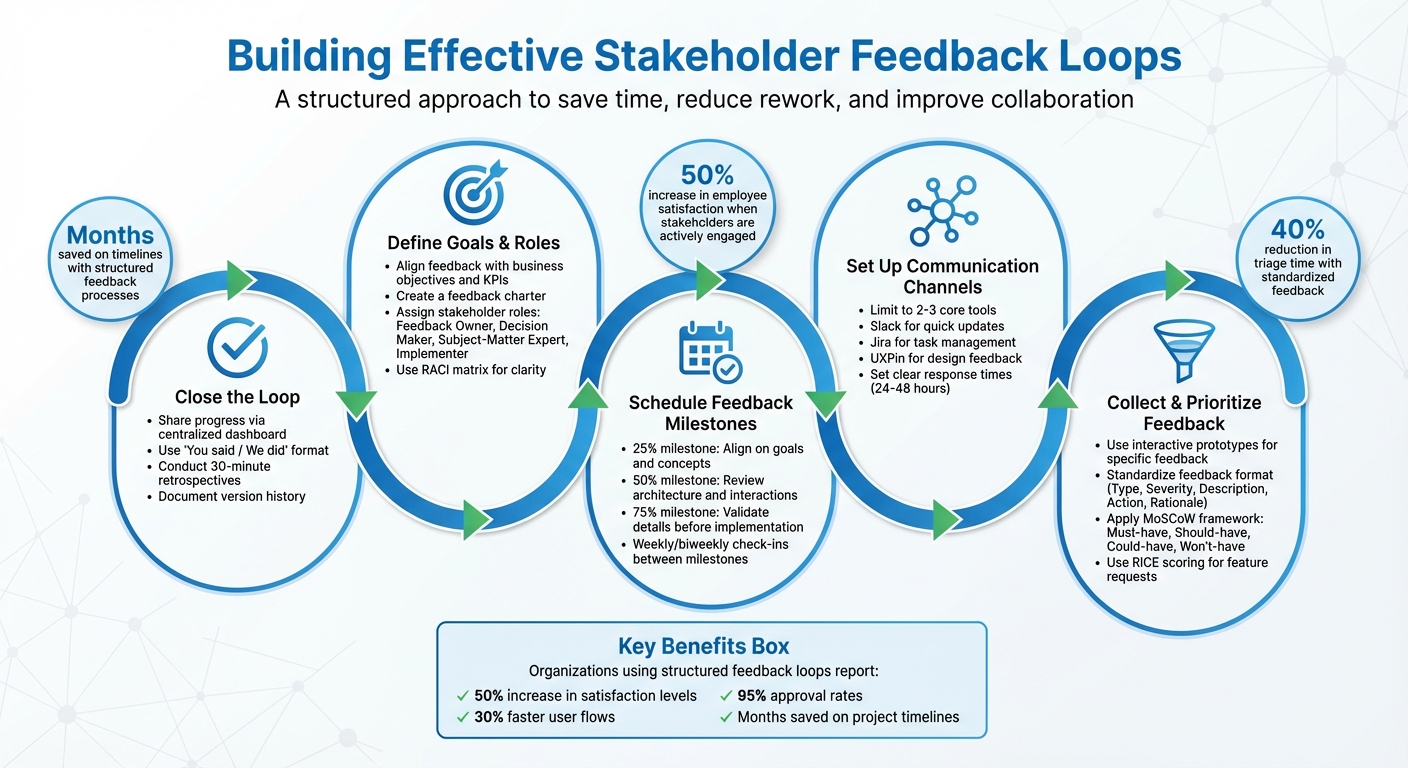
5-Step Stakeholder Feedback Loop Framework for Project Success
How Do Feedback Loops Improve Stakeholder Communication? – The Project Manager Toolkit
Defining Goals and Stakeholder Roles
Before diving into a feedback session, it’s essential to ask two key questions: Why are we collecting feedback, and who should provide it? Without clear answers, you risk ending up with scattered input that doesn’t move your project forward in a meaningful way.
Aligning Feedback Goals with Project Objectives
Every feedback activity should tie directly to a specific decision or potential risk. For example, during the discovery phase, your goal could be to confirm that a new onboarding process cuts time-to-task by 20%. In the design phase, you might focus on ensuring that features align with critical business metrics or identifying compliance risks. As launch approaches, the focus shifts to addressing adoption challenges and ensuring the release is ready.
Goals should be specific, measurable, and time-bound. Instead of asking for vague feedback on a dashboard, aim for something like: "Validate that executives can access Q4 revenue reports in under three clicks by December 31, 2025." Tie these goals to concrete KPIs – such as task completion rates, Net Promoter Scores (NPS), or roadmap confidence – and integrate them into your sprint schedule or quarterly plans.
Creating a straightforward feedback charter can help keep everyone on track. This document should outline your primary objectives (e.g., revenue growth, compliance, customer satisfaction), essential requirements (such as regulatory standards and accessibility), and trade-off rules (like prioritizing quality over delivery speed or managing within specific budget constraints). Reviewing this charter during feedback sessions helps avoid scope creep and keeps discussions focused on what truly matters.
Once your goals are clearly defined, the next step is to assign stakeholder roles to ensure that feedback contributions remain targeted and productive.
Mapping Stakeholders and Their Influence
With goals in place, it’s time to classify stakeholders based on their influence and interest. Stakeholders with both high influence and high interest – such as product leads who can block releases or executives controlling budgets – should be part of your "manage closely" group. Meanwhile, stakeholders with lower influence might only need updates or occasional input via surveys.
To stay organized, develop a stakeholder registry that captures key details about everyone involved. Assign clear roles to avoid redundant discussions or conflicting feedback. For example:
- Feedback Owner: Synthesizes and organizes input.
- Decision Maker: Approves or rejects proposed changes.
- Subject-Matter Expert: Provides specialized guidance.
- Implementer: Executes the approved changes.
A RACI matrix (Responsible, Accountable, Consulted, Informed) can further clarify who does what, especially for major decisions involving UX, technical architecture, compliance, or budget allocation.
Using collaborative tools like UXPin can simplify this process. These tools centralize feedback, assign role-specific access, and allow comments to be tied directly to interactive prototypes. For each project milestone, identify which stakeholder groups are critical. For instance, discovery sessions might focus on end-users and business owners, while pre-launch reviews could include legal, security, and operations teams. Keep core feedback sessions limited to stakeholders who can block releases or represent key user segments, while keeping others informed through asynchronous updates and summary reports.
Organizations that approach stakeholder feedback systematically often see tangible benefits. For instance, companies that actively engage stakeholders report a 50% increase in employee satisfaction levels.
Setting Up Communication Channels
Once stakeholder roles are clearly defined, the next step is to establish dedicated communication channels to streamline feedback. Keeping these channels limited – ideally to just a few – helps centralize input and avoid confusion. Most effective teams stick to 2–3 core tools, each serving a distinct purpose, ensuring feedback remains focused and actionable without overwhelming stakeholders or losing track of critical decisions.
Choosing the Right Tools for Collaboration
Each tool should serve a specific purpose. For example:
- Use a real-time messaging platform like Slack for quick updates, deadline reminders, and immediate clarifications.
- Rely on a project tracking tool such as Jira for structured feedback, task management, and actionable tickets.
- Incorporate an interactive prototyping platform like UXPin for design-specific feedback, allowing stakeholders to comment directly on flows and components.
This setup avoids "tool overload" and keeps everyone aligned. Platforms like UXPin make feedback more precise by enabling stakeholders to interact with realistic prototypes and annotate specific elements. Because UXPin uses code-backed components, what stakeholders review closely resembles the final product, minimizing miscommunication and last-minute surprises.
To ensure clarity, document which tool is used for what at the project kickoff. For instance, design reviews might happen in UXPin, decision tracking in Jira, and blockers flagged in Slack. Also, set clear response-time expectations: urgent Slack messages within 24 hours, standard Jira comments within 48 hours, and comprehensive design reviews within one week. Assign ownership for each channel – for example, a product manager overseeing Jira tickets and a design lead managing UXPin feedback – to maintain accountability and ensure nothing falls through the cracks.
With this structure in place, schedule regular checkpoints to keep feedback timely and actionable.
Setting Feedback Schedules and Milestones
Establishing a feedback schedule helps avoid last-minute surprises. Plan formal reviews at key milestones – 25%, 50%, and 75% completion – while supplementing them with shorter, weekly or biweekly check-ins. This ensures feedback is received early enough to influence the project’s direction.
- 25% milestone (discovery/concept phase): Align on goals, constraints, and initial concepts.
- 50% milestone (mid-fidelity): Focus on information architecture and core interaction patterns.
- 75% milestone (high-fidelity): Validate details like content, visual design, and edge cases before implementation.
This phased approach spreads stakeholder involvement across the project, ensuring feedback is relevant and actionable. For high-stakes initiatives, like new product launches, consider increasing review frequency to weekly and involving senior stakeholders at the 50% and 75% stages. For smaller updates, asynchronous reviews in UXPin combined with a standing weekly feedback session may suffice.
Document this cadence in your project plan, and be ready to adjust based on participation patterns or bottlenecks. When stakeholders know exactly when their input is needed and see their feedback acknowledged and acted upon, engagement improves, and the quality of feedback rises.
Collecting Actionable Feedback
Once you’ve established clear communication channels and schedules, the next step is collecting feedback that truly makes a difference. To refine design outcomes, feedback needs to be specific, constructive, and actionable. Vague comments like "This doesn’t feel right" only lead to confusion, leaving designers guessing about what stakeholders actually want. Instead, ensure every piece of feedback includes context, its potential impact, and a clear suggestion for improvement. A great way to achieve this is by moving from static screenshots to interactive prototypes during review sessions.
Facilitating Interactive Reviews
The way you conduct review sessions can make or break the quality of feedback you receive. Static images or slide decks tend to focus attention on superficial elements like colors or fonts. On the other hand, interactive prototypes encourage discussions about what really matters – user flows, behaviors, and real interactions.
With tools like UXPin, stakeholders can explore code-backed prototypes that mimic the final product. They’ll experience buttons, screen transitions, and even conditional logic as if they were using the finished design. This hands-on interaction generates more precise feedback. Instead of something generic like, "This button feels off", you’ll hear actionable input such as, "The hover effect on this button feels delayed – try adjusting the timing to 200ms."
To keep feedback sessions productive, use a structured 30-minute agenda:
- 5 minutes: Provide updates on progress.
- 10 minutes: Walk through the prototype.
- 10 minutes: Focus on key discussions.
- 5 minutes: Summarize action items.
Use screen-sharing to guide stakeholders through specific scenarios, and encourage feedback in the format: "I recommend X because Y." This method ensures feedback remains actionable and catches potential issues early – ideally at the 25%, 50%, and 75% progress milestones – before they escalate into costly revisions.
Once you’ve gathered feedback, standardizing its format helps streamline the process of addressing it.
Standardizing Feedback Formats
Even the most productive review sessions can result in scattered feedback if stakeholders use different methods to share their thoughts. One might send an email, another might leave a Slack message, and someone else might mention something casually during a meeting. This chaos can be avoided with standardized feedback templates, ensuring all input includes the same essential details.
A simple feedback form can include fields like:
- Feedback Type (e.g., UI, UX, functionality, content)
- Severity (high, medium, low)
- Description
- Suggested Action
- Rationale
For instance, instead of vague comments like, "The navigation is confusing", you could receive:
"Type: UX | Severity: High | Description: Users can’t find the account settings in the main menu | Action: Move ‘Settings’ to the top-level navigation | Rationale: 70% of users expect it there."
Centralize all feedback into a single repository, such as a project management board or a dedicated feedback hub, with tags for stakeholders, project phases, and priorities. This approach ensures nothing gets overlooked. One team that adopted this method reduced their triage time by 40% and built stronger stakeholder trust by tracking which changes were implemented and why. When feedback is organized and easily searchable, stakeholders feel confident that their input is driving meaningful decisions. In fact, organizations that act on structured feedback report up to a 50% increase in satisfaction compared to those that simply collect feedback without implementing changes.
sbb-itb-f6354c6
Prioritizing and Implementing Feedback
Collecting feedback is just the first step; the real challenge lies in deciding which suggestions to act on and when. Without a clear system to prioritize, teams can easily get overwhelmed by requests, waste time on low-impact changes, or miss critical input that could jeopardize the project. To avoid this, establish a structured approach that balances stakeholder needs with project constraints while keeping a transparent record of every change.
Sorting Feedback with Prioritization Models
Not all feedback carries the same weight. Some suggestions are essential, while others are nice-to-haves. The MoSCoW framework is a practical way to categorize feedback into four groups:
- Must-have: Critical requirements that must be addressed.
- Should-have: Important but not immediately necessary.
- Could-have: Nice-to-have features, if time allows.
- Won’t-have: Out of scope for the current iteration.
Holding quick, weekly triage meetings (around 15 minutes) can help teams review, tag, and assign feedback efficiently.
For a more quantitative approach, the RICE scoring model (Reach, Impact, Confidence, Effort) can help assess the value of feature requests. When disagreements arise among stakeholders, a weighted decision matrix can provide clarity. For instance, criteria like revenue impact (40%), feasibility (30%), and strategic alignment (30%) can objectively guide decisions.
Here’s an example: During a product redesign, a team used the MoSCoW method to sift through over 50 feedback items. They identified 10 Must-haves – critical UX fixes – that were implemented first, resulting in 30% faster user flows. Should-have items were tackled in a later phase. By tracking everything on a shared Notion board and providing weekly updates, the team achieved a 95% approval rate and secured repeat business. Companies that prioritize feedback in this way can see satisfaction rates climb by as much as 50% compared to those that simply collect input without acting on it.
Once feedback is prioritized, it’s crucial to document changes systematically to maintain transparency and trust with stakeholders.
Keeping Track of Changes and Version History
After prioritizing feedback and starting implementation, transparency becomes key. Stakeholders want to know how their input influenced the design, and your team benefits from a clear record of changes – what was updated, when, and why. Maintaining a central repository with version history is essential. This should include details like version numbers, dates, a summary of changes, linked feedback items, and the stakeholders involved.
Tools like UXPin simplify this process by enabling version history directly within prototypes. Teams can document revisions and tie them back to specific feedback. Mark Figueiredo, Sr. UX Team Lead at T. Rowe Price, highlights the efficiency gained:
"What used to take days to gather feedback now takes hours. Add in the time we’ve saved from not emailing back-and-forth and manually redlining, and we’ve probably shaved months off timelines".
When teams use shared, code-backed components for both design and development, tracking changes becomes effortless. No more searching through endless email chains or outdated files to figure out what shifted between versions.
Closing the Loop: Communicating Updates and Refining Processes
Once feedback has been collected and prioritized, the next step is to clearly demonstrate how it has influenced the design process. Ignoring feedback or failing to show results can erode trust with stakeholders. By "closing the loop" – explicitly showing how their input shaped decisions – you build trust, encourage ongoing engagement, and foster continued support. When stakeholders feel their voices are heard and see tangible results, they’re more likely to stay involved.
Sharing Progress and Final Outcomes
One effective way to keep everyone informed is by using a centralized dashboard. This dashboard should serve as the single source of truth, showcasing real-time project updates. Include details like completed actions, current progress, upcoming milestones (using MM/DD/YYYY for U.S. audiences), and links to the latest design versions. Instead of sharing static files, provide live project links so stakeholders always have access to the most up-to-date work.
When delivering updates, be specific. Highlight what changed, why it changed, who was responsible, and when it was completed. A "You said / We did" format works particularly well for this. For example:
- Feedback Item #7: "Navigation menu simplified based on Marketing Team input – Completed on 12/15/2025, Impact: High."
If certain feedback cannot be implemented, acknowledge it openly and explain the reasons. This level of transparency prevents stakeholders from feeling ignored. Regular updates – such as weekly progress reports or milestone reviews at key points (e.g., 25%, 50%, 75% completion) – help align expectations and catch potential issues early. Tools like UXPin can simplify this process by centralizing version histories and prototypes, allowing stakeholders to easily see how their feedback has shaped the design without digging through endless email threads. This approach ties earlier feedback mapping efforts directly to visible outcomes.
Conducting Feedback Loop Retrospectives
After implementing feedback, it’s important to evaluate the process itself to ensure continuous improvement. Once the project is delivered, schedule a 30-minute retrospective with key stakeholders. Use this session to reflect on both the process and the final product. Ask questions like: What worked well? What caused delays? Were stakeholders engaged at the right times? Was the feedback clear and actionable? Did we close the loop in a timely manner?
Document the findings and outline specific ways to improve. For example, one team discovered that unclear escalation protocols slowed decision-making. By establishing a clear decision hierarchy and scheduling brief alignment meetings, they reduced conflicts by 30% in their next project cycle. Assign ownership and deadlines for each improvement, and schedule follow-up check-ins – such as quick, 15-minute weekly reviews – to ensure the changes are implemented. Transparency throughout this retrospective process reinforces trust and keeps the system running smoothly. Over time, this iterative approach transforms feedback loops into a continuously evolving and improving framework.
Conclusion
Well-structured stakeholder feedback loops are the backbone of faster delivery, improved quality, and better alignment with user needs. The gap between disorganized, ad hoc reviews and a structured feedback system is immense – it can save months on timelines, reduce redesigns, and foster stronger trust among stakeholders. As highlighted in this guide, clear communication is the key to eliminating inefficiencies that often derail traditional feedback processes.
A well-defined approach ensures feedback translates into meaningful design improvements. At its core, structured communication – with clear channels, set schedules, and defined expectations – minimizes confusion and avoids unnecessary rework. Pair this with actionable feedback that is specific, prioritized, and aligned to objectives, and teams can confidently make decisions that enhance quality. Closing the loop by showing stakeholders how their input influenced the final product further strengthens trust and builds a foundation for long-term collaboration.
Collaboration is where feedback transforms into a driving force for innovation. When designers, product managers, engineers, and business stakeholders come together in reviews, workshops, and prioritization sessions, they surface challenges early, resolve conflicts faster, and align on solutions that work across technical, commercial, and user dimensions. This collective effort consistently leads to better product outcomes and more satisfied teams.
To streamline the process, adopt a focused feedback rhythm and consider tools like UXPin to centralize insights. Platforms that support collaborative design and prototyping allow teams to collect feedback directly on interactive prototypes, maintain version control, and link design decisions to reusable components. This ensures stakeholders remain aligned and informed throughout the feedback cycle.
Think of feedback loops as living systems that evolve with each project. Perfection doesn’t happen overnight, but by refining tools, formats, and practices over time, teams can turn feedback loops into an ongoing design challenge – one that yields higher-quality results, smoother workflows, and stronger relationships with the people shaping your product’s success. By consistently applying these practices, stakeholder input becomes a powerful engine driving product excellence.
FAQs
How can I make sure stakeholder feedback supports project goals?
To make stakeholder feedback truly beneficial for your project, start by clearly outlining and sharing the project’s objectives right from the beginning. This ensures everyone understands the goals and can offer input that aligns with the desired outcomes.
Set clear guidelines for feedback to keep it focused and constructive. For example, ask stakeholders to concentrate on areas like usability, functionality, or how well the design supports business goals. Incorporating interactive prototypes can also be a game-changer, as they allow stakeholders to visualize the design and provide more practical, actionable suggestions.
Finally, schedule regular review sessions to keep everyone aligned and ensure that feedback remains relevant and aligned with the project’s objectives. This consistent communication helps keep the project moving in the right direction.
What are the best tools for managing stakeholder feedback effectively?
To handle stakeholder feedback effectively, leveraging tools that encourage collaboration and simplify workflows is key. Features such as interactive prototypes, advanced interactions, and reusable UI components make it easier for stakeholders to give precise, actionable input directly within the design process. This approach helps cut down on confusion and avoids unnecessary revisions.
Incorporating code-backed prototypes ensures that stakeholder feedback aligns closely with the final product, creating a stronger connection between design and development. This alignment makes the design-to-code transition much smoother. By using these tools, teams can establish efficient feedback loops, improve communication, and achieve better design results.
What’s the best way to prioritize and act on stakeholder feedback for better project outcomes?
To make stakeholder feedback a priority, start by sorting it into three groups: urgent, high-impact, and low-impact. Tackling high-impact feedback first is key since it can bring the most meaningful improvements. Approach changes in small, manageable steps, testing each one to confirm it aligns with your project’s objectives.
Interactive prototyping tools can be a game-changer here. They let stakeholders review and validate designs in real-time, cutting down on miscommunication. This way, feedback is seamlessly incorporated into the process, keeping the project on track and moving toward success.

