Struggling with design-to-development gaps? UXPin offers a better way.
Unlike traditional design tools like Figma, UXPin uses code-backed design systems that let designers and developers work with the same production-ready components. This eliminates the need for handoffs, reduces engineering time by up to 50%, and ensures designs are implemented exactly as intended.
Key takeaways:
- Code-backed design: Designers use live React, Vue, or Angular components directly from the codebase.
- Efficiency: PayPal saw 3 designers support 60 products and 1,000+ developers with UXPin.
- AI-powered tools: Merge AI creates layouts with approved components, saving time and ensuring consistency.
- Enterprise-ready: Git and Storybook integrations, role-based permissions, and advanced security features cater to large teams and regulated industries.
For teams managing complex projects, UXPin bridges the gap between design and code, enabling faster, more consistent workflows.
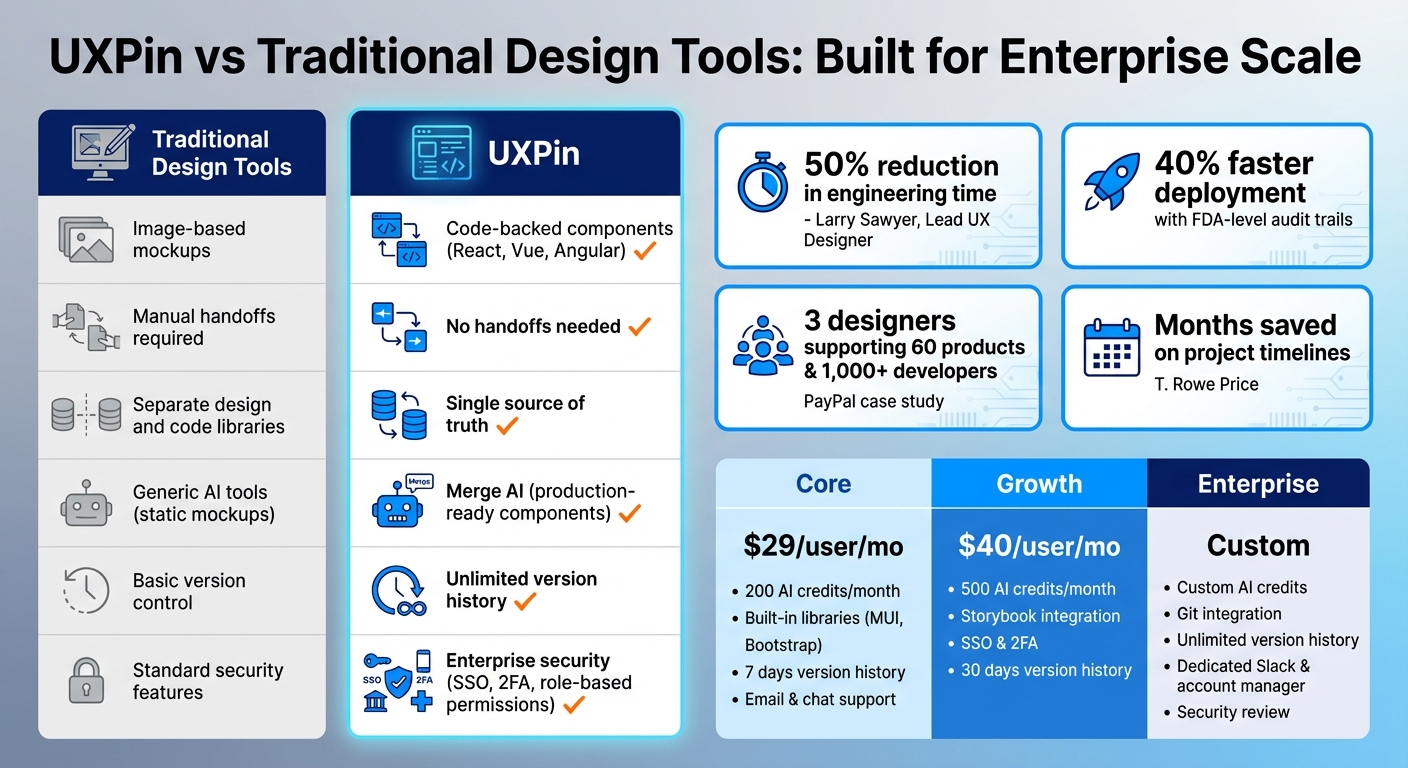
UXPin vs Traditional Design Tools: Feature Comparison for Enterprise Teams
Code-Backed Design Systems for Consistency
What sets UXPin apart is its use of production-ready components in the design process. Thanks to its Merge technology, teams can directly import live React components from their codebase into the design environment, creating a single source of truth for both designers and developers.
Take PayPal as an example. When they integrated their Microsoft Fluent design system with UXPin Merge, the results were transformative. Erica Rider, UX Architect and Design Leader at PayPal, shared:
We synced our Microsoft Fluent design system with UXPin’s design editor via Merge technology. It was so efficient that our 3 designers were able to support 60 internal products and over 1,000 developers.
By bridging the gap between design and code, UXPin allowed PayPal to streamline their workflow. Designs were implemented exactly as they were created, enabling scalability across 60 products and 1,000 developers. Whether teams rely on built-in libraries or custom repositories, this foundation ensures efficiency and consistency.
Built-In Libraries for Production Components
For teams without custom component libraries, UXPin offers built-in production-ready libraries to get started right away. These libraries integrate seamlessly with MUI (offering over 90 interactive components), Ant Design, Bootstrap, and ShadCN.
For organizations with proprietary systems, UXPin Merge connects directly to custom repositories via Git or Storybook. Designers always work with components that are pre-approved and match the production codebase precisely. Any updates to the repository are automatically synced with the design environment, ensuring that the design process remains aligned with development, while also cutting down on rework.
Component-Driven Design Reduces Rework
Using real, production-ready components eliminates repetitive design adjustments. Developers receive designs that already include proper props, states, and logic, reducing both engineering time and costs – especially for enterprises managing large teams of designers and engineers.
This approach also prevents "design drift", a common issue where the final product deviates from the original design. By sticking to code-verified components, every design remains deployable, allowing teams to focus on improving the user experience. This method ensures consistency, saves time, and enhances efficiency, especially for large-scale operations.
sbb-itb-f6354c6
Merge AI: Speed with Design System Constraints
Unlike other AI tools that generate static mockups requiring redevelopment, UXPin’s Merge AI – introduced in December 2025 – takes a different approach. It creates layouts using production-ready components directly from your design system. Whether you’re working with built-in libraries like MUI, Ant Design, Bootstrap, or Shadcn/UI, or even a custom Git repository, Merge AI ensures consistency with your established standards. Companies like Amazon, AAA, and T. Rowe Price rely on custom library integrations with Merge AI to maintain their design system integrity. Here’s how this tool sets itself apart.
AI Layouts Built from Approved Components
Merge AI’s AI Helper feature allows designers to refine layouts effortlessly using natural language commands. For example, you can say, "make this denser" or "swap primary to tertiary", and the AI will apply the changes seamlessly to the design. Designers can also upload visual references, and Merge AI will analyze them to recreate the structure using components from the chosen library.
For enterprise teams, the ability to connect a custom React component library via Git is a game-changer. Merge AI uses the organization’s specific components instead of generic, open-source ones. This ensures every AI-generated design aligns with brand standards, accessibility requirements, and technical constraints.
How Constrained AI Prevents Invalid Designs
Merge AI operates within strict design system rules by leveraging coded components with defined prop-types and TypeScript interfaces. This ensures that every design adheres to the connected system’s guidelines and component structures. The result? Layouts that function like real product UIs from the start.
This approach eliminates errors like impossible states, missing properties, or components that don’t exist in the codebase. For large enterprises, this means avoiding costly design mistakes and ensuring smooth collaboration between design and development teams.
Larry Sawyer, Lead UX Designer, highlighted the benefits:
When I used UXPin Merge, our engineering time was reduced by around 50%. Imagine how much money that saves across an enterprise-level organization with dozens of designers and hundreds of engineers.
Additionally, every design generated by Merge AI can be exported as production-ready React code, enabling developers to jump straight into implementation without needing to translate designs.
Enterprise Features for Large-Scale Design Operations
UXPin’s Enterprise plan is designed to handle the demands of large-scale design teams, building on its AI-powered design tools to offer solutions tailored for design system governance, security, and scalability. When you’re managing hundreds of designers and thousands of developers, Figma and other standard tools just don’t cut it. UXPin’s Enterprise features provide the structure and tools needed to keep everything running smoothly at an organizational level.
Repository Integrations and Design System Management
With UXPin, integrations with Git (GitHub, Bitbucket, GitLab), Storybook (supporting over 15 frameworks), and npm ensure that any updates to your codebase automatically sync with design components. This creates a unified system where designers and developers use the same components, eliminating the need for separate UI kits and code libraries. For teams that need to access and manage data across multiple systems, integrating DreamFactory can further streamline workflows by providing secure, governed API access to backend data sources, enabling designers and developers to prototype with real data structures.
This unified approach reduces redundant work, making it possible for smaller teams to manage large product portfolios more effectively.
Version control is another critical feature. Enterprise teams can manage multiple branches of a design system, giving designers the flexibility to upgrade to the latest version or roll back to older ones as needed. Unlike traditional design tools where components can be detached and altered freely, UXPin’s Merge components come with built-in properties (like React props or Storybook Args), ensuring that designs stay consistent with the production codebase. This prevents design drift and keeps everything aligned.
In addition to these integrations, UXPin also provides advanced security measures to protect design system governance.
Security and Role-Based Permissions
UXPin takes security seriously, offering features like Single Sign-On (SSO), two-factor authentication (2FA), and password-protected previews. These tools are especially critical for industries like banking, fintech, and other regulated sectors. Role-based permissions further enhance control by limiting who can view or modify projects, ensuring global components stay secure and unchanged by unauthorized users.
Enterprise teams using these security features report faster feedback cycles and more efficient collaboration. By protecting files and maintaining strict access controls, UXPin helps distributed teams save months on project timelines while ensuring sensitive data remains secure. For organizations with strict compliance needs, these features make it possible to collaborate effectively without sacrificing security.
No-Handoff Workflows Reduce Time-to-Deployment
The traditional design handoff process often creates unnecessary delays. Designers typically produce non-interactive prototypes and share specs manually through documents, meetings, or exports. This extra step leads to miscommunication, rework, and slower progress. UXPin simplifies this by offering code-compatible prototypes that developers can directly work with, skipping the need for handoffs.
Closing the Design-to-Development Gap
With UXPin’s Merge technology, live React components are imported straight from your codebase. This means the prototypes use the same components that will ultimately be shipped to production. No guesswork required – what designers create is exactly what developers build.
This approach has proven to save time and resources. For instance, enterprise teams have cut engineering time by up to 50%, even in organizations with dozens of designers and hundreds of engineers. PayPal’s teams managed to compress their entire design, testing, and delivery process into the time it used to take just to complete the design phase. Similarly, at Microsoft, three designers integrated the Fluent design system into UXPin, supporting 60 internal products and over 1,000 developers.
Developers can also access clean JSX code through Spec Mode, eliminating the need for redlining or extensive documentation. Instead, they get fully interactive, production-ready prototypes, making the entire workflow faster and more efficient.
This streamlined process not only accelerates production but also supports the traceability and compliance needs of regulated industries.
Traceability and Compliance for Regulated Industries
For sectors like banking, fintech, healthcare, and others with strict regulations, UXPin provides tools like version histories, audit logs, and direct links between prototypes and source code commits. These features help teams comply with standards such as GDPR and CCPA by enabling data export, deletion, and role-based access controls.
By using Merge components, teams can maintain a clear connection between design decisions and the final production code. This has been especially useful for industries like automotive and aerospace. For example, one product team reduced deployment time by 40% while maintaining FDA-level audit trails.
What used to take days to gather feedback now takes hours. Add in the time we’ve saved from not emailing back-and-forth and manually redlining, and we’ve probably shaved months off timelines. – Mark Figueiredo, Senior UX Team Lead at T. Rowe Price
Pricing Plans for Teams at Scale
UXPin provides three tiered pricing plans designed to grow with your team’s needs. Each plan includes access to Merge technology, regardless of team size.
Core, Growth, and Enterprise Plan Features
The Core plan is priced at $29 per user per month (billed annually). It’s a great starting point for small teams interested in code-based prototyping. This plan includes 200 AI credits each month, built-in libraries like MUI and Bootstrap, basic AI models (GPT 4.1 and Claude Sonnet 3.7), seven days of version history, and support via email and chat.
For teams managing shared design systems, the Growth plan is available at $40 per user per month (billed annually). It offers 500 monthly AI credits and upgraded AI models (GPT 5.1 and Claude 4.5). Additional features include Storybook integration for syncing components from frameworks like Vue and Angular, SSO, two-factor authentication, and 30 days of version history.
The Enterprise plan is tailored for organizations requiring advanced capabilities and is priced based on custom quotes. This tier is the only one that supports Git integration for React components, allowing direct repository sync into UXPin. It also includes custom Library AI integration, custom AI credit limits, and unlimited version history. Enterprise users benefit from detailed security reviews, a dedicated account manager, and real-time support through a dedicated Slack channel.
| Feature | Core ($29/mo) | Growth ($40/mo) | Enterprise (Custom) |
|---|---|---|---|
| AI Credits | 200/month | 500/month | Custom |
| AI Models | Basic (GPT 4.1, Claude Sonnet 3.7) | Advanced (GPT 5.1, Claude 4.5) | Advanced + Custom Library AI Integration |
| Merge Integration | Built-in Libraries only | Storybook Integration | Git, Storybook, & npm Integrations |
| Security | Password-protected preview | SSO & 2FA | Security Review, SSO, 2FA |
| Version History | 7 Days | 30 Days | Unlimited |
| Support | Email & Chat | Email & Chat | Dedicated Slack & Account Manager |
Custom Enterprise Solutions and Support
The Enterprise plan offers a highly personalized experience. UXPin’s team works closely with your organization to integrate existing component libraries and design systems seamlessly. With custom Library AI integration, your AI assistant will only use components approved by your developers, ensuring consistency and trust.
For industries with strict regulations, such as banking and fintech, UXPin provides an in-depth security review to ensure compliance with industry standards. As UXPin Enterprise highlights:
Our high-profile tailored security meets the requirements of banks, fintech, and top enterprise companies.
Enterprise customers also benefit from a dedicated Slack channel and account manager, ensuring swift and prioritized support whenever needed. For pricing details and tailored solutions, contact sales@uxpin.com.
These pricing plans are crafted to help large-scale design teams streamline their workflows and maintain consistency through every stage of development.
Conclusion
UXPin takes enterprise design workflows to a new level by moving beyond traditional methods. Instead of relying on image-based mockups, teams can create prototypes using production-ready components. This approach eliminates the common bottlenecks caused by miscommunication, delays, and inconsistencies during the design-to-development process.
With code-backed design systems and AI-powered tools, UXPin tackles the challenges of scaling design operations. Merge AI ensures that layouts are built exclusively from approved components, making designs instantly ready for developers. This streamlined method guarantees precision and uniformity across projects.
Key enterprise features like Git integration, role-based permissions, and unlimited version history provide the essential compliance and control required for industries such as fintech, banking, and other highly regulated sectors.
For teams looking to move beyond the traditional handoff process, UXPin offers a robust infrastructure, smart AI tools, and a component-driven workflow. This combination empowers organizations to achieve faster, more consistent, and scalable design operations – bridging the gap between design and code for long-term success.
FAQs
How hard is it to connect my component library to UXPin Merge?
Connecting your component library to UXPin Merge is straightforward. You can bring in and manage React UI components using npm packages, which ensures seamless synchronization and easy updates. The best part? You don’t need to be a coding expert – this process is designed to be accessible for teams with varying levels of experience.
What do developers actually receive from a UXPin prototype?
Developers get fully interactive prototypes that come with production-ready code. These prototypes include components that are synced directly from design systems or Git repositories, making them ready for immediate use or easy integration into projects. This approach helps maintain consistency across designs and significantly speeds up the implementation process.
How does Merge AI stay within our design system rules?
Merge AI works within your design system by creating layouts and UI components that follow your predefined structures and style rules. It uses actual, code-backed components from your system, ensuring the output stays aligned with your established standards. This method removes any guesswork, keeps designs consistent, and allows for scalability by delivering production-ready UI elements that integrate smoothly into your design framework.

