Code-based design tools are transforming how teams bridge the gap between design and development. Unlike traditional tools that create static mockups, these solutions enable designers to work with real, production-ready components. This eliminates manual translation, reduces errors, and ensures designs match the final product.
Key Benefits of Code-Based Design Tools:
- Use real components for design, ensuring functionality and accuracy.
- Streamline workflows, cutting development time by up to 50%.
- Maintain consistency across large-scale projects with a single source of truth.
Why UXPin Stands Out: UXPin, especially with its Merge technology, allows seamless integration of code repositories like Git or Storybook into the design process. Designers can drag and drop live, interactive components, making prototypes behave exactly like the finished product. Teams like PayPal have seen dramatic improvements, supporting over 60 products with just three designers.
If you’re looking to align your design and development processes, UXPin and similar tools offer a practical, efficient solution.
What Is UXPin and Merge Technology?
UXPin Overview
UXPin is a SaaS platform designed for UX/UI prototyping, offering a fresh approach compared to traditional design tools. What sets UXPin apart is its ability to let designers work with production-ready components. This means the prototypes created are functionally identical to the final product. From simple wireframes to advanced, high-fidelity prototypes with features like conditional logic, variables, and expressions, UXPin covers it all. This unique foundation is key to understanding how Merge connects design and development.
How UXPin Merge Technology Works
Building on UXPin’s powerful foundation, Merge ensures seamless synchronization between design and live code. With UXPin Merge, components from your code repositories sync directly into the design editor. It connects through Git repositories, Storybook, or npm packages. Merge uses Webpack to process these components and integrate them into the design library. This creates a single source of truth, allowing designers and developers to work with the exact same components. Any updates made by developers in the repository are automatically reflected in the design environment, keeping everything perfectly aligned.
Why Use UXPin Merge
The standout benefit of Merge is that it eliminates manual translation between design and development. A great example comes from PayPal, where Erica Rider’s team used Merge to sync their Microsoft Fluent design system with UXPin. The results were game-changing. Just three designers managed to support 60 products and over 1,000 developers. The impact on timelines was dramatic:
"It used to take us two to three months just to do the design. Now, with UXPin Merge, teams can design, test, and deliver products in the same timeframe."
– Erica Rider, Senior Manager for UX, PayPal
sbb-itb-f6354c6
UXPin Merge Features
Design with Real Code Components
UXPin Merge bridges the gap between design and development by allowing teams to work directly with real code components. This approach eliminates the disconnect often found in traditional workflows, where design and development operate in silos.
With UXPin, you get access to built-in libraries like MUI, Ant Design, Bootstrap, and ShadCN, all integrated directly into the design canvas. There’s no need for additional imports or accounts – just open UXPin and start designing with live, functional components. For teams using proprietary systems, Merge syncs custom React components directly from Git repositories, Storybook, or npm packages. This ensures that what you design is exactly what gets coded, maintaining a perfect match between design and the final product.
Unlike static image-based tools, Merge components are fully interactive. They retain their states, logic, and functionality – sortable tables actually sort, and interactive elements respond to user input. This lets teams create high-fidelity prototypes that behave just like the end product. As Brian Demchak, Sr. UX Designer at AAA Digital & Creative Services, puts it:
"We have fully integrated our custom-built React Design System and can design with our coded components. It has increased our productivity, quality, and consistency."
Merge AI for Component-Driven Design
Merge AI takes things further by generating layouts using pre-approved design system components. Instead of generic wireframes, it builds layouts that are fully compliant with your design system and ready for functional prototyping. These layouts pull directly from integrated libraries and custom repositories, ensuring your prototypes look and behave like the final product.
Scalable Design Systems
Merge is built for scalability, supporting multi-platform integration through Git repositories (for React components), Storybook (compatible with various frameworks), and npm packages. Design Ops teams can manage component properties – like prop-types, TypeScript interfaces, and Flow – to ensure consistent, approved customizations. GitHub version control keeps designers and developers perfectly aligned, while auto-generated specifications based on real JSX improve the design handoff process. This makes it easy to iterate on code directly within the tool.
Merge has been tested with some of the most widely used design systems, including MUI, Microsoft Fluent UI, IBM Carbon, Shopify Polaris, Ant Design, and Atlassian Atlaskit. Its ability to integrate seamlessly with these systems ensures that teams can maintain consistency, no matter the scale of their projects.
Next, we’ll dive into how these features enable smooth component syncing and efficient prototype deployment.
UXPin Merge Tutorial: Intro (1/5)
How UXPin Merge Works
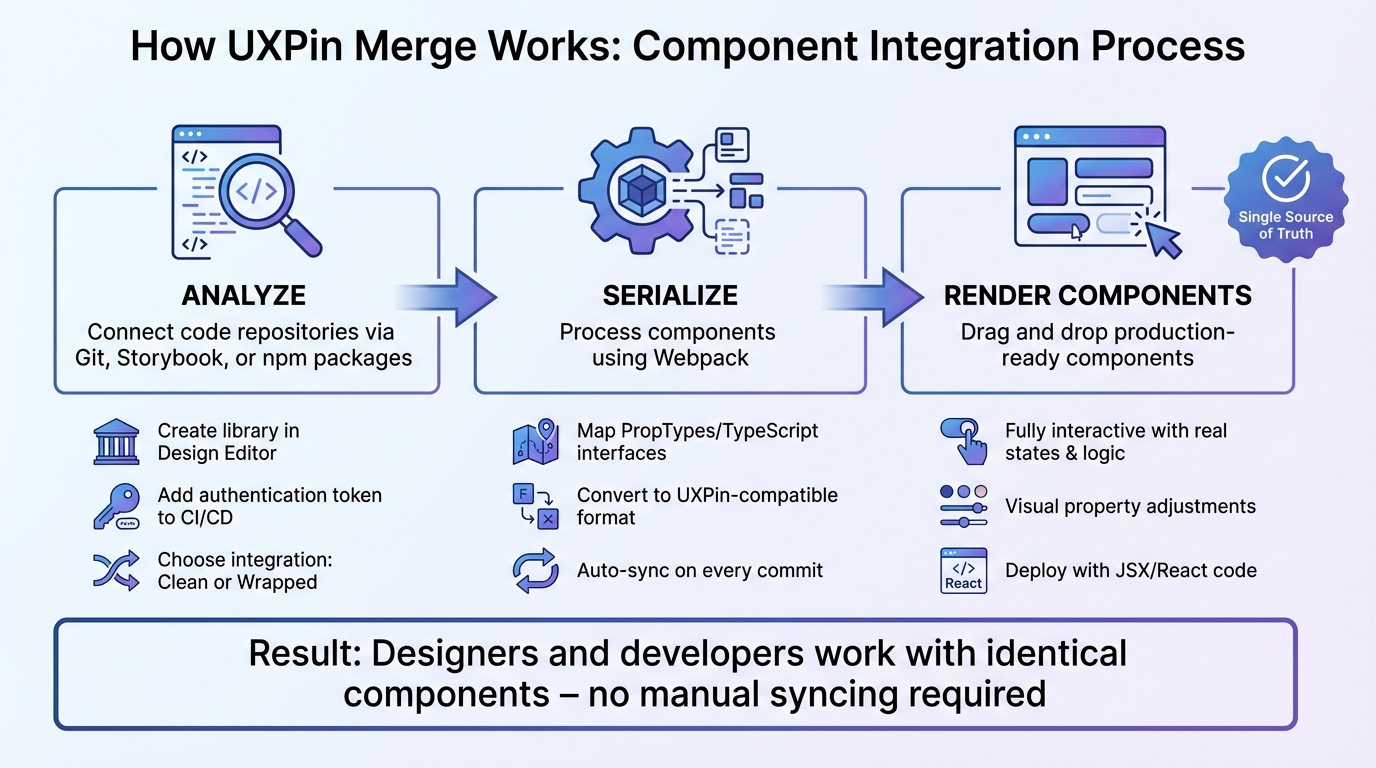
How UXPin Merge Works: 3-Step Component Integration Process
UXPin Merge connects your code repositories to the design canvas through three key steps: analyze, serialize, and render components. This process ensures that designers and developers work from the same source, eliminating the need for manual syncing and reducing errors.
Syncing Components to UXPin
To sync your components with UXPin, begin by creating a library in the Design Editor. UXPin provides an authentication token, which allows direct access to your repository and keeps everything in real-time sync. By adding this token to your CI/CD environment variables, every commit automatically updates the design. For enterprise teams managing multiple data sources and API integrations, DreamFactory can provide secure, governed API access to databases and backend systems, ensuring that your design and development workflow has reliable data connectivity.
There are two integration options:
- Clean Integration: Requires no additional coding.
- Wrapped Integration: Suitable for cases where extra code adjustments are needed.
If you’re using Storybook, you can link your public Storybook URL or use the @uxpin/storybook-deployer for private instances. Either way, components will update automatically.
Once synced, you can start building interactive prototypes directly within UXPin’s design canvas.
Building Prototypes with UXPin Merge
With synced components, designers can drag and drop production-ready elements onto the canvas. These aren’t static visuals – they are fully functional components with real states, logic, and interactions. This approach eliminates inconsistencies between design and the final product.
UXPin automatically maps PropTypes and TypeScript interfaces to the Properties Panel, enabling designers to adjust states and content visually without needing to dive into the code.
PayPal’s design team showcased the power of this workflow. Erica Rider, UX Architect and Design Leader, shared:
"We synced our Microsoft Fluent design system with UXPin’s design editor via Merge technology. It was so efficient that our 3 designers were able to support 60 internal products and over 1000 developers."
After building interactive prototypes, the next step is to deploy them with real code.
Deploying Prototypes with Real Code
Because UXPin prototypes rely on production components, there’s no need for a translation layer. Designers can share a single link containing full specifications, documentation, and production-ready JSX code. Developers can either copy this code directly into their environments or export prototypes to platforms like StackBlitz. Version control is also built in, with Git branches and tags ensuring that designers always work with the correct component versions.
Larry Sawyer, Lead UX Designer, highlighted the time-saving benefits:
"When I used UXPin Merge, our engineering time was reduced by around 50%. Imagine how much money that saves across an enterprise-level organization with dozens of designers and hundreds of engineers."
Use Cases for Enterprise Teams
UXPin Merge isn’t just a technical tool – it’s a game-changer for enterprise teams looking to solve common challenges in scaling design operations and speeding up product development. By bridging the gap between design and production code, it eliminates delays and inefficiencies that often plague large organizations.
Faster Time-to-Deployment
For enterprise teams, long design-to-development cycles can drag out product launches. UXPin Merge tackles this by removing the need to translate designs into code, dramatically shortening timelines.
Take PayPal as an example. Their design timelines, which once stretched over two to three months, were slashed to a fraction of that time. Teams could now design, test, and deliver products within the same timeframe that used to be spent on design alone. This faster process doesn’t just save time – it also cuts costs. Developers can focus on building features instead of recreating designs pixel by pixel.
And it’s not just about speed. Keeping a unified design language across multiple products is just as important.
Maintaining Consistency Across Products
When managing dozens (or even hundreds) of products, ensuring a consistent brand experience is no small task. Traditional design tools often lead to "design drift", where different teams interpret a design system in slightly different ways. The result? Fragmented user experiences that weaken the brand.
UXPin Merge solves this by creating a single source of truth. Designers and developers work with the same code components, meaning every product automatically reflects consistent UI patterns, behaviors, and visual styles based on design system best practices. Any updates to the design system are instantly applied across all projects.
PayPal’s experience illustrates this perfectly. Erica Rider, UX Architect and Design Leader, shared:
"We synced our Microsoft Fluent design system with UXPin’s design editor via Merge technology. It was so efficient that our 3 designers were able to support 60 internal products and over 1,000 developers."
Better Collaboration Between Design and Development
The traditional handoff process between design and development is often clunky and inefficient. Designers create mockups, developers interpret them, and the back-and-forth begins – clarification meetings, redlining sessions, and endless emails over tiny details.
UXPin Merge eliminates this back-and-forth by letting both teams work with the same production-ready components. Designers can create prototypes using real code, ensuring designs stay on-spec. Developers then receive prototypes that include the exact components they need, complete with states, logic, and interactions. This alignment reduces miscommunication, cuts down on meetings, and ensures the final product matches the design vision without endless revisions.
Getting Started with UXPin Merge
This section walks you through the setup and deployment process for UXPin Merge, showing how to bring your production-ready components to life. UXPin Merge integrates seamlessly with your existing workflow, whether you’re using built-in libraries or syncing custom components. The setup is simple, and the results are almost immediate.
Setting Up UXPin Merge
If you’re using built-in libraries like MUI, Ant Design, Bootstrap, or ShadCN, there’s no setup required – these libraries are already integrated into the UXPin canvas. For custom components, you’ll need to take a few steps:
- Create a
uxpin.config.jsfile. - Configure Webpack.
- Add a Wrapper Component.
Once that’s done, use the UXPin Merge CLI to sync components from your repository. Most teams start seeing results in under 30 minutes, with full integrations typically taking between 2 hours and 4 days. New users can speed things up with UXPin’s boilerplate repository, which includes a sample design system and development environment. For continuous updates, automate the process using your CI/CD pipeline with the uxpin-merge push command through tools like CircleCI or Travis.
Once your components are synced, you can choose the integration method that best fits your workflow.
Using Built-In Libraries and Custom Components
UXPin supports two integration methods: Clean Integration (directly using production code) and Wrapped Integration (via Higher-Order Components). You can sync components through Git repositories, Storybook (compatible with 15 frameworks, including Vue and Angular), or npm packages.
The system is CSS agnostic, meaning it supports pure CSS, Sass, Less, Styled Components, and Emotion. However, components must meet a few technical requirements:
- Built with React.js (v16.0.0 or later).
- Bundled using Webpack (v4.6.0 or later).
- Property definitions provided via PropTypes, Flow, or TypeScript interfaces to map properties to UXPin’s panel.
Testing and Deploying Prototypes
After integration, it’s time to test your prototypes. Use UXPin Editor’s features – like variables, conditional logic, and expressions – to ensure your prototypes behave just like the final product. Once everything checks out, you can hand off a single link that includes auto-generated JSX and production-ready React code. This link comes complete with states, logic, and interactions, making developer handoff smooth and efficient.
"As a full stack design team, UXPin Merge is our primary tool when designing user experiences… It has increased our productivity, quality, and consistency, streamlining our testing of layouts and the developer handoff process." – Brian Demchak, Sr. UX Designer at AAA Digital & Creative Services
"What used to take days to gather feedback now takes hours. Add in the time we’ve saved from not emailing back-and-forth and manually redlining, and we’ve probably shaved months off timelines." – Mark Figueiredo, Sr. UX Team Lead at T.Rowe Price
Conclusion
Looking back at the discussion above, UXPin Merge stands out as a game-changer for bridging the gap between design and development.
Key Takeaways
With UXPin Merge, teams can work directly with production-ready components from the very beginning. This ensures complete alignment between what designers envision and what developers deliver – no surprises, no wasted effort.
The tool also delivers impressive efficiency. For example, at PayPal, a small team of just three designers managed to support 60 internal products and over 1,000 developers. That kind of scalability is tough to achieve with traditional design tools.
Whether you’re using pre-built libraries or syncing custom components, Merge keeps your design system and code perfectly aligned. Plus, with the addition of Merge AI, you can generate layouts that exclusively use your approved components – ensuring designs are always ready for development without any off-brand or inaccurate suggestions.
Next Steps for Adopting Code-Based Design Tools
If your team struggles with design-to-development handoffs, maintaining consistency across products with a UI design system, or supporting a large developer base with a lean design team, UXPin Merge offers a practical way forward.
Start by experimenting with the built-in libraries to get a feel for code-based design workflows. For larger teams ready to scale, UXPin’s Enterprise plan offers custom library integration, onboarding support, and advanced AI tools. Visit uxpin.com/pricing to learn more, or reach out at sales@uxpin.com to discuss your needs. Transitioning to a code-based workflow isn’t just about efficiency – it’s about creating a scalable, future-proof design process for your organization.
FAQs
What do we need in our codebase to use UXPin Merge?
To work with UXPin Merge, your codebase needs to include React.js components that follow these guidelines:
- One component per directory: Each folder should contain a single component to ensure proper compatibility.
- Default exports: All component files must use
export default. - React version: Components should be compatible with React ^16.0.0.
- Webpack version: Your setup should use webpack ^4.6.0.
Make sure your directory structure is organized with one component per folder to avoid compatibility issues.
How do designers update component states without coding?
Designers can tweak component states effortlessly in UXPin by adjusting properties, props, or attributes directly within the platform. This means you can make real-time changes and create interactive designs – all without writing a single line of code.
How do we keep design libraries in sync with Git automatically?
With UXPin, you can automatically sync design libraries with Git by linking your Git repository. This feature, known as UXPin Merge, allows you to integrate React and Web Components from any Git repository directly into the UXPin design tool. It ensures smooth updates and effortless collaboration within your team.

