Want to design UIs faster with fewer handoffs? Combining Claude Sonnet 4.5, Ant Design, and UXPin Merge helps teams turn ideas into production-ready React code in hours instead of days. Here’s how it works:
- Claude Sonnet 4.5: An AI tool that generates UI layouts and specs from natural language prompts, cutting ideation time by up to 70%.
- Ant Design: A React component library with 60+ pre-built, accessible components used by enterprise teams like Alibaba.
- UXPin Merge: A design tool that lets you prototype with live Ant Design components and export clean React code.
Key Benefits:
- Faster Prototyping: Generate layouts in minutes using AI and refine them in UXPin.
- Streamlined Workflow: Design with real code components, eliminating the need for developers to rebuild designs.
- Easy Handoff: Export production-ready React code directly from UXPin.
How to start:
- Set up a UXPin Merge account with access to Ant Design.
- Use the AI Component Creator with Claude Sonnet 4.5 to generate layouts.
- Customize and test prototypes in UXPin, then export React code.
This approach simplifies UI design for enterprise teams, saving time and ensuring consistency.
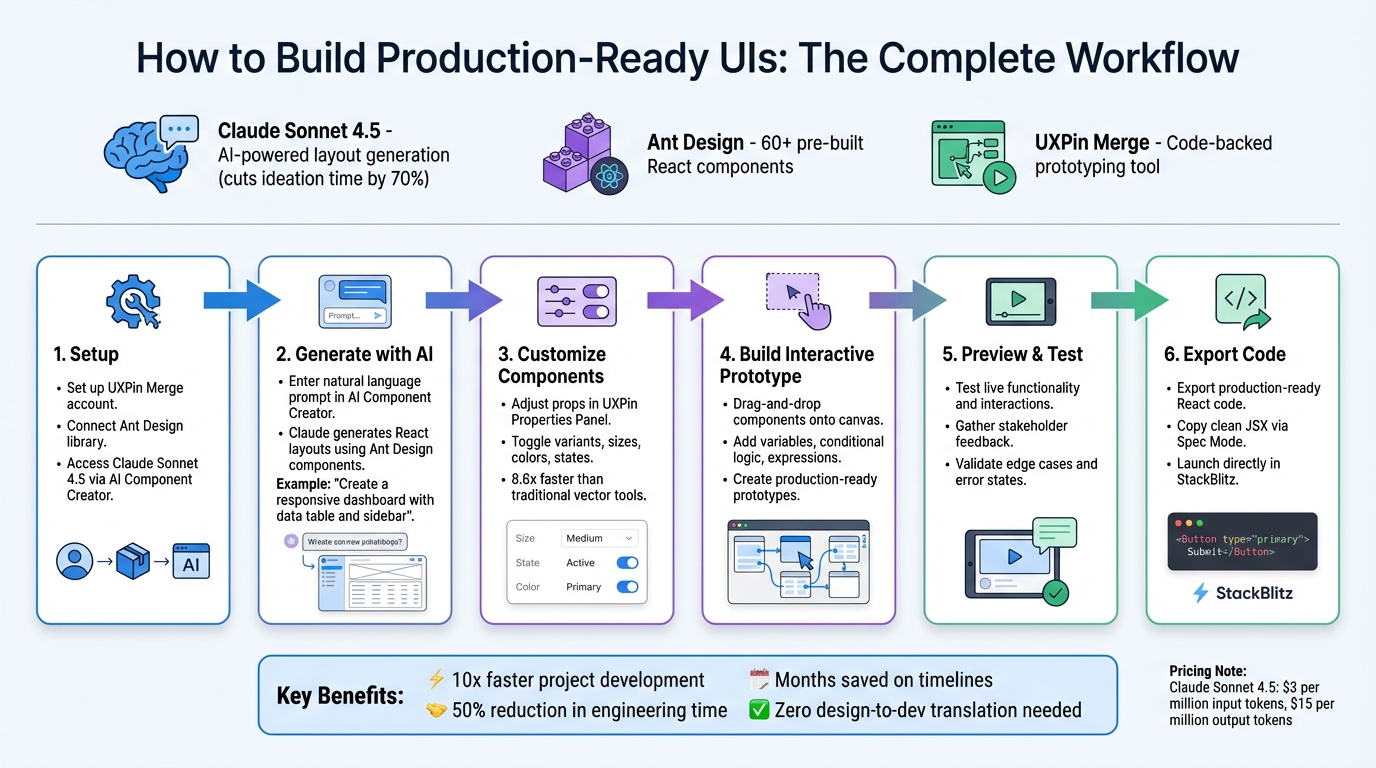
Claude Sonnet 4.5 + Ant Design + UXPin Merge UI Design Workflow
Getting Started: Setup and Requirements
Required Tools and Accounts
To begin creating UIs with this workflow, you’ll need three essentials: a UXPin Merge account, access to Claude Sonnet 4.5, and the Ant Design library. Luckily, UXPin integrates these tools seamlessly – no need for separate subscriptions or API keys.
A UXPin subscription or trial unlocks Merge’s code-backed prototyping features and the AI Component Creator. It also provides built-in access to Claude models and the Ant Design library. Additionally, you’ll need a modern web browser and a reliable internet connection since UXPin Studio operates entirely in the cloud.
Once you’ve got these in place, you’re ready to set up UXPin Merge with Ant Design.
Setting Up UXPin Merge with Ant Design
After gathering the necessary tools, log into UXPin and head to the "Merge" section to start a project using code-backed components. From there, navigate to the libraries section and select the built-in Ant Design library – custom imports are only necessary if you’re working with a modified version of the library.
Once selected, the Ant Design library provides a comprehensive set of React components that you can drag and drop onto your design canvas. These components are functional, complete with states, props, and logic. When you’re done prototyping, use the "Get Code" feature to export production-ready React code, including all dependencies.
Connecting Claude Sonnet 4.5
To integrate AI into your workflow, open the AI Component Creator, choose Claude Sonnet 4.5, and set "Ant Design" as your target library. This integration uses the claude-sonnet-4-5 model identifier via Claude’s API. Pricing is straightforward: $3 per million input tokens and $15 per million output tokens.
With this setup, you can enter prompts like "create a user registration form with email validation" to see Claude transform your request into a fully functional Ant Design layout. These AI-generated components sync directly to your UXPin design system, allowing for further customization and interactive prototyping.
sbb-itb-f6354c6
Building UI with Claude Sonnet 4.5 and Ant Design
Generating Design Ideas with Claude Sonnet 4.5
To kick off your workflow, open the AI Component Creator in UXPin and clearly define your UI needs. Treat Claude like a seasoned expert who thrives on precise instructions. For example, instead of a vague request like "create a dashboard", go with something detailed: "Generate a responsive dashboard layout using Ant Design components, including a data table for user metrics and a sidebar for navigation."
Claude takes your input and converts it into React layouts, using real Ant Design components. These aren’t just static shapes – they’re interactive, code-backed prototypes that sync directly into UXPin Merge.
For more intricate layouts, consider using XML tags to structure your prompts. Wrap specific details in tags like <branding>, <layout>, and <components> to help Claude interpret your requirements effectively. Providing 3–5 examples of Ant Design implementations can also ensure the output aligns with the library’s visual and functional standards.
Once Claude delivers the initial layouts, you can refine them further using Ant Design’s component library.
Customizing Ant Design Components
After Claude generates the layout, you can fine-tune it directly in UXPin. The UXPin Properties Panel makes it easy to adjust component props – whether you’re toggling between variants, changing sizes, or tweaking colors and states. Every change you make in the design tool translates seamlessly into the final code.
UXPin reports that designing with Merge components is 8.6 times faster than traditional vector-based tools. This efficiency comes from being able to edit props directly, cutting out the manual design guesswork. Once your customizations are complete, Spec Mode lets you share exact JSX code, dependencies, and functions with developers.
With your components tailored, the next step is to assemble them into an interactive prototype.
Creating Interactive Prototypes
Use drag-and-drop functionality to place Ant Design components onto the canvas and build your prototype. Add variables, conditional logic, and expressions to simulate real-world scenarios, creating a prototype that’s nearly production-ready.
This streamlined process can dramatically reduce development timelines. Mark Figueiredo, Sr. UX Team Lead at T.Rowe Price, shared:
"What used to take days to gather feedback now takes hours. Add in the time we’ve saved from not emailing back-and-forth and manually redlining, and we’ve probably shaved months off timelines."
Larry Sawyer, Lead UX Designer, also highlighted the impact:
"When I used UXPin Merge, our engineering time was reduced by around 50%."
Once your prototype is finalized, you can export it as code-ready React files or open it directly in development environments like StackBlitz with just one click.
Previewing, Testing, and Exporting Prototypes
Previewing UI Designs
UXPin’s preview feature allows you to interact with your prototype just as it would function in production. By using code-backed Ant Design components, the preview replicates live production states, dynamic content, and interactivity. You can use the browser preview to check how forms respond, test date pickers, and verify conditional UI behaviors.
This high-fidelity approach makes stakeholder feedback more actionable. As Erica Rider, Former UX Lead EPX at PayPal, shared:
"C-suite people and directors can give us stronger feedback about the ultimate direction because they experience the features and goals of these prototypes rather than just commenting about how these boxes don’t look like a text field."
After previewing, the next step is to validate your design through thorough testing to ensure it works as intended.
Testing for Functionality and Usability
Once you’ve reviewed the live preview, it’s time to test your prototype against real-world scenarios. Incorporate variables and expressions to simulate actual user behavior, and avoid relying on static screens that only show ideal conditions. Focus on testing edge cases, error states, and complex user flows to identify potential issues before development begins.
UXPin’s built-in commenting system makes it easy to gather feedback from team members like designers, product managers, and engineers. You can tag specific people, assign tasks, and mark comments as resolved – all directly within the prototype. For usability testing with external users, password-protect your prototype links to maintain control over access.
Brian Demchak, Sr. UX Designer at AAA Digital & Creative Services, highlighted the benefits:
"It has increased our productivity, quality, and consistency, streamlining our testing of layouts and the developer handoff process."
Exporting Code-Ready Prototypes
After validating the prototype through preview and testing, the final step is exporting your production-ready components. When your design is complete, UXPin allows you to export it as production-ready React code along with all necessary dependencies. You can use Spec Mode to copy clean JSX code or export it directly into your project. There’s even an option to launch it in StackBlitz with a single click.
Since UXPin Merge uses the same Ant Design components for both design and development, there’s no need for a translation layer. This means your design elements translate directly into production code, eliminating manual redlines and reducing back-and-forth communication. This streamlined handoff process helps teams save months of work and significantly cuts down on engineering time.
UXPin Merge AI: Smarter UI Generation That Follows Your Design System
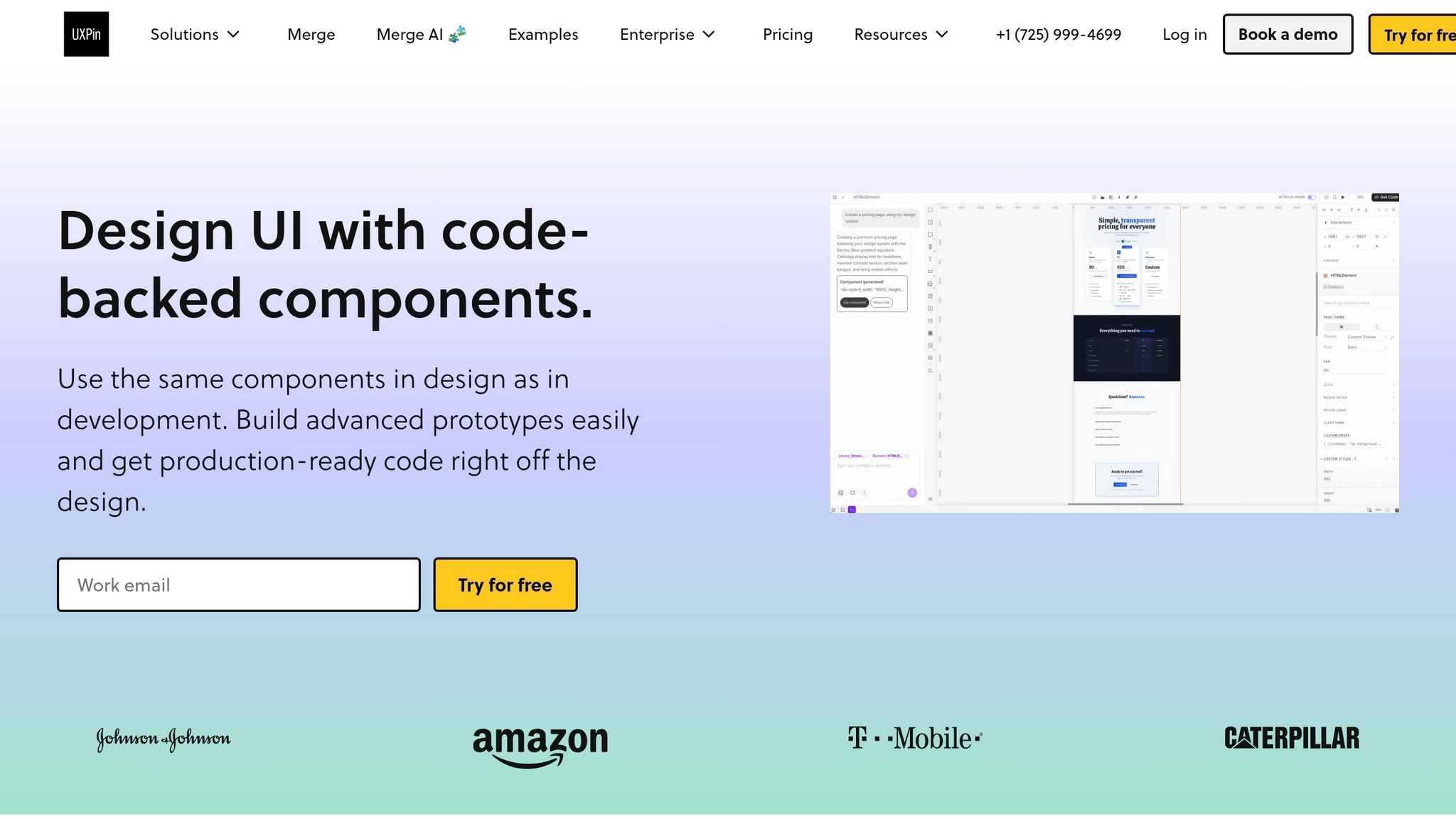
Benefits of Using Claude Sonnet 4.5 + Ant Design in UXPin Merge
Building on the streamlined workflows mentioned earlier, this combination offers several advantages that can transform enterprise-scale design processes.
Faster Prototyping and Delivery
This approach drastically cuts down on the manual effort involved in UI construction, which often slows enterprise teams. With Claude Sonnet 4.5, text prompts are turned into production-ready Ant Design React components. This means you can create complex interface layouts in just minutes instead of hours. Since these components are backed by real code, the prototypes are immediately functional, eliminating the need for time-consuming rebuilds later.
The results are impressive. Using UXPin Merge can make project development up to 10 times faster compared to traditional methods. Teams can move from initial concepts to testable prototypes in just one day, enabling quicker iteration cycles and more effective feedback from stakeholders.
Better Collaboration Between Designers and Developers
When both designers and developers work with the same Ant Design components, communication gaps shrink. There’s no need for a “translation” layer between design and code because the prototype is essentially the actual code. DreamFactory and similar platforms excel at providing governed API access to data sources, and this principle—using the same components across your entire stack—applies equally to design systems. Developers can grab clean JSX directly from the design interface, complete with all the properties and dependencies configured by designers.
Mark Figueiredo, a Senior UX Team Lead at T. Rowe Price, highlighted this efficiency:
"What used to take days to gather feedback now takes hours. Add in the time we’ve saved from not emailing back-and-forth and manually redlining, and we’ve probably shaved months off timelines."
Scalability and Governance for Enterprise Teams
UXPin Merge integrates Ant Design components directly into the editor, serving as a single source of truth for enterprise teams. When Claude Sonnet 4.5 generates layouts, these AI-created components automatically align with your organization’s design system standards, ensuring consistency across projects.
In addition to maintaining consistency, this setup allows you to control which components are available, enforce theming standards, and track version histories. These features are vital for enterprise-scale operations. Plus, because the components are code-backed, any updates to your design system are automatically applied across all projects, keeping every team in sync without requiring manual updates.
Conclusion
Merging Claude Sonnet 4.5 with Ant Design through UXPin Merge creates an efficient workflow that reshapes how enterprise teams approach user interface design. By generating production-ready React components with Claude, refining them in UXPin, and exporting functional prototypes, teams can eliminate the traditional design-to-development handoff entirely.
This approach allows teams to move quickly from initial ideas to testable prototypes, saving significant time compared to older methods. Because the workflow relies on shared components, what gets designed is exactly what gets built, reducing errors and the need for rework.
For enterprise teams, this process tackles scalability issues head-on. Components generated by Claude naturally adhere to your organization’s design system, ensuring consistent branding and functionality across all projects.
Here’s how it works: set up your UXPin Merge environment with Ant Design components, use Claude to create initial layouts, customize and test prototypes with real interactivity, and export development-ready designs. This seamless pipeline takes concepts straight to production efficiently.
FAQs
Do I need separate API keys to use Claude in UXPin Merge?
To enable Claude Sonnet 4.5 in UXPin Merge, you’ll need to connect your API key. This integration allows smooth operation and gives you access to the necessary tools for creating user interfaces effectively.
How do I make Claude generate only Ant Design components?
When working with Claude to create React components, it’s essential to provide clear and specific prompts that explicitly reference Ant Design as the target library. For example, instead of a vague request, you could say:
"Generate React components using only Ant Design for a login form."
By including precise instructions like this, you guide the AI to focus exclusively on Ant Design. This approach ensures the output stays aligned with your needs and is ready for production use.
Will exported React code include Ant Design dependencies?
Yes, the React code exported from UXPin Merge, which integrates Claude Sonnet 4.5 with Ant Design, does include Ant Design dependencies. This is because UXPin Merge allows you to prototype using production-ready components, ensuring that the generated code is fully prepared for development and already includes the necessary Ant Design dependencies.

