AI is transforming how design systems maintain consistency by automating tedious checks and aligning designs with code in real time. Here’s what you need to know:
- Why It Matters: Consistency improves user trust, speeds up decision-making, and reduces design-related technical debt by 82%.
- How AI Helps: AI detects design inconsistencies, performs real-time audits, and ensures accessibility compliance, saving time and effort.
- Key Tools and Techniques: Design tokens, metadata, and AI-powered linters enable structured, machine-readable systems for efficient validation.
- Workflow Integration: Platforms like UXPin streamline design-to-code workflows, ensuring seamless updates and reducing manual work.
Config 2025: Design systems in an AI first ecosystem with Bharat Batra & Noah Silverstein
Building Blocks for AI Consistency Checks
Design Token Hierarchy for AI-Driven Design Systems
AI can’t ensure consistency without machine-readable data. This is where design tokens come into play – they act as the foundation for AI to enforce rules effectively. Let’s dive into how this works in practice.
Core Components of Design Systems
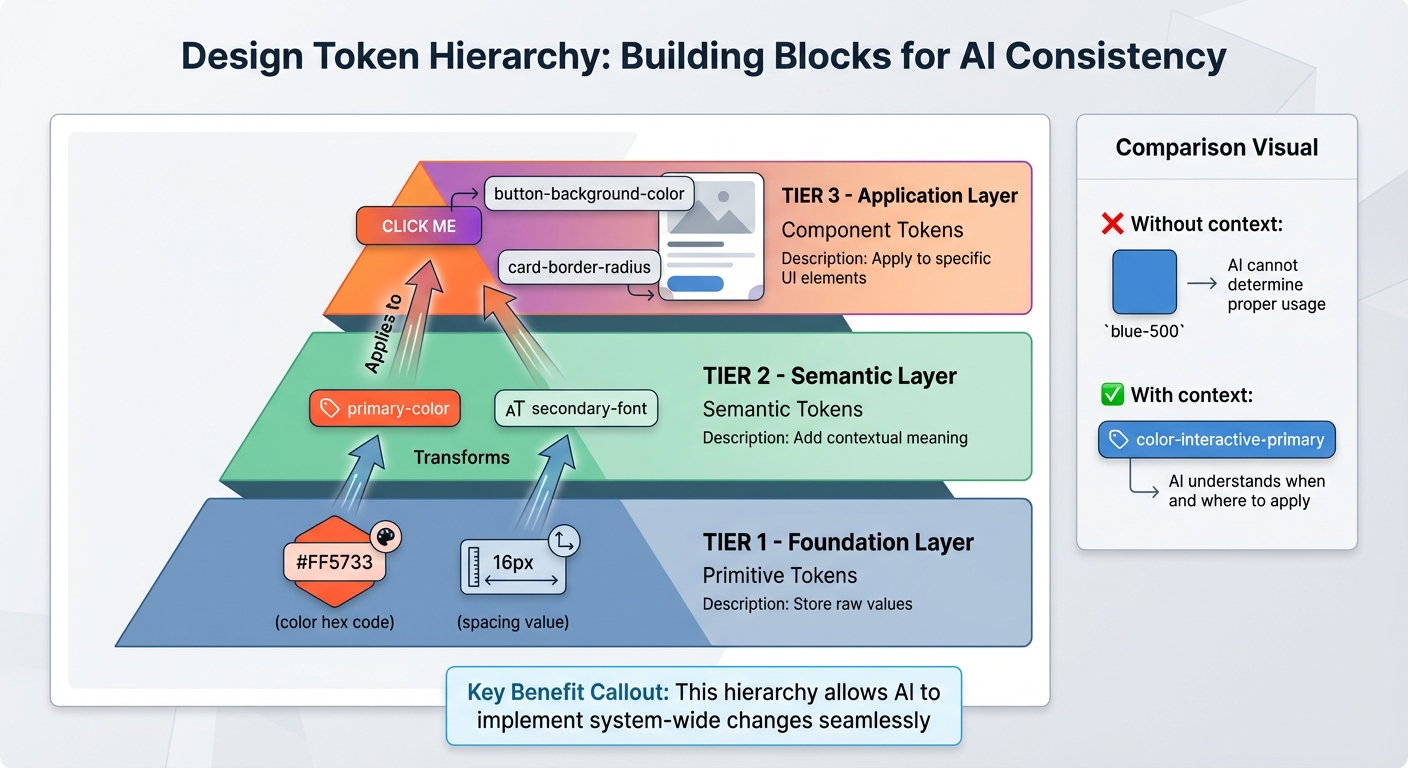
Design tokens are the building blocks of AI-driven consistency. They represent the raw values – like colors, typography, and spacing – that define a brand’s visual identity. For example, a token named blue-500 provides a color value but lacks context. On the other hand, a token like color-interactive-primary gives AI the necessary context to make informed decisions about its usage.
The structure of these tokens is crucial. Here’s how it breaks down:
- Primitive tokens: Store raw values, such as
#FF5733or16px. - Semantic tokens: Add meaning, like
primary-colororsecondary-font. - Component tokens: Apply to specific UI elements, such as
button-background-color.
This hierarchy allows AI to implement system-wide changes seamlessly.
"A design system is our foundation. When AI or new technologies come into play, we’re ready to scale because the groundwork is already there." – Joe Cahill, Creative Director, Unqork
Equally important is the format of your documentation. By storing guidelines in JSON, YAML, or Markdown, you make them machine-readable, enabling AI to sync updates across platforms efficiently. This creates a unified source of truth for both humans and AI.
Metadata for AI Consistency Checks
Metadata transforms tokens into actionable insights. While human designers can infer brand logic or business goals, AI requires explicit instructions. Metadata fields like primary_purpose, when_to_use, avoid_when, and semantic_role provide AI with the context it needs to apply tokens and components appropriately.
Accessibility is a prime example of how metadata improves AI functionality. AI-powered tools can use metadata to identify unauthorized color combinations, flag typography inconsistencies, and detect spacing errors in real time. These tools can even suggest approved alternatives instantly, stopping inconsistencies before they spread. As Marc Benioff, CEO of Salesforce, explains:
"AI’s true gold isn’t in the UI or model – they’re both commodities. What breathes life into AI is the data and metadata that describes the data to the model – just like oxygen for us."
Capturing the reasoning behind design decisions – not just the outcomes – enhances AI’s ability to conduct accurate quality checks. Given that design teams often spend over 40% of their time on manual system maintenance, structuring systems with AI in mind lets teams focus on innovation instead of micromanaging consistency. These foundational steps enable AI to conduct real-time design consistency checks effectively.
How AI Performs Consistency Checks
AI-driven consistency checks evaluate design files by comparing them against a set of predefined rules and tokens. These systems scan designs in real time, flagging components that deviate from established standards. By catching issues during the creation phase, rather than weeks later during quality assurance, AI provides immediate feedback that can save time and effort. This proactive approach opens the door to a wide range of practical applications.
Common Use Cases for AI Consistency Checks
One major use case is spotting off-system components. Integrated AI linters in design tools can identify unapproved elements, such as incorrect colors, typography mismatches, or spacing errors based on your design tokens. For instance, if a designer uses a color like #FF5734 instead of the approved token (e.g., color-interactive-primary), the system flags the issue and suggests the correct token.
Another critical application is ensuring accessibility compliance. AI tools can automatically detect color contrast issues, missing alt text, and improper heading structures by aligning designs with WCAG standards. Additionally, AI helps maintain cross-platform consistency by checking that components like buttons have a uniform appearance across frameworks like React and Swift. These examples highlight how AI tackles various challenges before diving into the technical tools behind it.
AI Techniques and Technologies
AI consistency checks rely heavily on rule-based validation. By centralizing design tokens – often managed in platforms like Style Dictionary – AI systems can validate designs against a single source of truth. This approach is particularly effective for straightforward issues, such as incorrect colors, spacing problems, or unapproved fonts.
Beyond rule-based methods, computer vision enhances these capabilities by analyzing visual layouts pixel by pixel. Tools like Applitools use visual AI to perform aesthetic regression testing, identifying even minor shifts in component appearance across different screen sizes. Similarly, tools like Percy detect layout changes and visual bugs within CI/CD pipelines, while open-source solutions like Resemble.js and BackstopJS offer cost-effective alternatives for visual comparisons.
Machine learning adds another layer of sophistication. These models learn patterns from your designs, gradually adapting to your team’s unique design language. As Matt Fichtner, Design Manager at Figma, puts it:
"Imagine AI that not only flags issues but also understands your design intent – making scaling best practices as simple as spell-check."
Over time, this adaptive learning improves the accuracy and usefulness of AI tools.
AI Integration in the Design-to-Code Workflow
Integrating AI into the design-to-code process ensures that consistency rules are upheld throughout development. During the design phase, AI monitors token usage and provides real-time feedback to prevent inconsistencies from creeping in. Wayne Sun, Product Designer at Figma, explains:
"Design systems stop being just about consistency; they start becoming vessels for creative identity."
In the implementation phase, AI checks that developers are using approved components correctly by comparing the rendered output with the original design specifications. This helps identify discrepancies between design files and production code. During the maintenance phase, AI continuously monitors for drift – instances where components begin to diverge from established standards. This ongoing oversight transforms design systems into dynamic frameworks that automatically pinpoint areas needing updates.
Implementing AI Consistency Checks in Your Workflow
Preparing Your Design System for AI
To make your design system compatible with AI, it needs to be machine-readable. Static images or PDFs won’t cut it – structured data formats are the way forward. Diana Wolosin, author of Building AI-Driven Design Systems, explains:
"Design systems must evolve into structured data to be useful in machine learning workflows".
Start by creating clear naming conventions and organizing components in a way that APIs or MCP servers can easily access them. Add metadata to each component, detailing its state, properties, accessibility features, and platform-specific constraints. Without this information, AI tools are forced to guess, which undermines the purpose of consistency checks.
Another key step is moving toward modular documentation. Instead of relying on long, traditional how-to guides, break your documentation into smaller, context-specific units linked directly to components. This approach makes it easier for both humans and AI to search and understand the system. A great example of this is Delivery Hero’s product team. In 2022, they created a reusable "No results" screen component within their Marshmallow design system. This effort cut front-end development time from 7.5 hours to just 3.25 hours – a 57% time savings.
Once your design system is machine-readable and well-documented, you’re ready to integrate AI tools into your processes.
Integrating AI Tools into Existing Processes
With an AI-ready design system in place, integration becomes much easier. For example, AI-powered linters can work directly within your design tools, flagging unauthorized colors or typography in real time as designers create. This ensures consistency during the design phase, rather than catching issues later during quality assurance.
Development teams can benefit from tools like visual regression testing software such as Chromatic or Percy. These tools compare rendered outputs against your design specifications, automatically identifying subtle discrepancies that might go unnoticed in manual reviews. By building real-time feedback loops into your workflow, teams can address inconsistencies as they arise, rather than scrambling to fix them during production.
Shopify’s Polaris Design System offers a great example of how this can work. In 2023, they implemented a gradual rollout strategy, allowing their distributed teams to adopt AI-driven features incrementally. This approach avoided disruptions while ensuring systematic improvements across their platform.
Balancing Automation with Human Oversight
While AI tools bring speed and efficiency, human oversight is still critical for handling edge cases and making strategic decisions. A tiered contribution model works well here: let automation handle minor updates while reserving major changes for review by a design council.
Regular cross-functional governance meetings are another important piece of the puzzle. These sessions bring together designers, developers, and product managers to review AI-generated updates, addressing technical and user experience challenges before changes go live. Wayne Sun, a Product Designer at Figma, illustrates this balance between automation and human input:
"Design systems open the door for product experiences that scale without losing their soul. Intuition becomes substance. Taste becomes repeatable".
Finally, your AI tools should include escalation paths for designers to propose exceptions when automated checks flag legitimate design decisions. This ensures that automation enhances workflows without becoming an obstacle, maintaining both flexibility and consistency.
sbb-itb-f6354c6
Using UXPin for AI-Driven Consistency
Code-Based Components for Design-Code Alignment
UXPin bridges the gap between design and code by working directly with production code instead of relying on static mockups. Thanks to its Merge technology, designers can use actual React components from libraries like MUI, Shadcn, or custom repositories. This means every element in a prototype is a perfect reflection of the final product.
PayPal saw the impact of this approach when they adopted UXPin’s code-to-design workflow. Their team reported that it was over six times faster than traditional methods based on static images.
For enterprise teams, UXPin takes it a step further by enabling direct Git repository integration with Merge. This allows AI to generate and refine UI elements using your design tokens. The result? A unified source of truth where design decisions seamlessly align with the codebase, setting the stage for smarter component creation and validation.
AI Tools for Component Creation and Validation
Building on its code-driven foundation, UXPin leverages AI to simplify and enhance component creation. The AI Component Creator transforms static designs into functional, code-backed components. Instead of manually recreating layouts from screenshots or sketches, you can upload an image, and the AI reconstructs it using real components. For example, uploading a dashboard screenshot could prompt the AI to identify table structures and rebuild them with MUI Tables or Shadcn Buttons, turning static visuals into interactive prototypes.
The AI Helper (Merge AI 2.0) takes this process further by enabling natural language adjustments. With simple commands like "make this denser" or "switch primary buttons to tertiary", the system updates the underlying coded components without disrupting your work. This ensures every change aligns with your design vision while saving time and reducing errors. As UXPin aptly states:
"AI should create interfaces you can actually ship – not just pretty pictures".
This approach is especially useful for maintaining consistency in complex interfaces, where manual updates could be both tedious and prone to mistakes.
Design-to-Code Workflows with UXPin
UXPin doesn’t just stop at AI-driven tools – it also integrates design and code workflows to ensure consistency across projects. By linking design components, documentation, and live code, the platform minimizes design-code drift. When your design system uses centralized design tokens, bulk updates become effortless. For instance, changing a primary color once automatically updates it across all interfaces – no developer intervention needed.
Additionally, automated QA features catch deviations from design system standards in real time, cutting down on the lengthy manual audits usually required to spot inconsistencies. With version history, teams can safely experiment and roll back changes when needed. This combination of flexibility and safeguards allows teams to innovate confidently while maintaining consistency on a large scale.
Measuring and Improving AI-Driven Consistency
Key Metrics to Track Consistency
To gauge the effectiveness of AI-driven consistency checks, it’s essential to monitor the right metrics. Start by assessing the front-end development effort – this metric highlights the time your team saves when building components. For instance, tracking how long it takes to develop components can uncover efficiency improvements and reductions in design debt.
Another critical metric is component reuse rates across different projects. A higher reuse rate suggests that your design system is successfully standardizing components, making them easier to implement. Additionally, pay attention to design-code drift, which measures the gap between what designers envision and what developers implement. Features like real-time syncing can help bridge this gap, ensuring that the final product closely aligns with the original designs, from prototype to production.
Continuous Improvement Through Feedback Loops
Once you’ve validated performance through key metrics, the next step is to refine your system through continuous feedback. Regular, ongoing feedback helps fine-tune AI consistency checks. Schedule periodic reviews where designers and developers collaboratively analyze AI-generated reports. During these sessions, identify recurring patterns in the flagged inconsistencies – are specific components consistently problematic, or is the AI missing subtle design details?
Based on these findings, adjust your design tokens and metadata to enhance the AI’s accuracy. Keep in mind that the quality of your data directly impacts the AI’s performance. A clean, well-organized design system is essential for reliable results. By maintaining this feedback loop, your AI can evolve alongside your team’s needs and standards, ensuring it remains a valuable tool for maintaining consistency.
Conclusion
Final Thoughts on AI in Design Systems
AI is reshaping the way teams ensure design consistency by taking over repetitive tasks like checks and validations, while seamlessly aligning design intent with the final product. Throughout this guide, we’ve explored how structured systems provide the foundation for AI to enforce standards, cutting down on manual effort.
However, the human touch remains essential. AI might be great at spotting patterns and flagging inconsistencies, but it’s the designers and developers who bring the critical context and judgment needed for decision-making. Together, this partnership creates smoother workflows – AI handles the routine checks, freeing up your team to dive into the bigger, strategic aspects of design.
A great example of this synergy is UXPin. By combining code-backed components with AI-driven tools, it ensures consistency from the initial design phase all the way to implementation, minimizing the usual friction between design and development.
FAQs
How do design tokens enhance AI-driven consistency in design systems?
Design tokens are essentially reusable variables that define core visual elements like colors, typography, spacing, and shadows. By consolidating these attributes into a single source of truth, teams can make updates to a design element once and have those changes reflected across all components, screens, and platforms. This approach helps maintain consistency, even when several teams are working on the same product.
When AI is paired with a token-based system, it takes this efficiency to the next level. AI can recognize token updates and automatically apply those changes throughout the design system, cutting down on manual work and ensuring designs stay aligned across iOS, Android, and web platforms. It can even validate new designs against existing tokens, catch inconsistencies, and recommend adjustments, making it easier to keep every design iteration in sync with the brand.
How does metadata help AI maintain design consistency in design systems?
Metadata serves as a crucial building block for AI to effectively interpret and manage design systems. By tagging design elements with specific, machine-readable details – such as component type, purpose, design-token references, or version information – AI can accurately apply the appropriate styling or behavior throughout the system. For instance, it can differentiate between a primary button and a secondary one or confirm that a color token aligns with the brand’s palette.
This structured information also enables AI to perform real-time consistency checks. When a designer updates a token or renames a component, the metadata ensures those changes are reflected across the system while identifying any inconsistencies with design standards. Tools like UXPin take full advantage of metadata, offering features such as smart recommendations, automated style guide creation, and seamless alignment of UI elements across platforms. These capabilities help teams maintain consistency more efficiently and reliably.
How can AI be seamlessly integrated into design-to-code workflows?
To make AI a seamless part of your design-to-code workflow, start by ensuring design files are well-organized. This means including clear annotations for elements like spacing, colors, typography, and the purpose of each component. AI tools, such as UXPin’s AI-powered features, can then take these designs – or even static UI screenshots – and convert them into production-ready HTML, CSS, or React components that use actual code. By linking these components to a shared design system, any updates made in the design file automatically sync with the codebase, cutting out the need for manual adjustments.
For smooth implementation, integrate AI-generated components into a continuous integration process that includes automated checks for consistency, accessibility, and interactions. Designers can include detailed notes to account for edge cases, while developers refine and validate the AI’s output. This collaborative workflow ensures that AI acts as a tool to accelerate processes without compromising quality. By combining clear design inputs, AI-driven automation, and human oversight, teams can streamline their workflows, reduce turnaround times, and deliver polished products with greater consistency.

