Building UI has never been faster or more efficient for enterprise teams. By combining Claude Sonnet 4.5, MUI, and UXPin Merge, you can design and deploy production-ready interfaces directly from your codebase. Here’s how it works:
- Claude Sonnet 4.5: Generates functional React interfaces in real-time with high precision, using your design system and MUI components.
- MUI (Material-UI): Provides a robust library of React components built on Material Design principles, ensuring consistent and accessible designs.
- UXPin Merge: Bridges the gap between design and development by allowing designers to work with the exact components developers use, eliminating the need for design handoff or translation.
This trio allows teams to create, test, and deploy interfaces faster while maintaining alignment between design and code. Designers can use real components, engineers avoid rebuilding designs, and AI accelerates the entire process.
Key Benefits:
- Reduce error rates to 0% with precise AI-generated MUI configurations.
- Save time by designing with production-ready components in UXPin Merge.
- Streamline workflows with seamless GitHub integration for custom repositories.
This approach is ideal for enterprise teams looking to deliver consistent, high-quality UIs with fewer delays and no manual handoffs. Keep reading to learn how to set up and maximize this system.
Setting Up UXPin Merge with MUI
You can start using UXPin Merge with MUI by either selecting the built-in library or connecting a custom repository.
If your team doesn’t have a custom codebase, UXPin provides a pre-configured MUI library. Simply choose the MUI library from the built-in coded libraries section, and you can begin designing right away – no extra setup or configuration required.
For enterprise teams with an existing design system, UXPin allows you to connect your Git repository directly. This ensures designers work with the exact same components developers use in production. Brian Demchak, Sr. UX Designer at AAA Digital & Creative Services, highlights the benefits:
"We have integrated our custom React Design System and can design with our coded components. It has increased our productivity, quality, and consistency, streamlining our testing of layouts and the developer handoff process."
Connecting MUI Components to UXPin
If you’re using the built-in library, MUI components will be available in the UXPin editor immediately.
For custom setups, UXPin connects through GitHub repositories. The MUI-Merge repository is the main integration point. Teams can also leverage the material-ui-cra starter project, which includes configurations that allow designers to copy JSX directly from UXPin into a React environment.
To ensure your MUI theme in UXPin matches production code, use the mui-theme-creator tool. This generates a standardized ThemeOptions object, aligning your UXPin designs with the production environment. Once connected, designers can modify properties, switch themes, and add conditional logic to MUI components – all while working with production-ready React code. The setup also supports TypeScript through template-merge-typescript-ds, ensuring accurate mapping of component properties.
This integration keeps AI-generated layouts and code in sync with your production environment.
Once components are linked, the next step is to configure your team for smooth collaboration.
Configuring Merge for Your Team
Set up team access and permissions to streamline collaboration. UXPin’s Growth and Enterprise plans include role-based permissions, allowing you to control who can edit design systems, publish components, or export code.
By defining shared libraries and component systems, your team can maintain a single source of truth. This ensures everyone works with the same MUI components, styled and behaving consistently. Version history is also tracked, with the Growth plan offering 30 days of history and the Enterprise plan providing unlimited versioning.
For developer handoff, configure export settings so engineers can either copy production-ready code or open designs directly in StackBlitz. Mark Figueiredo, Sr. UX Team Lead at T. Rowe Price, shares the impact of this streamlined process:
"What used to take days to gather feedback now takes hours. Add in the time we’ve saved from not emailing back-and-forth and manually redlining, and we’ve probably shaved months off timelines."
The AI Component Creator is another powerful tool. Once your MUI library is connected, Claude Sonnet 4.5 can generate complex layouts, like tables and forms, using only your approved components. This ensures AI-generated outputs align with your design system from the start.
To maintain stability, teams should regularly check the uxpin-merge GitHub organization for updates. As of March 2026, repositories like volta-sample-ds are actively maintained to ensure seamless integration.
sbb-itb-f6354c6
Building UI with Claude Sonnet 4.5 in UXPin
With your MUI library connected and your team set up, you can now use Claude Sonnet 4.5 to create interfaces that developers can immediately deploy. This integration ensures that the AI works exclusively with your approved components – no generic wireframes or unexpected designs.
Here’s how to make the most of Claude’s capabilities for generating production-ready components.
Generating MUI Components with AI Prompts
To get started, clearly define Claude’s role in your prompt. Frame it as if Claude is a senior React developer with expertise in MUI and UXPin Merge. Use structured prompts, wrapping your MUI documentation, design requirements, and constraints in XML tags like <documentation> and <requirements>. For instance, instead of a vague request like "create a login form", specify details such as:
- Which MUI components to use (e.g.,
TextField,Button,Card) - Spacing and alignment requirements
- References to your theme settings
Claude’s ability to process multiple documentation files or component definitions simultaneously ensures it builds context quickly, even for complex layouts. To encourage direct implementation rather than suggestions, include a <default_to_action> instruction in your prompt.
This approach mirrors successful integrations in other design tools, where Claude Sonnet 4.5 has proven effective at producing functional prototypes with smoother interactions.
Assembling and Customizing Layouts
Once individual components are generated, the next step is combining them into complete layouts. Claude Sonnet 4.5 excels at handling multi-step workflows, making it ideal for assembling intricate UI designs like dashboards with headers, sidebars, data tables, and footers. Its support for parallel tool execution allows it to make changes across multiple components at once – for example, updating themes for a header, sidebar, and footer in a single operation.
To achieve the best results, provide your design system documentation as a "handbook" before asking Claude to generate layouts. Upload your component library and brand guidelines to the context window. With a 1-million token context window, Claude can reference extensive MUI libraries and project files simultaneously, ensuring it uses your approved components instead of improvising with custom CSS or unapproved patterns.
Jennifer Fu, a UI Tech Lead, highlights the value of setting clear constraints:
"The problem is not the AI’s coding ability; it is the lack of constraints. To get production-quality UI, stop treating Claude like a junior freelancer and start treating it like a senior engineer."
This structured approach has significantly reduced error rates, dropping from 9% in earlier versions to 0% with Claude Sonnet 4.5.
Adding Conditional Logic and Variables
With UXPin Merge, you can incorporate conditional logic and variables into your MUI components, enabling interactive features without writing custom code. Claude Sonnet 4.5’s "Adaptive Thinking" feature is designed to handle complex tasks like managing component state or adding conditional logic. For example, you can instruct Claude to "reflect on tool results and determine optimal next steps" to ensure conditional logic is thoroughly verified before finalizing the code.
For larger UI projects, ask Claude to maintain a "progress.txt" or a "todo-list" within the prompt. This helps the model track the state across multiple iterations and resolve complex queries with ease. Whether you’re working on dynamic forms, interactive tables, or multi-step wizards, this feature ensures Claude delivers reliable, production-ready code.
Best Practices for Using Claude Sonnet 4.5 and MUI in UXPin Merge
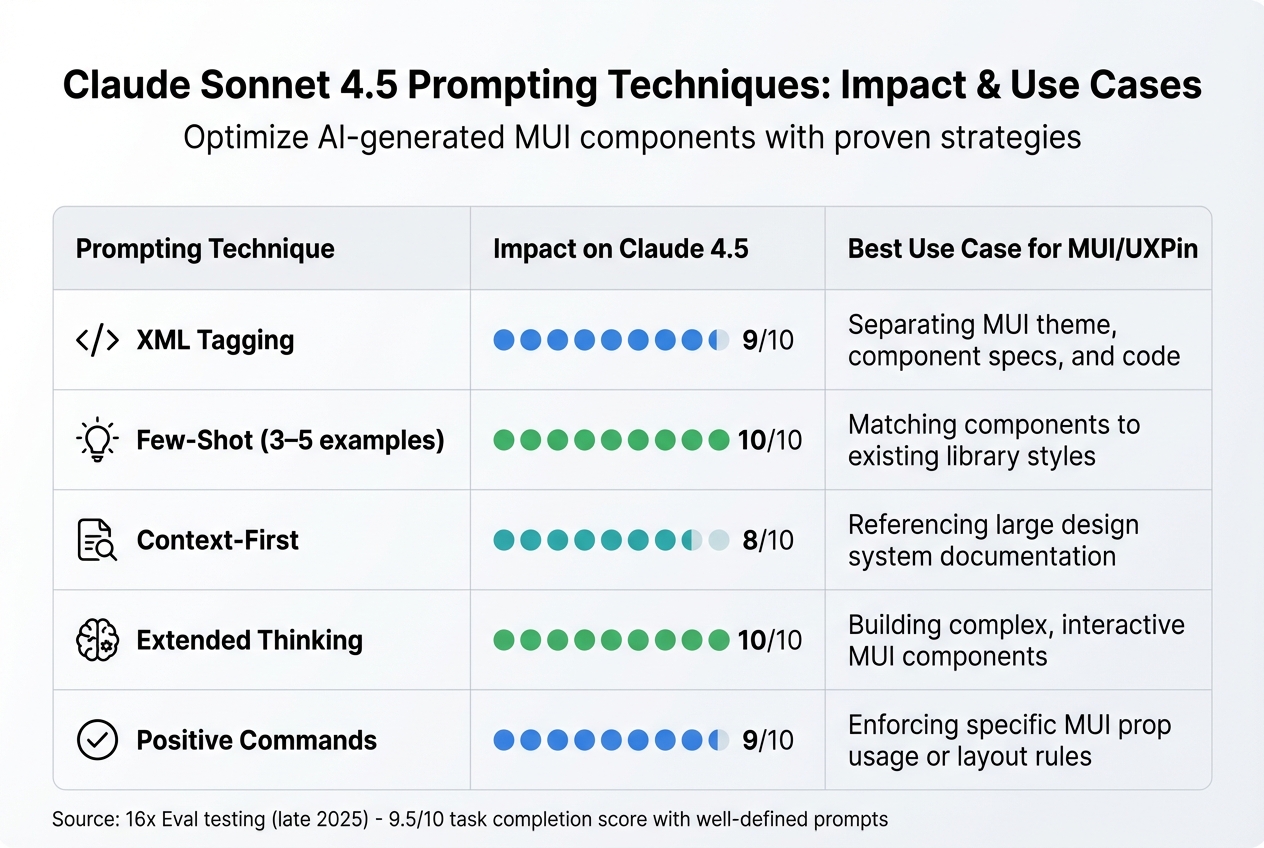
Claude Sonnet 4.5 Prompting Techniques for MUI and UXPin Merge
When working with UXPin Merge and Claude Sonnet 4.5, it’s essential to treat the model like a seasoned engineer – clear, direct instructions are key to ensuring production-quality UI components. By adhering to these best practices, you can make the most of your configured UXPin Merge environment and deliver polished, consistent MUI components.
Testing conducted by 16x Eval in late 2025 revealed that Claude Sonnet 4.5 achieved a 9.5/10 task completion score when prompts included well-defined success criteria and formatting rules.
Writing Effective Claude Sonnet 4.5 Prompts
The structure of your prompts plays a critical role in the quality of the output. Claude Sonnet 4.5 thrives on precise instructions, avoiding unnecessary "guesswork". For instance, a vague request like "create a dashboard" often leads to incomplete results. Instead, use XML tags such as <component_specs>, <mui_theme>, and <output_requirements> to clarify your needs and avoid misinterpretation.
Here are some key tips for effective prompts:
- Assign a specific role: Start by defining the model’s role, such as "Expert React Developer specializing in MUI and UXPin Merge." This helps focus its tone and technical accuracy.
- Include examples: Provide 3–5 examples of existing MUI components within
<examples>tags. This "few-shot" approach significantly improves results, with a 90% success rate for complex design tasks compared to prompts without examples. - Context-first ordering: For documents exceeding 20,000 tokens, place reference material at the beginning and the query at the end. This improves response quality by about 30%.
- Use positive constraints: Rather than saying, "Don’t use inline styles", specify, "Apply all styling via the MUI
sxprop or styled-components". - Enable Extended Thinking mode: For layouts requiring conditional logic, this mode allows the model to validate its reasoning before generating code.
Cognition AI‘s transition to Claude Sonnet 4.5 in September 2025 resulted in an 18% performance improvement in complex planning tasks, particularly in multi-step logic and custom codebase interactions.
| Prompting Technique | Impact on Claude 4.5 | Best Use Case for MUI/UXPin |
|---|---|---|
| XML Tagging | High (9/10) | Separating MUI theme, component specs, and code |
| Few-Shot (3–5 examples) | High (10/10) | Matching components to existing library styles |
| Context-First | High (8/10) | Referencing large design system documentation |
| Extended Thinking | High (10/10) | Building complex, interactive MUI components |
| Positive Commands | High (9/10) | Enforcing specific MUI prop usage or layout rules |
These techniques not only refine AI-generated outputs but also help your team collaborate more effectively within UXPin Merge.
Maintaining Consistency with Design Systems
To keep your design system consistent, provide Claude with clear instructions that align with your established guidelines. Before finalizing a prompt for a new MUI component, share it with a colleague who has minimal context. If they find it unclear, the AI likely will too.
Explain the reasoning behind your design rules. For example, say, "Use the MUI Container component to ensure consistent horizontal padding across all screen sizes". This added context helps the model produce more accurate and compliant results.
Define what "reusable" means for your project. Specify requirements like TypeScript interfaces, JSDoc comments for props, and ARIA labels for accessibility. You can also ask Claude to "verify its output against the design system criteria" to catch errors before completion.
Collaborating Across Teams with Merge
UXPin Merge eliminates the traditional design-to-development handoff by enabling teams to work with real, production-ready components. Claude Sonnet 4.5 enhances this workflow with its ability to operate independently while offering fact-based progress updates.
Here’s how to maximize its capabilities:
- Memory tool: Store design system guidelines and project states outside the context window. This ensures consistent outputs across sessions.
- Efficient context building: Use the model’s ability to perform multiple speculative searches or read several files simultaneously. This speeds up syncing with design libraries.
- Token management: Claude tracks its token usage and context window, preventing task interruptions. When nearing token limits, use the API to clear older tool calls and maintain performance.
The model’s concise communication style simplifies collaboration, providing clear, actionable updates without unnecessary verbosity. For teams on UXPin’s Enterprise plan, features like custom AI credit limits and dedicated support channels ensure scalability without delays.
Troubleshooting MUI Integration Issues in UXPin
After setting up and integrating MUI with UXPin, it’s essential to troubleshoot any issues to ensure your components and AI-generated outputs align with your production code. If you’re facing problems with syncing MUI components or refining AI-generated layouts, here’s how to tackle them.
Fixing Component Sync Problems
If your MUI components aren’t syncing properly, start by checking your GitHub connection to the appropriate repository (e.g., uxpin-merge/MUI-Merge). Make sure you’re logged into the correct account, and reload your session if you encounter "Unable to load page" errors. Additionally, specify the correct MUI version (v5 or v6) in your prompts to avoid errors caused by deprecated props.
Once the components are syncing as expected, you can address any layout inconsistencies using the steps outlined below.
Refining AI-Generated Outputs
If the AI-generated layouts don’t meet your expectations, there are a few ways to refine them. For incomplete layouts, request the full JSX code using the 64K output limit to generate fully functional UI components.
To ensure accurate styling, include your design system’s theme file in the 1M context window. If visual discrepancies persist, upload a screenshot of the rendering error using Claude’s Vision capability to identify and address the problem.
For ongoing issues with logic errors or inconsistencies, consider upgrading to Claude Sonnet 4.6 (released February 17, 2026). This version offers faster response times (0.5 seconds latency) and higher throughput (55 tokens per second). The pricing for this upgrade is $3.00 per million input tokens and $15.00 per million output tokens. This enhancement can streamline real-time refinements and improve your workflow within UXPin Merge.
Wrapping It All Together
Throughout this article, we’ve seen how combining Claude Sonnet 4.5, MUI, and UXPin Merge reshapes the way enterprise teams approach UI development. With its massive 1,000,000-token context window, Claude Sonnet 4.5 stands out by enabling entire design systems and MUI documentation to fit into a single prompt. This means you can generate production-ready UI components without the usual hurdles of translation errors or guesswork.
"Claude Sonnet 4.5 resets our expectations – it handles 30+ hours of autonomous coding, freeing our engineers to tackle months of complex architectural work in dramatically less time." – Anthropic
The integration with UXPin Merge ensures that AI-generated code seamlessly connects to production-ready design. By designing directly with MUI components in UXPin, both designers and developers operate from a single source of truth. MUI supplies the library, Claude automates the heavy lifting, and UXPin Merge guarantees perfect alignment between design and code.
For enterprise teams aiming to speed up delivery while maintaining high standards, this trio delivers real results. For instance, Claude Sonnet 4.5 cut vulnerability intake time by 44%, boosted accuracy by 25%, and achieved a 0% error rate on internal code editing benchmarks. And with predictable pricing – $3.00 per million input tokens and $15.00 per million output tokens – it’s cost-effective even for large-scale projects.
Why This Matters
This integration redefines the UI creation process. By combining AI-powered component generation, code-based design tools, and fully functional UI libraries, teams can compress timelines dramatically. You’re not just prototyping faster – you’re building with reliable, consistent components that adhere to your design system’s standards across every platform. The result? Moving from concept to deployment in days, not months, with full traceability and no compromises on quality.
FAQs
What do I need to connect my MUI components to UXPin Merge?
To integrate MUI components with UXPin Merge, you’ll need to connect your codebase to Merge. This process links your MUI component library directly to UXPin Merge, enabling the use of real, production-ready components in your design process. It ensures smooth collaboration and keeps your design and development workflows perfectly aligned.
How do I make Claude use only our approved MUI design system components?
To make sure Claude sticks to your approved MUI components, connect it to your MUI library during the setup process. Provide the library’s codebase or API access so Claude Sonnet 4.5 can exclusively reference your design system components. By integrating these components into UXPin Merge, you ensure consistent UI generation that aligns with your design standards while enabling smooth workflows.
How can designers hand off production-ready React code from UXPin?
Designers can now export production-ready React code directly from UXPin by utilizing AI tools like Claude Sonnet 4.5. These tools generate clean React components that adhere to design constraints, minimizing errors in the process. The workflow includes creating layouts and logic with the AI tool, fine-tuning them in UXPin Merge, and testing everything within the platform. This approach delivers functional, design-consistent code that’s ready for development, speeding up deployment timelines.

