React is fast by design, but optimizing rendering performance is key to maintaining a smooth user experience, especially in apps with complex components or large datasets. Frequent or unnecessary re-renders can slow down your UI and hurt metrics like Interaction to Next Paint (INP) and Total Blocking Time (TBT), which impacts both user satisfaction and SEO rankings.
Here’s what you need to know:
- Key Issues: React re-renders components when state, props, or context change. Without optimizations, this can lead to sluggish performance, especially in apps with deeply nested components. Using code-backed components can help maintain consistency while managing these complex structures.
- Optimization Tools:
- React.memo: Prevents unnecessary re-renders by caching functional components.
- React.PureComponent: Skips rendering for class components when props and state are unchanged.
- useMemo & useCallback: Stabilize references and cache results of expensive computations.
- React.lazy & Virtualization: Reduce initial load times and optimize large lists by rendering only visible items.
- Measure First: Use UX engineer tools and the React DevTools Profiler to identify bottlenecks before implementing changes.
Quick Tip: Avoid overusing these techniques, as they can add complexity and overhead. Focus on optimizing components with measurable performance issues.
This guide breaks down these strategies to help you apply them effectively without unnecessary complexity.
The Ultimate React Performance Guide (Part 1): Stop Useless Re-Renders!

sbb-itb-f6354c6
1. React.memo
React.memo is a higher-order component designed to optimize functional components by caching their last render. Typically, when a parent component re-renders, all its child components follow suit. With React.memo, React performs a shallow comparison of the component’s previous and current props using Object.is. If the props haven’t changed, the component skips re-rendering.
Re-render Prevention
While the shallow comparison used by React.memo is fast, it has limitations. For instance, Object.is({}, {}) evaluates to false, meaning inline objects, arrays, or arrow functions can disrupt memoization. To avoid this, wrap these values in useMemo or useCallback to ensure their references remain stable.
If you’re working with CMS data that includes volatile metadata like timestamps, you can pass a custom arePropsEqual(prevProps, nextProps) function as a second argument to React.memo. This lets you ignore specific changes. However, avoid deep equality checks on complex data structures – they can be slower than a re-render and may even freeze the UI.
These strategies help you leverage React.memo effectively, especially when aiming for measurable performance gains.
Performance Impact
In practical scenarios, React.memo can significantly reduce unnecessary renders. For example, in a dashboard managing over 1,000 tasks, it cut down re-renders from 50 per interaction to around 15–20. Profiling data shows that proper memoization can reduce render times by 60–80%.
That said, keep in mind that the prop comparison itself introduces a slight overhead. For components that already render in under 1ms, this overhead might outweigh the benefits. Use the React DevTools Profiler to identify bottlenecks and focus on optimizing heavy components like data tables, charts, virtualized lists, or complex Markdown editors. Avoid applying React.memo to lightweight components such as simple buttons or icons.
Bundle Size and Memory Usage
In terms of bundle size, the caching mechanism of React.memo adds about 0.1 KB (or up to 0.5 KB with full optimization). Memory usage is generally minimal and unlikely to impact most applications.
Scalability
Memoization is crucial for scaling applications that handle large datasets or complex component trees. In scenarios like dashboards, infinite-scroll lists, or data grids, effective use of React.memo ensures your application remains responsive.
"Mastering memoization moves you from ‘it works’ to ‘it scales’ – a hallmark of senior-level React development".
While future React versions (expected around late 2025) might automate some of these optimizations, for now, memoization remains an essential manual tool for improving performance.
2. React.PureComponent
React.PureComponent is a feature in React designed to optimize performance by automatically implementing shouldComponentUpdate() using a shallow comparison of props and state. When a component extends PureComponent instead of the standard Component, React evaluates its props and state. If no changes are detected, the rendering process for that component and its child subtree is completely skipped.
Re-render Prevention
The shallow comparison used by PureComponent checks primitives like strings, numbers, and booleans by their value. For objects and arrays, it compares their references. Here’s an example: if you modify an array using array.push() instead of creating a new array (e.g., with the spread operator), PureComponent won’t detect the change because the reference remains unchanged.
To ensure PureComponent works as intended, avoid defining inline objects, arrays, or functions directly in your JSX. These generate new references with each render and can lead to unnecessary re-renders. Instead, define static objects outside the render method or bind functions in the constructor.
"React.PureComponent’s shouldComponentUpdate() skips prop updates for the whole component subtree. Make sure all the children components are also ‘pure’." – React Legacy Documentation
Performance Impact
Using PureComponent can significantly reduce unnecessary renders, especially in complex lists, with potential reductions of 30–50%. However, there’s a tradeoff: the shallow comparison itself adds overhead. For components that update very frequently or consistently receive new props, this extra processing might outweigh the rendering cost.
| Feature | React.Component |
React.PureComponent |
|---|---|---|
| shouldComponentUpdate | Always returns true | Implements shallow comparison of props and state |
| Re-render Trigger | Always re-renders on update | Skips render if props and state are shallowly equal |
| Subtree Optimization | Re-renders entire child tree by default | Optimizes child subtree by skipping updates if props and state are shallowly equal |
Scalability
PureComponent is particularly useful for components higher in the component tree, as it can prevent recursive re-renders across many child components. It works best with immutable data structures, where changes create new references. However, for deeply nested data, it may fail to detect changes if only nested properties are updated while the top-level reference remains unchanged.
For teams working on interactive prototypes or component libraries, adopting these React best practices can make rendering more efficient. Tools like UXPin can help developers and designers seamlessly incorporate such strategies into their workflows.
Note: With the rise of functional components, React now often favors React.memo for similar optimizations.
Next, we’ll dive into hooks like useMemo and useCallback to explore additional ways to improve rendering performance.
3. useMemo and useCallback
useMemo and useCallback are two React hooks designed to maintain referential stability across renders. In JavaScript, objects, arrays, and functions are compared by reference, not by value. This means that every re-render creates new references for these entities, which can sometimes lead to unnecessary child component re-renders. useMemo helps by caching the result of an expensive computation, while useCallback ensures that the same function reference is retained across renders. Essentially, you can think of useCallback as applying useMemo specifically to functions.
Re-render Prevention
These hooks shine when paired with React.memo. Without stable references from useMemo or useCallback, React.memo‘s shallow comparison won’t work effectively, resulting in redundant re-renders. For example, if you pass unstable references as props to memoized child components, the optimization breaks because those references change with every render.
Context Providers also benefit greatly from memoization. By wrapping the value object in useMemo, you can prevent all consumers from re-rendering whenever the parent of the provider re-renders. Similarly, custom hooks should leverage useCallback to ensure that returned functions maintain stable references. This approach is also useful for hooks like useEffect, where stable dependencies prevent unnecessary effect executions.
Performance Impact
The impact of useMemo on performance can be dramatic. For instance, in a text analysis component, it reduced render time from 916.4ms to just 0.7ms. Similarly, in dashboard components, it cut the number of re-renders from over 50 to just 2–5. These improvements are crucial because applications that respond in under 400ms tend to keep users engaged, while longer delays can lead to frustration and abandonment.
"useMemo is essentially like a lil’ cache, and the dependencies are the cache invalidation strategy." – Josh W. Comeau
That said, memoization isn’t free. React uses Object.is to shallowly compare dependencies on every render, and if your calculation takes less than 1ms, this comparison might actually cost more than recalculating. Before optimizing, use the React DevTools Profiler to identify real bottlenecks. As React’s documentation advises: "You should only rely on useMemo as a performance optimization. If your code doesn’t work without it, find the underlying problem and fix it first".
Bundle Size and Memory Usage
Combining useMemo, useCallback, and React.memo typically adds around 0.5KB to your bundle size. These hooks store cached values and function definitions in memory, so excessive use can increase memory usage, especially in resource-constrained environments. It’s also worth noting that React doesn’t guarantee cached values will persist indefinitely. For example, React may discard cached data to free up resources, especially if a component suspends during its initial mount.
Scalability
Before jumping into memoization, think about restructuring your state. Moving state to lower-level components can help prevent parent re-renders from affecting unrelated children. For applications with heavy CPU usage, consider offloading complex calculations to Web Workers to keep the main thread responsive. Use useMemo strategically for resource-intensive tasks like processing large datasets or performing complex array operations (e.g., filtering or sorting). Always include all reactive values – such as props, state, or variables – in the dependency array to avoid bugs caused by stale data.
UXPin’s design and prototyping platform is an example of how these optimization strategies can be effectively implemented. While these hooks can significantly improve performance, it’s essential to balance their benefits with their potential trade-offs, such as increased memory usage or added complexity.
4. React.lazy and Virtualization
React.lazy and virtualization tackle separate performance bottlenecks in React applications. While React.lazy focuses on breaking your code into smaller, on-demand chunks, virtualization ensures only the visible DOM nodes are rendered. This is a big deal when you consider that the median JavaScript payload for desktop users in 2024 exceeds 500 KB. Traditional loading methods require downloading the entire bundle upfront, which can significantly slow down your app.
Performance Impact
React.lazy uses dynamic imports to load components only when they’re actually needed, reducing the strain on your front end – especially in complex systems. On the other hand, virtualization shines when dealing with large lists. Rendering a non-virtualized list of, say, 10,000 items can take hundreds of milliseconds. Virtualization sidesteps this by rendering only the items visible in the viewport (and a few extra for smooth scrolling), keeping performance steady.
"Lazy loading is an optimization technique where the loading of an item is delayed until it’s absolutely required… saving bandwidth and precious computing resources." – Ryan Lucas, Head of Design, Retool
Both strategies fit neatly into broader performance optimization practices, complementing other techniques discussed earlier.
Bundle Size and Memory Usage
To make React.lazy work, you need to wrap it in a <Suspense> component, which provides a fallback UI while the component is loading. Virtualization, on the other hand, is a go-to solution for lists with more than 50 items, ensuring that performance remains smooth. These techniques align well with earlier strategies for managing complex component trees.
Scalability
To scale effectively, begin with route-based code splitting – users generally accept slight delays when transitioning between pages. However, avoid lazy loading components critical for the initial "above-the-fold" view, as this can hurt metrics like First Contentful Paint. For apps with frequently updated data, combining virtualization with React 18’s useTransition can keep your UI responsive, even during heavy re-renders. Always use unique identifiers (like IDs) as keys in virtualized lists to optimize React’s diffing process. Additionally, wrap lazy-loaded components in Error Boundaries to gracefully handle potential network issues.
A great example of these practices in action is UXPin. Their platform uses virtualization, memoization, and hooks to ensure smooth and responsive interactive prototypes. These strategies show how thoughtful performance enhancements can lead to a better user experience.
Advantages and Disadvantages
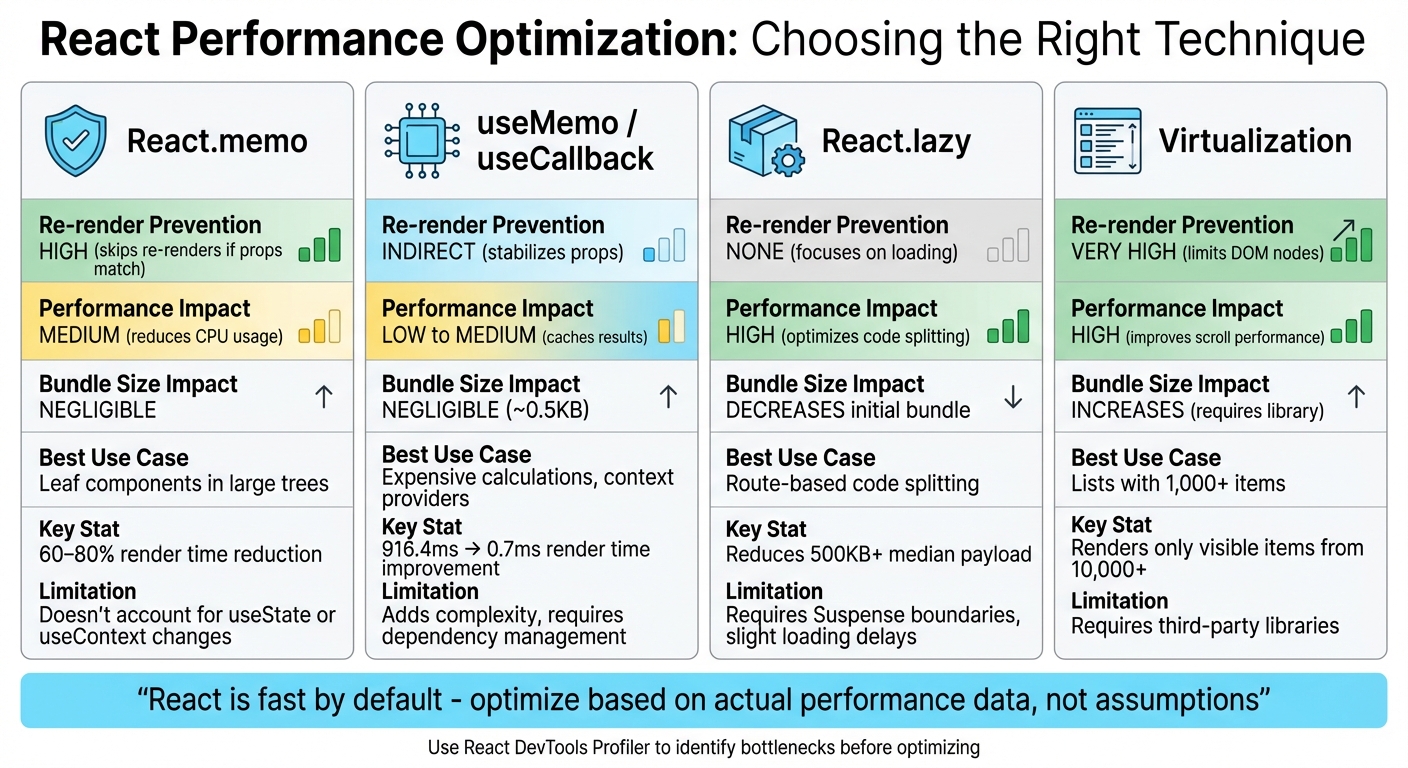
React Performance Optimization Techniques Comparison Chart
This section takes a closer look at the pros and cons of various React optimization techniques. By understanding these trade-offs, you can make informed decisions about which approach best suits your app’s performance needs. The analysis covers performance improvements, resource costs, and ideal scenarios for each method.
React.memo is a great tool for avoiding unnecessary re-renders in functional components. It works by comparing props and skips rendering when they haven’t changed. However, it doesn’t account for state changes triggered by hooks like useState or useContext. On the plus side, it adds almost no extra weight to your bundle and fits well with modern React practices.
useMemo and useCallback shine when it comes to stabilizing references in computationally heavy operations. For instance, tests showed useMemo could cut render times from 916.4ms to just 0.7ms. That said, these hooks can add complexity and require careful dependency management. As Sarvesh SP points out:
"React is already fast at DOM updates through its diffing algorithm. The expensive part is the JavaScript execution during re-renders".
While these hooks help reduce JavaScript overhead, overusing them can lead to unnecessary complexity.
React.lazy focuses on shrinking your initial bundle size, which can speed up startup times. However, it requires wrapping components in Suspense boundaries, which can introduce slight delays when loading components. Similarly, virtualization boosts performance for large lists by rendering only the visible items at any given time. The downside is that it typically requires third-party libraries, which add to your bundle size.
| Technique | Prevention | Impact | Bundle Size Impact | Best Use Case |
|---|---|---|---|---|
| React.memo | High (skips re-renders if props match) | Medium (reduces CPU usage) | Negligible | Leaf components in large trees |
| useMemo / useCallback | Indirect (stabilizes props) | Low to Medium (caches results) | Negligible | Expensive calculations, context providers |
| React.lazy | None (focuses on loading) | High (optimizes code splitting) | Decreases initial bundle | Route-based code splitting |
| Virtualization | Very High (limits DOM nodes) | High (improves scroll performance) | Increases (requires library) | Lists with 1,000+ items |
The React team offers a word of caution:
"You should only rely on useMemo as a performance optimization. If your code doesn’t work without it, find the underlying problem and fix it first".
Before diving into any optimization, take time to profile your app using React DevTools. Premature optimizations like unnecessary memoization can complicate your code without delivering meaningful benefits.
Conclusion
Choose optimization techniques based on what your app truly needs. During the prototyping phase, React’s default speed is more than sufficient, so focus on keeping your code clean and easy to modify. This allows for smoother iterations on design and functionality. As React Express explains:
"React is fast by default, only slowing down in extreme cases, so we generally skip using memo until we notice sluggish behavior in our app."
For production, let performance data guide your decisions. Tools like the React DevTools Profiler can help pinpoint actual bottlenecks before adding unnecessary complexity. Techniques such as React.memo are ideal for pure components that frequently re-render with stable props. Similarly, useMemo and useCallback are useful for stabilizing references or caching resource-heavy calculations. This data-driven mindset creates a natural progression from prototyping to production.
In design workflows, tools like UXPin (https://uxpin.com) simplify the process by using code-backed React components. This ensures your prototypes mirror actual performance from the start. Larry Sawyer, Lead UX Designer, shared his experience:
"When I used UXPin Merge, our engineering time was reduced by around 50%."
FAQs
How can I identify React components that need performance optimization?
To pinpoint which React components might be slowing down your app, take advantage of the Profiler tool in React DevTools. This tool tracks how long components take to render and how frequently they re-render. Pay close attention to components with either high render frequency or long render times, particularly those handling heavy computations or rendering large lists without proper virtualization.
After identifying bottlenecks, you can explore optimization techniques like memoization with tools such as React.memo, useMemo, or useCallback. Additionally, avoid passing inline functions or objects as props, as these create new references with every render, potentially impacting performance. Lastly, always validate your optimizations in a production build to ensure you’re working with accurate performance metrics.
What are the pros and cons of using React.memo for performance optimization?
React.memo can boost performance by stopping a component from re-rendering if its props stay the same. This is particularly handy for components that are resource-intensive to render or get updated frequently.
That said, there are some trade-offs to consider. React.memo uses a shallow comparison to check props, which introduces some processing overhead. If your component has simple props, the performance gains might be negligible. On the other hand, for complex objects, you might need to write custom comparison logic, adding complexity to your code. Also, if the React Compiler already applies built-in optimizations, React.memo might not add much value. It’s best to use it selectively, focusing on cases where it genuinely improves rendering efficiency.
When should I use useMemo and useCallback in React?
When working on optimizing performance in React, useMemo can be a game-changer. It helps you cache the results of resource-intensive calculations or derived values, ensuring React doesn’t waste time recalculating them during every render.
On the other hand, useCallback is perfect for keeping function references stable between renders. This is especially useful when passing functions as props to child components, as it prevents unnecessary re-renders caused by constantly changing references.
Both hooks are incredibly useful for boosting rendering efficiency, particularly in apps with complex structures where performance matters.

