Building user interfaces can be faster and easier by combining Claude Sonnet 4.5, Bootstrap, and UXPin Merge. Here’s how these tools work together:
- Claude Sonnet 4.5: Generates React code for Bootstrap components based on your design prompts, saving time on manual coding.
- Bootstrap: Offers pre-built grids, buttons, and forms for responsive and accessible design.
- UXPin Merge: Syncs your React components directly into a design editor, enabling designers to use production-ready code for interactive prototypes.
Key Steps:
- Use Claude Sonnet 4.5 to create Bootstrap code by describing your design needs.
- Import the code into UXPin Merge to build and test interactive designs.
- Enhance designs with UXPin’s tools for interactivity and state changes.
- Export production-ready JSX code directly to your development environment.
This workflow eliminates the gap between design and development, reduces handoff issues, and speeds up UI creation. Pricing starts at $20/month for Claude Sonnet 4.5 and $29/month for UXPin Merge. Bootstrap is free and open-source.
Prerequisites: What You Need to Get Started
To kick things off, you’ll need accounts for Claude Sonnet 4.5 and UXPin Merge. While Bootstrap is free and open-source, and doesn’t require an account, you can easily download it from getbootstrap.com or use its CDN for quick integration.
For Claude Sonnet 4.5, head to the Anthropic website and sign up using your email or a Google/Apple login. The free tier offers a limited number of daily messages, but if you’re planning to use it extensively – like generating Bootstrap code snippets throughout the day – the Pro plan ($20/month) is worth considering. Once you’ve signed up, you can generate an API key from your account dashboard if you plan to integrate Claude into your workflow programmatically.
UXPin Merge requires a paid plan, but there’s a 14-day free trial to explore the features and workflow. Sign up at uxpin.com with your email, set a password, and verify your email address. You can also link your GitHub account to enable code syncing. Their pricing starts at $29/month for the Core plan, and Merge technology is now included in all tiers.
Setting Up Your Accounts
For the best experience, use Chrome v100+ or Firefox v110+ with JavaScript enabled and disable any ad blockers. UXPin Merge runs smoothly on standard laptops.
If you’re testing AI-generated code locally, use VS Code to tweak Bootstrap components before syncing them to UXPin Merge. When working in a team, store your Anthropic API key securely in environment variables (via a .env file) instead of hard-coding it into your project. This keeps your credentials safe and ensures a smoother workflow.
Taking the time to secure your credentials and set up your development environment properly will save headaches later. Once this is done, you’re ready to configure Bootstrap in UXPin Merge and start building UI components efficiently.
Configuring Bootstrap in UXPin Merge
UXPin Merge makes it easy to integrate Bootstrap without needing to manually import or configure npm packages. Start by creating a new project in UXPin, where you’ll find Bootstrap components like buttons, navbars, cards, and forms ready to use on the design canvas.
If you’re using a custom Bootstrap build or your own component library, go to "Libraries" > "Add Library" in UXPin Merge. Select "Code Library" and choose "Import React Components with npm integration." You’ll need two npm packages: react-bootstrap and bootstrap. Make sure to specify the correct CSS path: bootstrap/dist/css/bootstrap.min.css. This ensures that all component properties and styles render accurately in the editor.
To test your setup, drag a Bootstrap card or navbar onto the canvas. If responsive classes like .col-md-6 work as expected, you’re good to go. For teams leveraging Claude Sonnet 4.5 with Merge AI, you can add your Anthropic API key in UXPin Merge under "Integrations" to enable AI-assisted design improvements directly within the platform.
With these steps complete, you’re ready to start building UI components using Claude Sonnet 4.5 and UXPin Merge.
sbb-itb-f6354c6
How to Build UI with Claude Sonnet 4.5 and Bootstrap
With your tools set up, you can streamline your workflow by combining Claude Sonnet 4.5 for code generation, Bootstrap for responsive design, and UXPin Merge for seamless deployment. Here’s how to make the most of each tool in just a few steps.
Step 1: Generate Bootstrap Code with Claude Sonnet 4.5
Start by opening Claude Sonnet 4.5 and crafting a clear, detailed prompt for the component you want to create. Be specific about the Bootstrap version and whether you need React Bootstrap or standard HTML/CSS. For instance: "Generate a responsive pricing card using React Bootstrap. Include three tiers, a featured badge on the middle tier, and a call-to-action button in each card."
Claude will produce clean, responsive code that aligns with Bootstrap’s grid system and utility classes. It understands breakpoints like .col-md-6 and .col-lg-4, ensuring your components adapt seamlessly to various screen sizes. You can review the code directly in Claude and request tweaks – whether it’s adjusting spacing, changing colors, or modifying the structure – all without writing code yourself.
If your project involves custom design tokens or specific branding, include those details in your prompt. For example: "Use primary color #0066CC and maintain 16px spacing between elements." Claude will incorporate these preferences into the generated Bootstrap classes and inline styles.
Step 2: Import Bootstrap Code into UXPin Merge
Once the code is ready, copy it over to your UXPin Merge project. For React Bootstrap components, paste the JSX code into your component library under "Libraries" > "Add Component". UXPin Merge will automatically parse the component structure, making it available for use in the design editor.
Drag the component onto the canvas and test its interactivity in real time. You can adjust properties like button styles, card layouts, or grid columns directly in the editor. This immediate feedback loop ensures that the AI-generated code works as expected before you move forward.
If your component combines multiple Bootstrap elements, this process is especially useful. UXPin Merge retains all the code-based functionality, meaning buttons, forms, and modals behave just as they would in a live environment.
Step 3: Add Interactivity in UXPin Merge
Now that your component is on the canvas, you can enhance it by adding dynamic interactions. UXPin Merge allows you to go beyond static designs by incorporating conditional logic, variables, and state changes directly in the editor.
For example, you can configure button clicks to trigger state changes, use variables to capture form input, or build multi-step workflows that replicate real-world application behavior. Since you’re working with actual React components, these interactions will function exactly like they would in production.
"From a design point of view, we can visually see how our components work together, what they’re capable of in the context, and how they interact with each other."
When it’s time to gather feedback, share an interactive prototype via password-protected preview links. Stakeholders can experience the UI as end users would, making feedback sessions more productive and reducing misunderstandings about functionality.
Step 4: Refine Components with Merge AI
For final adjustments, use Merge AI to polish your Bootstrap components. Unlike more generic tools, Merge AI works within your design system, suggesting changes that align with approved Bootstrap components and patterns.
Select a component or layout and ask Merge AI for specific improvements. For example: "Make this form more accessible" or "Optimize this card layout for mobile." The tool will suggest updates using Bootstrap’s utility classes, ensuring consistency and responsiveness. You can preview these changes instantly on the canvas.
Once you’re satisfied, copy the production-ready JSX code. UXPin Merge generates developer-friendly code that can be pasted directly into React projects, eliminating handoff issues and ensuring pixel-perfect results.
"You can simply copy clean JSX code off the design interface. Thanks to this seamless process, you can build projects at a speed that’s 10x faster than usual."
Benefits of Using These Tools Together
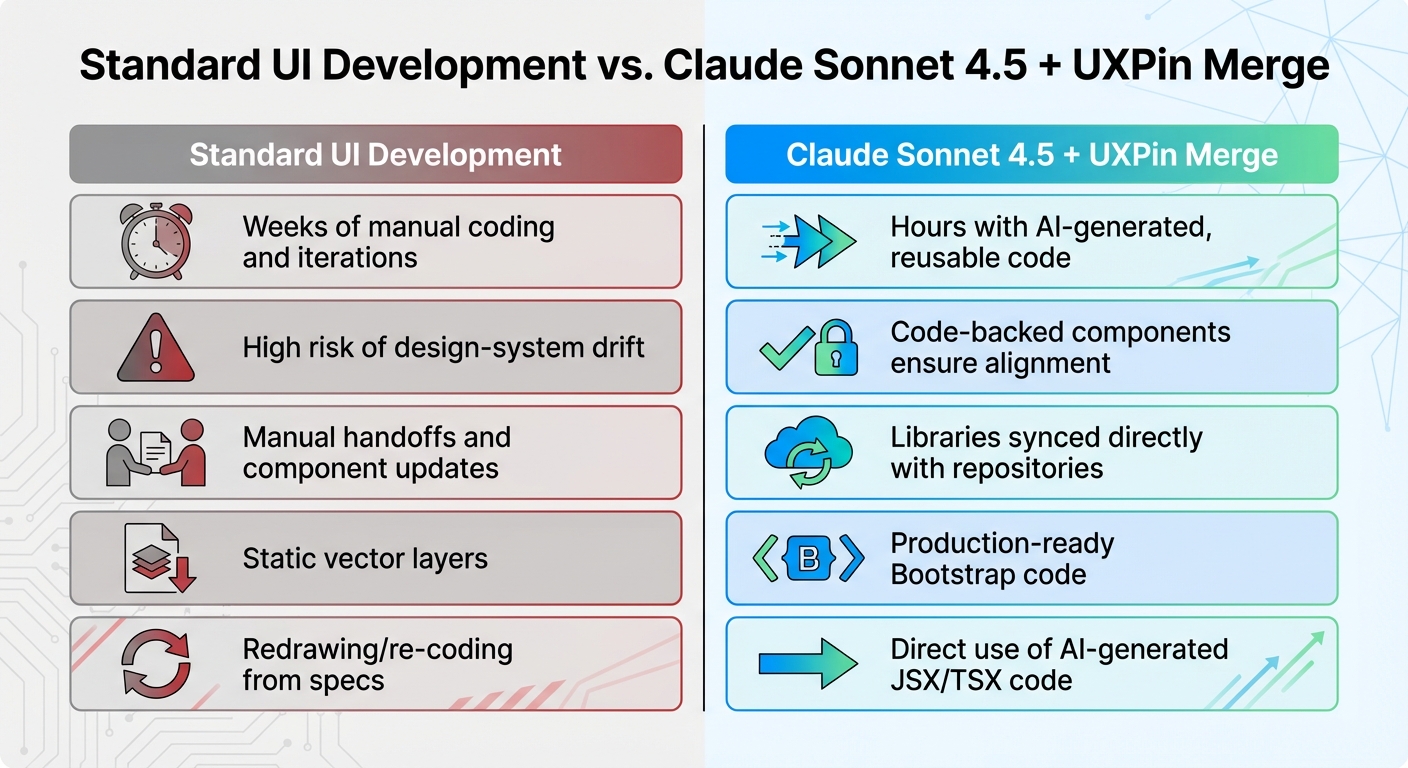
Standard UI Development vs Claude Sonnet 4.5 + UXPin Merge Workflow Comparison
Integrating production-ready code into the design workflow offers a host of advantages that make it a better option compared to traditional methods.
Comparison: Standard UI Development vs. Claude Sonnet 4.5 + UXPin Merge
The key differences between conventional UI workflows and this integrated approach boil down to speed, consistency, and scalability. Traditional tools rely on static vector shapes, which means developers must manually recreate designs in code. This process often leads to discrepancies between the design and the final product.
In contrast, using Claude Sonnet 4.5 and UXPin Merge means starting with production-ready Bootstrap code. The components you place in your design are the exact React components developers will use in production. This eliminates the need for redrawing, recoding, and guesswork. These efficiencies are reflected in the comparison below:
| Aspect | Standard UI Development | Claude Sonnet 4.5 + UXPin Merge |
|---|---|---|
| Speed | Weeks of manual coding and iterations | Hours with AI-generated, reusable code |
| Consistency | High risk of design-system drift | Code-backed components ensure alignment |
| Scalability | Manual handoffs and component updates | Libraries synced directly with repositories |
| Source of Truth | Static vector layers | Production-ready Bootstrap code |
| Handoff Process | Redrawing/re-coding from specs | Direct use of AI-generated JSX/TSX code |
Faster Enterprise UI Design Workflows
This integration doesn’t just improve individual projects – it transforms enterprise workflows. Large teams often face challenges like managing multiple products and coordinating across distributed teams. With Claude Sonnet 4.5, Bootstrap, and UXPin Merge, these bottlenecks are removed entirely. UXPin Merge uses real React-Bootstrap components, turning your design tool into a seamless extension of your codebase. When developers update a component in the repository, those updates sync automatically to the design environment via Git or Storybook integrations.
This approach prevents design drift by unifying your design system and codebase into a single, reliable source of truth. Claude generates the initial code, UXPin Merge transforms it into an interactive prototype, and developers can copy the JSX directly into their IDE. No need for translation, interpretation, or rework.
UXPin Merge also supports TypeScript, enabling type-safe component integration. This ensures alignment in props and state management, which is particularly critical for enterprise applications where precision and compliance are non-negotiable.
Conclusion
Key Takeaways
This approach eliminates the typical friction between design and development. By using real React-based Bootstrap components instead of static mockups, you achieve complete design-to-code alignment. Here’s how it works: Claude generates the JSX, UXPin Merge converts it into an interactive prototype, and developers can directly integrate the code into production. The result? A smooth transition from design to deployment.
With this workflow, you get quick component creation, scalability for enterprise-level designs, and a unified source for both design and code. Whether you’re managing a large-scale application or collaborating across distributed teams, this method removes common roadblocks and ensures consistency. Plus, UXPin Merge supports TypeScript, React, and Storybook, so you can seamlessly integrate it into your existing tech stack.
By combining AI-driven code generation with production-ready components, enterprise teams can drastically cut down on product development timelines – going from concept to deployment in days rather than months.
Getting Started with UXPin Merge
You can dive in with the Core plan starting at $29/month. This plan includes basic AI models, 200 AI credits, and integrated Bootstrap libraries. Other options include the Growth plan at $40/month and custom Enterprise solutions tailored to your needs.
Getting started is simple. UXPin’s Bootstrap library is natively integrated, so you don’t need to worry about manual imports. For custom component libraries, check out the react-bootstrap-v2-merge and uxpin-merge-boilerplate repositories on the UXPin Merge GitHub organization, which offers over 35 integration repositories for major frameworks. For more details on pricing and features, visit the UXPin pricing page or reach out to sales@uxpin.com for Enterprise-level options.
FAQs
What should I include in my Claude prompt to get usable Bootstrap React code?
To get production-ready React components styled with Bootstrap using Claude Sonnet 4.5, make sure your request is clear and specific. Ask for clean, functional code that follows proper JSX syntax and utilizes Bootstrap class names effectively. For instance, you could say: "Create a responsive navbar component using Bootstrap classes, ready to integrate into a React project."
Be sure to highlight the importance of adhering to best practices for both React and Bootstrap. This ensures the output is practical, easy to maintain, and ready for real-world applications.
How do I sync React-Bootstrap components into UXPin Merge from npm or GitHub?
To integrate React-Bootstrap components into UXPin Merge, you can use UXPin’s npm integration. This feature allows you to import libraries directly into your design workspace. Once imported, you can configure these components using UXPin’s resources, such as open-source boilerplates and CLI tools, ensuring everything works seamlessly. These tools make it easier to keep components updated and in sync with your design system, enabling you to create precise, code-based prototypes that stay consistent with your development process.
How do I add real interactivity (state, variables, logic) in UXPin Merge with these components?
To bring interactivity – like state management, variables, and logic – into UXPin Merge using components from Claude Sonnet 4.5 and Bootstrap, you can integrate live React components seamlessly. With UXPin Merge, you can set up variables, manage states, and define logical flows directly within the platform’s built-in tools. This approach allows your prototypes to be functional, backed by actual code, and capable of simulating real-world user interactions effectively.

