12 UX/UI Design Trends That Are Defining Product Design in 2026

UX and UI design in 2026 is defined by a fundamental shift: AI is no longer an experimental feature — it is a core design workflow. Component-driven development has become the enterprise default. Spatial computing, adaptive personalization, and system-level thinking are pushing the boundaries of what product teams can deliver. Meanwhile, users expect interfaces that are not just usable but genuinely intelligent, accessible, and respectful of their time and attention.
This article breaks down the 12 most impactful UX/UI design trends shaping product design in 2026 — with practical context on what each means for your work, your tooling decisions, and your team structure. These are not speculative predictions. They are patterns that leading product teams are already implementing in production.
Key takeaways:
- AI design tools that generate UI from real component libraries (not generic pixels) are production-grade and widely adopted.
- Design systems have evolved from documentation into active governance platforms that enforce rules across AI-generated and human-created interfaces.
- Conversational UI, voice-first interactions, and natural-language interfaces are primary patterns — not chatbot add-ons.
- Motion design, spatial computing, and adaptive personalization are moving from experimental to standard practice in specific verticals.
- The design-engineering boundary continues to dissolve as code-backed design tools and AI-generated JSX close the handoff gap.
- Ethical, transparent design is becoming a competitive advantage as users increasingly choose products they trust.
Explore these trends hands-on. Start a free UXPin trial and build interactive prototypes with real production components.
1. AI Design Generation from Real Component Libraries
The biggest shift in design tooling in 2026 is that AI-powered generation has moved from producing generic mockups to delivering production-quality UI built from a team’s actual component library. This distinction is critical: generic AI output still requires hours of rework to align with brand guidelines, accessibility standards, and engineering requirements. AI constrained to your real design system produces output that is immediately usable.
UXPin Forge is a leading example. Forge generates, edits, and iterates layouts using real React components from the user’s production codebase. Teams can prompt it with text, upload a screenshot, or paste a URL, and the result is a fully interactive layout built from their own components — exportable as production-ready JSX.
Why this trend matters:
- Speed: Teams using Forge with Merge report up to 8.6x faster design-to-prototype cycles when AI handles the first 80% of a layout.
- Consistency: AI output constrained to your design system never breaks brand rules, spacing tokens, or component APIs.
- Iteration: Conversational AI lets designers modify layouts in place — “make the sidebar narrower,” “swap the data table for cards” — without starting over.
- Professional polish: Designers focus on the remaining 20% — responsive breakpoints, micro-interactions, edge-case states — using professional design tools alongside the AI.
2. Design Systems as Governance Platforms
Design systems in 2026 have evolved beyond reference documentation into enforceable governance platforms. Modern systems don’t just describe components — they enforce rules across every interface, including AI-generated output.
The concept of Design System Guidelines is central to this evolution. In tools like UXPin, teams define approved color palettes, spacing scales, component usage patterns, and layout constraints. These guidelines then govern both human designers and AI assistants like Forge, ensuring that every layout — manual or AI-generated — is on-brand from the first draft.
This trend is particularly transformative for enterprise teams at scale. PayPal, for instance, relies on a 5-person UX team to support 60+ products and over 1,000 developers. That leverage is only possible because their design system acts as an automated quality gate for every interface the organization produces.
What defines a governance-grade design system in 2026:
- Code-backed components via UXPin Merge ensure designers see exactly what developers ship.
- Design tokens manage cross-platform consistency across web, mobile, and embedded surfaces.
- Automated validation checks enforce accessibility, spacing, and component usage compliance.
- AI assistants reference the design system as their single source of truth for all generation.
3. Conversational and Voice-First Interfaces
Conversational UI has matured from a novelty chatbot pattern into a primary interaction paradigm. Natural-language interfaces now handle complex workflows — not just FAQ lookups. Users book travel, configure enterprise settings, query analytics dashboards, and manage projects through conversation.
The evolution driving this trend:
- Large language models have become reliable enough for production-critical interactions with appropriate guardrails.
- Voice assistants now handle multi-turn, context-aware conversations.
- Hybrid interfaces combine conversational input with traditional UI — users can type a query and refine results with familiar filters.
Design implications:
- Design for intent, not just clicks. Map conversational flows the same way you map screen-based flows.
- Provide graceful fallbacks when the AI doesn’t understand.
- Show the system’s confidence level and offer alternatives when uncertain.
4. Adaptive Personalization at Scale
Personalization has moved beyond “recommended for you” carousels. Adaptive interfaces now restructure layouts, adjust information density, reorder navigation, and modify content prominence based on individual user behavior, role, and context.
What adaptive personalization looks like:
- Role-based dashboards: A marketing manager and a data engineer see different default views of the same platform.
- Behavioral adaptation: Frequently used features surface more prominently.
- Context-aware content: Mobile users see streamlined interfaces; desktop users see expanded views.
- Progressive complexity: New users see simplified interfaces that expand as they demonstrate proficiency.
Design challenge: Every adaptive change must be transparent (“We reorganized your dashboard based on your most-used reports”) and reversible.
5. Motion Design as a Functional UX Layer
Motion in 2026 is not decorative — it is a functional communication layer that conveys state changes, establishes hierarchy, guides attention, and provides spatial context.
Functional motion patterns:
- State transitions: Smooth animations between loading → loaded, collapsed → expanded states communicate what changed.
- Spatial continuity: Elements that move maintain spatial relationships, helping users track information.
- Attention direction: Subtle motion (pulsing dot, slide-in notification) draws the eye without interrupting.
- Progress indication: Skeleton screens and animated progress bars reassure users during loading.
Design rules: Honor prefers-reduced-motion. Keep animations under 300ms. Use easing curves rather than linear motion.
6. Spatial Design Enters Production
Spatial computing — 3D interfaces, AR overlays, mixed-reality experiences — has moved from demos to production deployment in specific verticals.
Where spatial design is production-ready:
- E-commerce: 3D product previews and AR “try before you buy.”
- Data visualization: Complex datasets rendered in 3D for exploration.
- Training: Medical, manufacturing, and military simulation environments.
- Collaboration: Virtual whiteboards and spatial document organization.
Guidance: Adopt spatial elements only where they genuinely improve comprehension. A 3D spinning logo adds nothing; a rotatable molecular visualization transforms understanding.
7. Cross-Platform and Multi-Modal Design
Users interact with products across phones, tablets, desktops, watches, cars, TVs, and voice-only devices — often within a single workflow. Cross-platform design means creating a coherent experience across all touchpoints.
Multi-modal design principles:
- Shared state: Users start on phone and continue on laptop without losing progress.
- Modality-appropriate interaction: Touch on mobile, mouse on desktop, voice in car.
- Consistent identity: Visual language and information architecture remain recognizable everywhere.
- Platform conventions: Respect each platform’s navigation patterns and accessibility features.
Design tokens and code-backed design systems are the infrastructure that makes multi-modal consistency possible.
8. Inclusive Design Beyond Compliance
Inclusive design has moved beyond WCAG checkbox compliance into a holistic practice considering the full spectrum of human diversity — cognitive differences, neurodivergence, literacy levels, cultural context, aging populations, and temporary impairments.
What “beyond compliance” looks like:
- Cognitive accessibility: Reduced information density, clear wayfinding, multiple learning styles.
- Neurodivergent-friendly design: Options for reduced motion, customizable density, focus modes.
- Global accessibility: RTL layout support, localized content, culturally appropriate iconography.
- Aging populations: Larger touch targets, higher contrast, simplified workflows.
Approximately 16% of the global population has some form of disability. Designing for the margins improves the experience for everyone.
9. The Design-Engineering Convergence
The traditional handoff model — designers create static mockups, throw them over the wall to engineers — is collapsing. The most effective product teams now work from a single source of truth where design and code are the same artifact.
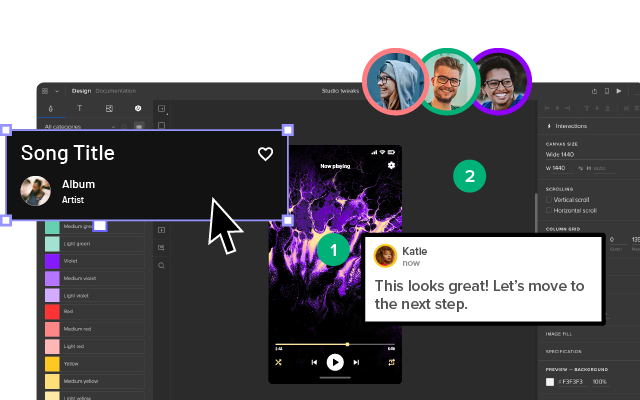
UXPin Merge has been at the forefront of this convergence. Designers drag and drop real React components onto a canvas, configure props, set states, and build layouts. The output is not a picture of a button — it is the actual button component. When Forge generates a layout, the result is exportable as clean JSX.
What convergence looks like in practice:
- Enterprise Merge customers report a 50% reduction in engineering time because there is no translation layer between design and code.
- Designers make component-level decisions (which variant, which props, which state) rather than pixel-level specifications.
- Design reviews happen in the browser, using the same components users interact with.
- Version control applies to both design and code because they share the same component source.
10. Ethical and Transparent Design
User trust is under pressure. Data breaches, dark patterns, and opaque algorithms have made users skeptical. In 2026, ethical design is a competitive advantage — products that are transparent about data usage and respectful of autonomy earn loyalty that manipulative patterns never sustain.
Ethical design practices gaining traction:
- Transparency by default: Explain what data you collect, why, and how users control it.
- AI disclosure: Label AI-generated content. Let users override AI suggestions.
- Anti-dark-pattern design: Make cancellation as easy as sign-up. Don’t bury privacy settings.
- Outcome-aware metrics: Measure user outcomes (goal completion, satisfaction) rather than raw engagement time.
11. Design Tokens as the Universal Language
Design tokens — the atomic values (colors, spacing, typography, shadows) that define a visual language — have emerged as the universal interchange format between design tools, code frameworks, and platforms.
Why tokens matter more than ever:
- AI design tools consume tokens to constrain output to your brand.
- Multi-platform products use tokens as the single source of truth across all rendering contexts.
- Theme switching (light/dark mode, high-contrast, brand variants) becomes trivial with token-based architecture.
12. Data-Driven Design Decisions at Every Level
Gut instinct is losing ground to evidence. The most successful product teams instrument every interface change with measurable hypotheses and validate with data before, during, and after launch.
The data-driven design stack:
- Pre-launch: Usability testing with interactive prototypes (built with real components via UXPin Merge) produces realistic behavioral data.
- Launch: A/B and multivariate testing validates design hypotheses with statistical significance.
- Post-launch: Analytics and session recordings surface problems at scale.
- Continuous: Regular usability test cycles (every 2–4 weeks) provide the qualitative “why.”
Putting These Trends into Practice
Trends are only valuable when they translate into better products. Here is a practical framework:
- Invest in your design system. A well-governed design system enables AI generation, cross-platform consistency, convergence, and inclusive design — all at once.
- Adopt AI tools that respect your system. Choose AI that generates from your component library, not generic templates. UXPin Forge is purpose-built for this.
- Prototype and test early. Use code-based prototypes to validate trend-inspired designs with real users.
- Measure outcomes, not aesthetics. Track task completion, error rates, and satisfaction — not whether a design “looks modern.”
- Start small. Pick the 2–3 trends most relevant to your product and users, implement them well, and expand from there.
Start a free UXPin trial to experiment with AI-powered design, code-backed components, and interactive prototyping — all in one platform.
Frequently Asked Questions About UX/UI Design Trends in 2026
What are the top UX/UI design trends in 2026?
The most impactful UX/UI trends in 2026 include AI-powered design generation from real component libraries, design systems as governance platforms, conversational and voice-first interfaces, adaptive personalization, functional motion design, spatial computing for practical use cases, cross-platform multi-modal design, inclusive design beyond WCAG compliance, design-engineering convergence, ethical and transparent design, design tokens as a universal language, and data-driven decision-making at every level.
How is AI changing UI/UX design workflows?
AI is transforming design workflows by generating production-quality layouts from real component libraries, enabling conversational iteration (modifying designs through natural language rather than manual manipulation), and automating repetitive tasks. Tools like UXPin Forge generate designs using a team’s actual React components and export the result as production-ready JSX — eliminating the handoff gap between design and engineering.
Why are design systems more important in 2026 than ever before?
Design systems now serve as the governance layer for AI-generated output. Without a design system, AI tools produce generic designs that require hours of rework. With one, AI output is automatically constrained to your brand’s approved components, colors, spacing, and interaction patterns — producing on-brand results from the first generation.
What is conversational UI and why is it a major trend?
Conversational UI lets users interact with products through natural language — text or voice — rather than traditional menus and forms. It has become a major trend because large language models are now reliable enough for production use, and users increasingly expect to accomplish complex tasks through conversation rather than navigating multi-step form interfaces.
How can product teams stay ahead of UX/UI trends?
Build a strong design system foundation, adopt AI tools that integrate with your existing component library, prototype and test new patterns with real users before full implementation, and measure outcomes (task completion, satisfaction) rather than subjective aesthetics. Tools like UXPin provide AI-powered speed via Forge and professional design precision in a single platform.
Is spatial design (3D/AR) practical for mainstream products in 2026?
Spatial design is practical in specific use cases: e-commerce product visualization, data exploration, training simulations, and collaborative workspaces. For most standard SaaS and consumer products, 2D interfaces remain the default. The trend is about selectively integrating spatial elements where they genuinely improve user comprehension or engagement — not replacing flat interfaces wholesale.