UXPin vs Figma

UXPIN VS Figma

Real components vs visual representations

Figma's canvas renders vectors that represent your components. UXPin's canvas renders the real thing. Here's what that means for your team.

50%

reduction in engineering time

8.6x

faster prototyping

3

designers supporting 60 products

The fundamental difference

Figma is a vector-based design tool. When you place a Button in Figma, it's a visual shape that references your component library.

UXPin's canvas renders real production code. When you place a Button in UXPin, it's your actual React component — same props, same variants, same states, same code your developers ship.

That's not a feature difference. It's an architecture difference. And it determines whether developers receive specifications they interpret and rebuild, or production-ready JSX they integrate directly.

gif

Figma documents your design system. UXPin renders it.

quotation marks

Side-by-side comparison

Every row is a question you're actually asking — not a feature checkbox.

logo logo
Canvas renders Real React components Vectors — visual representations
AI generates with Your actual components via Forge Vectors (Make) / code from vectors (Codex)
Design system integration Production React library via Git or Storybook Figma component library (visual)
Post-AI refinement Full design suite on code-backed components Full design suite on vector layer
Developer output Production-ready JSX — direct integration Specs, CSS annotations — rebuild required
DS governance Production components + Guidelines (enforced) Libraries + guidelines (advisory)
Design system drift risk None — structurally impossible Medium — designers can go off-brand
Collaboration Real-time collaboration Industry-leading multiplayer
Plugin ecosystem Growing — Merge integrations Massive — thousands of plugins
AI models GPT + Claude, bring your own API key Codex integration (OpenAI)
Codex / Code integration Not needed — canvas already IS code Codex interprets visual layers — translation step
Path to a working product UXPin + Wire: a working app with exportable React code interactive prototype (vectors) for review
IDEAL USER Enterprise DS teams shipping production UI Design teams of any size

Canvas renders

UXPin Real React components
Figma Vectors — visual representations

AI generates with

UXPin Your actual components via Forge
Figma Vectors (Make) / code from vectors (Codex)

Design system integration

UXPin Production React library via Git or Storybook
Figma Figma component library (visual)

Post-AI refinement

UXPin Full design suite on code-backed components
Figma Full design suite on vector layer

Developer output

UXPin Production-ready JSX — direct integration
Figma Specs, CSS annotations — rebuild required

DS governance

UXPin Production components + Guidelines (enforced)
Figma Libraries + guidelines (advisory)

Design system drift risk

UXPin None — structurally impossible
Figma Medium — designers can go off-brand

Collaboration

UXPin Real-time collaboration
Figma Industry-leading multiplayer

Plugin ecosystem

UXPin Growing — Merge integrations
Figma Massive — thousands of plugins

AI models

UXPin GPT + Claude, bring your own API key
Figma Codex integration (OpenAI)

Codex / Code integration

UXPin Not needed — canvas already IS code
Figma Codex interprets visual layers — translation step

Path to a working product

UXPin UXPin + Wire: a working app with exportable React code
Figma interactive prototype (vectors) for review

IDEAL USER

UXPin Enterprise DS teams shipping production UI
Figma Design teams of any size

Three pillars deep-dive

Where the architectural difference plays out in practice.

PILLAR 1

AI that uses your real components

Figma's AI generates vectors. Forge places real components from your synced library - with actual props, variants, and states. Off-brand output is structurally impossible.

logo

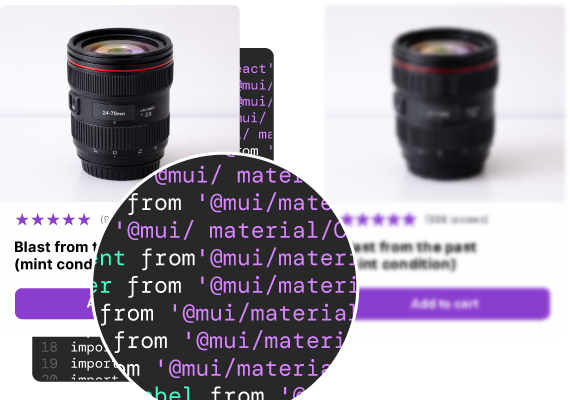
AI picks <Button variant="contained" /> from your live MUI build.

logo

AI generates a styled rectangle that approximates a button.

PILLAR 2

Professional tools for the last mile

Figma's tools are the industry benchmark - but they operate on vectors. UXPin's tools operate on code-backed components. Adjust a layout in UXPin and you're adjusting the actual implementation, not a visual that developers have to rebuild.

logo

Adjust padding, swap variants, add interactions — all post-AI, no re-generation.

logo

Adjust vectors, then hand off for rebuild.

PILLAR 3

Production code output

Figma exports design specs. Developers inspect and rebuild using their own component library. UXPin exports production-ready JSX referencing your actual components - developers copy it and integrate directly. With Wire, that design becomes a fully interactive app with a shareable link and a complete React export. Figma's output is a starting point for developers. UXPin's is the product and the code.

// UXPin Forge — MUI export

import { Button } from '@mui/material';

<Button variant="contained" color="primary">

Save changes

</Button>

When to use each tool

Fair and specific. Both tools have real strengths — here's where each wins.

logo

Choose UXPin if...

Your team has a custom React component library synced via Git or Storybook

Design system governance is a requirement, not a preference

You need production-ready JSX that developers ship directly — no rebuild

The design-to-dev rebuild is costing you measurable engineering time

You want AI constrained to your real components, not generating generic output

logo

Choose Figma if...

Your team prioritises collaborative exploration and divergent thinking

You need a rich plugin ecosystem and community resources

Your workflow centres on visual design and you're comfortable with the developer handoff as it exists

You're a design team of any size without a custom coded component library

Use both if: Many enterprise teams do. Figma for early exploration, stakeholder alignment, and collaborative ideation. UXPin for production design with real components, code export, and design system enforcement. They solve different steps in the workflow.

quotation marks

What teams actually say

When I used UXPin Merge, our engineering time was reduced by around 50%. Imagine how much money that saves across an enterprise-level organization with dozens of designers and hundreds of engineers.

Larry Sawyer

Larry Sawyer

Lead UX Designer

50%

reduction in engineering time

8.6x

faster prototyping

3

designers supporting 60 products

Frequently Asked Questions
Figma is a vector-based design tool where the canvas renders visual representations of components. UXPin’s canvas renders real production React components synced from your codebase. Figma’s output is specifications developers interpret. UXPin’s output is production-ready JSX developers ship directly.
Yes. UXPin Merge syncs your custom React component library from Git or Storybook directly into the design canvas. Your components appear with their real props, variants, and states. Forge (the AI) generates exclusively with these components.
UXPin has a Figma plugin that lets you copy and paste designs from Figma into UXPin. Many teams use both tools: Figma for exploration and UXPin for production design with real components. You don’t have to choose one and abandon the other.
Figma exports design specifications, CSS properties, and visual annotations. The Codex integration can generate code from Figma frames, but it interprets visual layer data rather than exporting real components. Developers still rebuild designs using their own component library.
Because designers in UXPin can only use components that exist in their synced production library. There’s nothing to go off-brand with. In Figma, designers can override components, detach instances, or create custom elements that don’t exist in the library. UXPin prevents this architecturally, not through guidelines.

See the difference for yourself

Generate a dashboard in Figma. Generate the same dashboard in UXPin Forge with your component library. Compare the output. Compare what developers can do with each.

Read the full comparison on our blog
design example