Ant Design (AntD) Guide: Components, Benefits & How to Prototype with AI (2026)
Ant Design is one of the most popular design systems for building enterprise web applications. Its comprehensive component library, clear design language, and strong React ecosystem make it a go-to choice for product teams solving complex B2B design problems in 2026.
Key takeaways:
- Ant Design is a collection of high-quality UI components covering buttons, forms, navigation, data tables, modals, data visualizations, and more.
- It follows the “Ant Design Language” — a set of principles emphasizing clarity, efficiency, and simplicity.
- Ant Design supports React, Vue (Ant Design Vue), and Angular (NG-ZORRO) frameworks.
- It has a strong global community of designers and developers with active maintenance and frequent updates.
- You can prototype with real Ant Design components using UXPin Merge, and generate layouts instantly with UXPin Forge.
With UXPin Merge, design teams can import Ant Design UI components to build fully functioning prototypes. This article outlines the benefits of working with Ant Design, its vast component library, and how to build Ant Design prototypes that look and feel like the final product.
Create a single source of truth between design and development with UXPin Merge. Visit our Merge page for more details and how to gain access to this advanced prototyping technology.
What is Ant Design (AntD)?
Ant Design is an open-source design system developed by the Ant Group — parent company of Alibaba, Alipay, Huabei, and MYbank. The component library supports React, Vue, and Angular front-end frameworks.
Ant Design includes layouts, iconography, typography, navigation, data entry/forms, data visualizations, and more. Design tokens allow organizations to customize the component library to meet your product requirements.
In 2026, Ant Design remains one of the most downloaded UI libraries on npm, with over 90,000 GitHub stars and a growing ecosystem of extensions, templates, and third-party integrations.
Key Ant Design Benefits
One of the primary reasons product developers choose Ant Design is its comprehensive component library and features. You can find virtually every type of UI pattern, including data visualizations, making it an excellent choice for enterprise products.
Here are the key Ant Design benefits that make it popular among software developers:
- Well maintained: Ant Design’s team continually improves the design system with frequent updates. Engineers report finding few or no bugs in production usage.
- Comprehensive library: Ant Design has a component, pattern, or icon to solve virtually every design problem. Each element has multiple variants to accommodate different scenarios.
- Native library: Ant Design Mobile offers an extensive library for building native cross-platform applications.
- Animation library: Ant Motion provides animations for common patterns and micro-interactions to complement its web and native component libraries.
- Third-party libraries: Ant Design’s third-party React libraries include data visualizations, infinite scroll, maps, media queries, and more.
- Internationalization-ready: Built-in i18n supports languages from around the world with the option for developers to add custom locales.
- Forms: An extensive form library with excellent form handling, validation, and dynamic field management.
- Scaffolds: 100+ template projects for dashboards, reports, tables, admin UIs, chat, logins, and more.
- TypeScript compatible: Full TypeScript support with type definitions included.
Material Design vs. Ant Design
Material Design and Ant Design present more similarities than differences. Both offer comprehensive design systems for building cross-platform applications with excellent documentation and large global communities.
Theming
Material Design and Ant Design both use design tokens for theming, making it easy for developers to customize UI components and patterns. Ant Design v5 introduced a more flexible token-based theming system that allows fine-grained control over every visual property.
Accessibility
Accessibility is one of the most significant differences between the two. Material Design has accessibility “baked in” to every component with principles and best practices. Ant Design leaves more accessibility responsibility to developers, though community contributions continue to improve AntD’s ARIA support.
Tech Stack Compatibility
Material Design is the best option for cross-platform Flutter applications. For React apps, Material Design is available through MUI (Material UI), which you can also use in UXPin with Merge.
Ant Design accommodates React, Vue, and Angular frameworks, making it accessible to a wider range of development teams.
Ant Design vs. Bootstrap
Bootstrap is one of the oldest front-end CSS frameworks for building responsive websites and web applications. Many engineers use Bootstrap for prototyping because they can leverage the framework’s CSS and JavaScript libraries to develop websites quickly.
Like Ant Design, Bootstrap supports React, Vue, and Angular. The biggest difference is that Bootstrap is a framework, whereas Ant Design is a full design system with documented design principles, comprehensive component variants, and a richer set of enterprise-grade patterns.
Bootstrap is a better option for building marketing websites and simpler web apps, whereas Ant Design offers more specialized components for building complex enterprise and native cross-platform applications.
What Can You Build With Ant Design?
Ant Design’s vast library of components, patterns, templates, and icons makes it possible to develop both B2B and B2C digital products. The design system’s form and data visualization patterns make it especially popular for enterprise applications.
Enterprise Companies Using Ant Design
- Yuque: knowledge management platform
- Alibaba: the world’s largest online marketplace
- Baidu: one of the world’s largest AI and Internet companies with multiple products built on Ant Design
- Fielda: a mobile data collection application for field research
- Moment: project management software
- Videsk: video-based customer service platform
- Solvvy: chatbot software from Zoom
- Ant Financial: one of China’s leading FinTech organizations
Ant Design’s Design Language
1. Design Values
Ant Design’s Design Values include principles and patterns for solving common usability problems. The design system has four core values:
- Natural: products and user interfaces must be intuitive to minimize cognitive load.
- Certain: designers must use components and patterns consistently to enhance collaboration and deliver consistent user experiences.
- Meaningful: products must have clear goals and provide immediate feedback to help users focus on tasks without distraction.
- Growing: designers must consider the human-computer interaction symbiosis and design for scalability.
2. Motion Principles
Ant Design defines three Motion Principles:
- Natural: motion should be based on the laws of nature with smooth, intuitive animations and transitions.
- Performant: animations must have low transition times and not impact a product’s performance.
- Concise: designers should create justified, meaningful interactions while avoiding excessive animations that don’t add value.
3. Global Styles
The Global Styles section includes color, layout, font, icons, and dark mode guidelines.
Ant Design’s Palette Generation Tool generates a ten-shade palette based on your product’s primary color. While simpler than the Material Theme Builder, it provides a solid foundation for consistent color usage.
The font scale and line height guidelines are based on user reading efficiency calculated at an average distance of 50cm (20 inches) with a 0.3-degree angle. The base font is 14px with a line height of 22px.
Ant Design’s icons are available as outlined, filled, and two-tone variants, with instructions for creating custom icons that conform to the design system’s iconography principles.
Ant Design Components
Here is an overview of the Ant Design component library and its key categories.
General
General components include buttons, icons, and typography. There are five button types: Primary (main CTA), Default (secondary CTA), Dashed, Text button, and Link button. Button properties include Danger (high-risk actions), Ghost (outlined), Disabled, and Loading (spinner with disabled state to prevent duplicate submissions).
Layout
AntD’s layout components include dividers, a 24-column responsive grid system, and space components for alignment, direction, and sizing.
Navigation
Navigational patterns include affix (sticky elements), breadcrumbs, dropdowns, menus, page headers, pagination, and steps (wizards).
Data Entry
Ant Design’s Data Entry components are what make it a preferred choice for enterprise application development. Product teams can build complex enterprise UIs with these out-of-the-box patterns:
- Auto Complete input fields
- Cascading dropdown menus
- Checkboxes
- Date pickers
- Forms (with built-in validation)
- Inputs (text and number)
- Mentions (user tagging)
- Radio buttons
- Ratings (icons and emojis)
- Select menus
- Sliders
- Switches
- Time pickers
- Transfer select boxes
- Tree selectors
- File uploads
Data Display
Data display components handle visualizing and presenting data to users:
- Avatars, Badges, Calendars, Cards, Carousels
- Collapse (accordions), Comments, Descriptions (records/orders)
- Empty states, Images, Lists, Popovers
- Segmented controls, Statistics (numerical dashboards)
- Tables (with sorting, filtering, pagination), Tabs, Tags
- Timelines, Tooltips, Trees
Feedback
Feedback components communicate system status to users: Alerts, Drawers, Messages (system feedback at screen top), Modals, Notifications, Popconfirm, Progress bars, Result pages (success/fail/error), Skeletons (lazy loading placeholders), and Spinners.
Other
Additional components include anchor (table of contents), back to top, and config provider for grouping components with shared configuration.
Importing Ant Design React Components into UXPin
One of the persistent challenges with any design system is that although there’s “a single source of truth,” designers and engineers still use different UI elements in practice — designers work with image-based UI kits while engineers use a code-based component library.
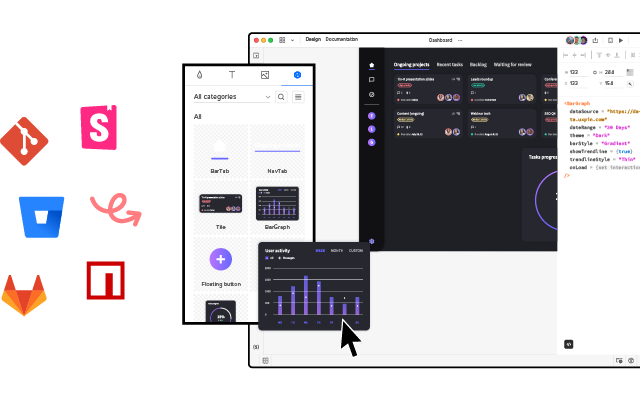
UXPin Merge solves this by creating a real single source of truth. Software developers can bring their product’s design system or open-source component library (like Ant Design) into UXPin, so designers use the same UI elements for prototyping that engineers use to build the final product.
Merge components are powered by code, giving designers complete interactivity and all properties defined by the design system. For example, an Ant Design button includes hover and click interactions by default — no additional setup required in UXPin.
Designers can access each component’s properties (color, size, type, content) via the Properties Panel to make changes.
UXPin renders these as JSX so that engineers can copy/paste from Spec Mode to begin development — no drift, 100% consistency every time.
Generate Ant Design Layouts with Forge
For teams using Ant Design, UXPin Forge adds another powerful workflow. Forge is UXPin’s AI design assistant that generates full-page layouts from text prompts, image uploads, or URL references — using real Ant Design React components.
Describe what you need (“a dashboard with a sidebar menu, stats cards, and a data table using Ant Design components”), and Forge produces a working interactive layout in seconds. Because Forge is constrained to your Ant Design component library, every generated screen uses real AntD components with proper props and styling.
You can then refine the layout conversationally — “make the table wider, add a filter bar above it” — and Forge modifies in place without regenerating the entire design. Output is exportable as production-ready JSX.
Ant Design npm Integration
UXPin’s npm integration allows designers to import UI elements from open-source component libraries hosted in the npm registry, including Ant Design (antd).
Using the Merge Component Manager, designers add Ant Design’s npm details:
- Package name: antd
- Assets location: antd/dist/antd.css
UXPin connects to Ant Design’s GitHub repo via npm, and designers can use Ant Design’s documentation to choose the components and properties they need for prototyping.
Follow this step-by-step guide for importing Ant Design components into UXPin.
You can also watch CoderOne’s YouTube tutorial, which walks through the setup and building a basic prototype:
Build fully functioning Ant Design prototypes that produce meaningful results during usability testing. Increase your design team’s value by solving more problems during the design process while identifying more opportunities. Visit our Merge page to find out more and how to request access.
Frequently Asked Questions About Ant Design
What is Ant Design (AntD)?
Ant Design (AntD) is an open-source design system developed by the Ant Group — parent company of Alibaba and Alipay. It provides a comprehensive library of high-quality React, Vue, and Angular UI components designed specifically for building enterprise-grade web applications with consistent, polished user interfaces.
Is Ant Design free to use?
Yes, Ant Design is completely free and open-source under the MIT License. You can use it in both personal and commercial projects without any cost. The design system is actively maintained with regular updates and has a large global community of contributors.
What frameworks does Ant Design support?
Ant Design primarily supports React, but also offers libraries for Vue (Ant Design Vue) and Angular (NG-ZORRO). Ant Design Mobile provides components for native cross-platform mobile applications, and Ant Motion offers animation libraries for micro-interactions and transitions.
How does Ant Design compare to Material Design (MUI)?
Both are comprehensive design systems with large component libraries and active communities. Key differences: Material Design has built-in accessibility features while Ant Design leaves accessibility to developers; Material Design is optimized for Flutter apps while Ant Design better supports React, Vue, and Angular; Ant Design offers more enterprise-oriented patterns like data tables, tree selectors, and cascading menus. Both are available in UXPin Merge — MUI library and Ant Design integration.
Can I prototype with real Ant Design components using AI?
Yes. With UXPin Forge and Merge, you can generate Ant Design prototypes from text prompts, image uploads, or URL references. Forge uses real Ant Design React components, so every generated layout is interactive and consistent with the AntD design system. Output is exportable as production-ready JSX.
What types of products is Ant Design best for?
Ant Design excels at enterprise B2B applications — dashboards, admin panels, data-heavy forms, CRM systems, and internal tools. Its comprehensive data entry, data display, and data visualization components make it especially well-suited for complex enterprise products that require polished, functional UIs out of the box.