Want to streamline UI development? By combining Claude Opus 4.5, MUI, and UXPin Merge, you can eliminate design-developer handoffs and create production-ready prototypes directly from AI-generated components. Here’s how it works:
- Claude Opus 4.5 generates MUI-based React components with precision, saving time and reducing errors.
- MUI (Material-UI) provides a reliable library of customizable UI components following Material Design principles.
- UXPin Merge integrates these components into a design tool, letting you prototype with real code, ensuring consistency between design and development.
This approach speeds up UI creation, reduces iterations, and ensures your designs align perfectly with production standards. Whether you’re building a data table or a complex layout, this workflow simplifies the process and keeps your team on the same page.
Why it matters: Teams report up to a 50% reduction in development time and fewer inconsistencies, making this a practical solution for enterprise-level projects. Ready to learn how? Let’s dive in.
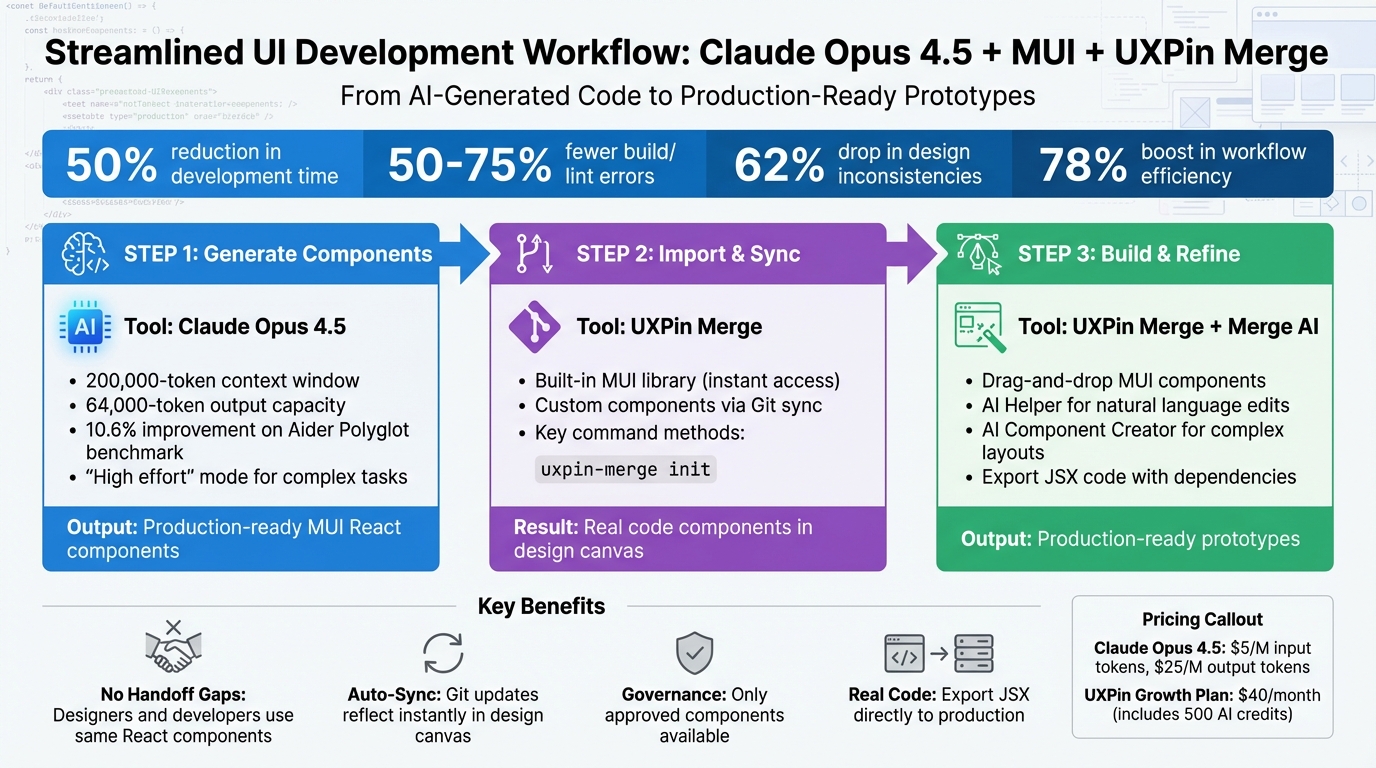
3-Step Workflow for Building UI with Claude Opus 4.5, MUI, and UXPin Merge
What You Need Before You Start
Before diving into UI generation and prototyping, you’ll want to have a few essential tools in place. These include the Claude API, the MUI library for React, and UXPin Merge. Together, they make it easier to transform AI-generated code into prototypes that are ready for production.
To access Claude Opus 4.5, you can use its API (model ID claude-opus-4-5-20251101), consumer apps, or cloud platforms like AWS, Google Cloud, and Azure. Pricing is token-based, with input tokens costing $5 per million and output tokens priced at $25 per million.
MUI (Material-UI) is a library of customizable UI components built on Google’s Material Design principles. It allows you to tweak elements like colors, typography, and spacing through a centralized theme, ensuring consistency across your app. MUI’s components are thoroughly tested in production and supported by a large open-source community, which ensures regular updates for security, performance, and compatibility with React – making it especially reliable for enterprise projects.
UXPin Merge bridges the gap between design and development by connecting real code components to your design workflow. Thanks to native integrations, you can start designing immediately without needing extra installations or a paid AI account. If your team uses custom libraries, you can sync your repository directly with UXPin to maintain consistency. Merge AI then uses your approved design system components to generate layouts, ensuring all AI suggestions are ready for development.
UXPin’s Growth plan starts at $40/month and includes 500 AI credits along with access to advanced AI models. The Enterprise plan offers tailored AI credit limits, dedicated support, and custom onboarding. For more details, visit uxpin.com/pricing or reach out to sales@uxpin.com.
With these tools, you’ll be set up for an efficient, production-focused UI development process.
What Claude Opus 4.5 Does for UI Development
Claude Opus 4.5 is designed to generate highly accurate, production-ready UI code. It even outperformed all human candidates on a challenging 2-hour technical exam conducted by Anthropic. Compared to its predecessor, Claude 3.5 Sonnet, it shows a 10.6% improvement on the Aider Polyglot coding benchmark. The model’s "effort" setting lets you switch between "medium" for everyday tasks and "high" for complex challenges, cutting tool errors and build/lint issues by 50% to 75%. It’s especially effective at handling intricate 3D visualizations and long-term coding tasks.
MUI: Material-UI Library for React
MUI offers a complete suite of React components built with Material Design guidelines, making it a reliable choice for creating consistent, accessible user interfaces. Its centralized theme system allows you to fine-tune colors, typography, spacing, and component behaviors, ensuring your app maintains a cohesive look. With its strong open-source community, MUI components are regularly updated to stay secure, performant, and compatible with the latest React versions – qualities that are critical for enterprise-level applications.
Setting Up UXPin Merge
UXPin Merge simplifies the setup process by including pre-integrated libraries like MUI, Ant Design, Bootstrap, and ShadCN. This means you can start designing immediately without the need for additional installations or imports.
For teams using custom component libraries, UXPin Merge allows you to sync your repository directly with its platform. This ensures that your custom components are available within the design canvas, maintaining consistency between design and development. Once connected, Merge AI uses your approved design system to generate layouts, ensuring all AI-generated suggestions are ready for production.
UXPin’s Growth plan starts at $40/month and includes 500 AI credits. The Enterprise plan offers more flexibility with custom AI credit limits, dedicated support, and tailored onboarding. For full pricing details and features, visit uxpin.com/pricing or contact sales@uxpin.com.
sbb-itb-f6354c6
Step 1: Generate MUI Components with Claude Opus 4.5
Claude Opus 4.5 can create production-ready MUI components based on clear, structured prompts. With its ability to handle a 200,000-token context and 64,000-token output, it’s designed to manage even the most intricate component libraries. It also incorporates modern MUI patterns and React best practices.
How to Write Effective Prompts for Claude Opus 4.5
To get the best results, use XML tags to structure your prompts. For example:
- Use
<instructions>for directives. - Include
<example>tags to provide clear samples. - Add
<mui_theme>for theme-specific details.
This approach minimizes confusion. If you’re building a data table, you could include <component_spec> tags to define columns, sorting, and pagination.
Few-shot prompting works wonders for improving output. By including three to five examples of existing MUI components from your codebase (wrapped in <example> tags), you can guide Claude to follow your team’s coding practices. This ensures the generated components align with your preferred prop naming, file structures, and styling methods.
Be explicit about MUI compatibility. For example:
- Specify the use of
@mui/materialand related libraries. - Request functional components with Hooks for modern React standards.
- Clarify whether to use the
sxprop for quick styles orstyled()components for reusable logic [[4]](https://github.com/x1xhlol/system-prompts-and-models-of-ai-tools/blob/main/Anthropic/Sonnet 4.5 Prompt.txt).
For more complex layouts that require advanced state management, set the effort parameter to "high." This boosts Claude’s reasoning capabilities.
"Claude responds well to clear, explicit instructions. Being specific about your desired output can help enhance results." – Anthropic
Avoid using overly aggressive language like "CRITICAL: MUST USE." Instead, stick to standard instructions like "Use this tool when…" for better results. Replace terms like "think" with "evaluate" or "consider" to encourage logical, step-by-step reasoning.
Once your prompt is ready, you can design with code by exporting the component in MUI format.
Export Components in MUI Format
When using UXPin Merge to sync your library, When preparing components for UXPin Merge, ensure they use default exports and either avoid required props or provide default values for all props. This ensures they render correctly inside the design canvas [[4]](https://github.com/x1xhlol/system-prompts-and-models-of-ai-tools/blob/main/Anthropic/Sonnet 4.5 Prompt.txt). For components longer than 20 lines, Claude automatically uses its "Artifacts" feature (application/vnd.ant.react) to provide a copyable code snippet [[4]](https://github.com/x1xhlol/system-prompts-and-models-of-ai-tools/blob/main/Anthropic/Sonnet 4.5 Prompt.txt).
Include a self-correction directive to ensure all components:
- Import from
@mui/material. - Follow WCAG standards for accessibility.
If you’re generating several related components, instruct Claude to "clean up and provide only the final MUI component code." This avoids clutter and eliminates temporary helper files.
One key limitation: don’t use browser storage APIs like localStorage or sessionStorage. These are unsupported in Claude’s preview environment and will cause testing failures [[4]](https://github.com/x1xhlol/system-prompts-and-models-of-ai-tools/blob/main/Anthropic/Sonnet 4.5 Prompt.txt). Instead, rely on React state tools like useState or useReducer for session-specific data persistence.
Step 2: Import MUI Components into UXPin Merge
After Claude Opus 4.5 generates your MUI components, the next step is bringing them into UXPin Merge. This integration links your production-ready React code directly to the design environment, creating a unified system for both design and development.
Connect MUI Components to UXPin Merge
UXPin Merge offers two ways to incorporate MUI components:
- Using standard MUI elements: Access the built-in MUI library directly within the UXPin canvas. Simply open the Library panel, select MUI, and drag components like
Button,Card, orTextFieldinto your prototype – no importing required. - For custom Claude-generated components: Integration happens via Git. First, ensure your components follow a standard React file structure with default exports. Then, install the UXPin CLI by running
npm install -g @uxpin/merge-cli. Navigate to your project directory and initialize the configuration file withuxpin-merge init. This will create amerge.jsonfile where you define component paths, such as:{ "components": [ { "name": "MUICard", "path": "./src/components/Card.jsx" } ] }Push these changes to your GitHub repository and link it through the Merge tab in UXPin. The platform will sync your components, making them available in the design canvas within minutes.
Claude Opus 4.5 produces code with 50–75% fewer errors, reducing the likelihood of sync issues during import. Before finalizing, run uxpin-merge preview locally to ensure components render correctly. If you encounter common issues like missing peer dependencies (e.g., @mui/icons-material), resolve them by running npm install after generating the code.
Following these steps ensures that your components are ready to use for rapid prototyping.
Keep Components Aligned with Production Standards
Maintaining alignment between design and production is key to efficient UI development. UXPin Merge achieves this by rendering production code directly in your prototypes. When you update a component in your Git repository, those changes automatically sync to all designs using that component via WebSocket connections. This eliminates version drift, ensuring that what designers create is exactly what developers implement.
To further enforce consistency, UXPin Merge includes:
- Linting and TypeScript checks during sync to catch errors early.
- Version control via Git, which tracks every change.
- A "Code Props" panel that only displays defined props, preventing invalid component states.
- Design system governance tools for enterprise teams, such as component approval workflows, to ensure only vetted components are added to the shared library.
As Brian Demchak, Sr. UX Designer at AAA Digital & Creative Services, explains:
"We have fully integrated our custom-built React Design System and can design with our coded components. It has increased our productivity, quality, and consistency, streamlining our testing of layouts and the developer handoff process."
The benefits are clear. Larry Sawyer, Lead UX Designer, shared:
"When I used UXPin Merge, our engineering time was reduced by around 50%. Imagine how much money that saves across an enterprise-level organization with dozens of designers and hundreds of engineers."
Step 3: Build and Refine Prototypes in UXPin Merge
Now that your MUI components are synced, it’s time to start assembling and fine-tuning your prototype. With UXPin Merge, you can drag production-ready React components onto the canvas, ensuring your design is backed by real code.
Build Prototypes with MUI Components
Head over to the Library panel and pick your MUI components. Drag and drop elements like Button, Card, or TextField onto the canvas. Use the Properties panel to tweak settings, themes, and interactions. The canvas also supports variables, conditional logic, and states, so your prototype can behave like a fully functional product.
Need to validate your work? The Get Code feature lets you export the React code, complete with all dependencies. You can open it in StackBlitz or share it directly with your developers for instant feedback. Mark Figueiredo, Sr. UX Team Lead at T. Rowe Price, highlighted how this process has transformed feedback cycles:
"What used to take days to gather feedback now takes hours. Add in the time we’ve saved from not emailing back-and-forth and manually redlining, and we’ve probably shaved months off timelines."
Once your interactive prototype is ready, you can refine its layout further using Merge AI.
Refine Layouts with Merge AI
Merge AI makes fine-tuning faster and easier by letting you use natural language commands. Instead of manually adjusting spacing or swapping component variants, just tell the AI Helper what you need – for example, “make this denser” or “swap primary to tertiary.” The AI handles the updates directly on your coded components without disrupting system rules or resetting your layout.
For more complex designs, like data tables or multi-step forms, the AI Component Creator is a game-changer. Simply provide a prompt, and the AI will generate a layout using your MUI components. According to reports, teams using AI in their design systems saw a 62% drop in design inconsistencies and a 78% boost in workflow efficiency. Because Merge AI works within your specific component library, every element it creates is fully functional and ready for production – bridging the gap between design and development seamlessly.
Best Practices for MUI UI Development with UXPin Merge
Once you’ve set up your UI workflow with Claude Opus 4.5 and UXPin Merge, following these best practices will help maintain consistency, streamline processes, and ensure compliance.
Keep Design and Development Consistent Across Teams
One of the standout features of UXPin Merge is that designers and developers work with the same React components. This eliminates the need for guesswork or reinterpretation during handoff. To fully leverage this, sync your production MUI component library through Git integration. Any updates developers make to components in the codebase will automatically appear in the design editor, ensuring everyone stays on the same page without manual updates or version conflicts.
Teams using their custom React Design Systems with UXPin Merge have noted improvements in productivity, quality, and consistency. It also simplifies layout testing and the developer handoff process.
If you don’t have a custom library yet, you can start with the built-in MUI React library. It adheres to standard MUI specifications and themes, so your prototypes will still align with industry norms and be ready for production.
Speed Up Deployment with UXPin Merge
Traditional design tools often result in static mockups that require rebuilding from scratch. UXPin Merge changes the game by enabling you to hand off real JSX code, complete with dependencies and properties. Developers can directly integrate this code into their projects or test it immediately in StackBlitz, skipping the translation phase entirely.
This approach has proven to save significant engineering time – some organizations report a reduction of about 50%. For enterprise teams with large design and engineering groups, this can translate into considerable cost savings.
Instead of relying on detailed design specs or redlining documents, you can provide developers with production-ready React code directly from your prototype. This allows them to start building without delays.
Maintain Governance and Compliance
Governance is critical for enterprise teams, and UXPin Merge makes it easier by serving as a single source of truth. Designers are limited to using only approved, production-ready components synced from your Git repository. This prevents the introduction of unapproved elements or inconsistent patterns. Every component in the library is pre-tested, compliant, and aligned with your organizational standards.
Additionally, this workflow ensures full auditability. Since designs are built using real code components, you can track which versions were used, when updates occurred, and who approved them. For teams in regulated industries or those managing complex SaaS platforms, this level of control ensures compliance long before designs reach production.
Conclusion
Speed up your workflow and maintain quality with production-ready UIs. By leveraging Claude Opus 4.5 for AI-driven component creation, MUI’s React library for dependable UI elements, and UXPin Merge for a code-backed design approach, you can seamlessly connect design and development.
This efficient process builds on the integrations outlined earlier. You can generate, import, and fine-tune components to create cohesive prototypes. What used to take weeks can now be done in days.
The results speak for themselves. Between November 2024 and July 2025, Anthropic’s engineering team saw a 67% boost in pull request throughput, even as their team size doubled. This was made possible by enabling the AI to handle approximately 90% of its own code generation. As Boris Cherny, Founding Engineer at Anthropic, put it:
"We wanted a tech stack which we didn’t need to teach: one where Claude Code could build itself. And it’s working great; around 90% of Claude Code is written with Claude Code".
For enterprise teams, this workflow ensures consistency and rapid deployment. Designers and developers work with the same React components, eliminating misinterpretations and design drift. Every component is pre-approved, tested, and ready for production before it even hits the design canvas.
Whether you’re using UXPin’s built-in MUI library or integrating a custom design system, you’re working with real code from the start. This integrated approach addresses the design-to-development challenges discussed in this guide, offering faster delivery, stronger oversight, and prototypes that are truly ready to launch.
FAQs
What should I include in my prompt so Claude generates MUI code that matches our design system?
To make sure Claude Opus 4.5 produces MUI code that aligns perfectly with your design system, include the following details in your prompt:
- Design System Styles: Clearly state that the code should follow your design system’s styles, such as specific colors, typography, and spacing guidelines.
- Material-UI Compatibility: Mention that the components need to work seamlessly with Material-UI (MUI) and follow your existing codebase’s conventions.
- Design Tokens: Provide essential design tokens, like your color palette, font sizes, and any custom variants you use.
These details help ensure the generated components are accurate, consistent, and ready for production.
What changes do my React components need to work correctly in UXPin Merge?
To get your React components ready for UXPin Merge, you’ll need to ensure they’re exported correctly, written with compatible syntax, and set up to support UXPin’s live editing features. Sometimes, this means tweaking your components – like wrapping them to handle UXPin-specific props or designing them to be stateless. Stick to React best practices, such as avoiding direct DOM manipulation, to ensure smooth integration and functionality within UXPin’s environment.
How do teams keep prototypes and production code in sync after components are updated?
Teams can keep prototypes and production code in sync effortlessly with UXPin Merge. This tool pulls coded React.js components straight from GIT repositories or other sources into the UXPin Editor. The result? Prototypes that perfectly mirror production components. Any updates made in the code repository are instantly reflected in the prototypes, removing the need for manual updates. This ensures a seamless workflow and keeps designs consistently aligned with the latest production code.

