Why Use React in 2026: 10 Reasons It Still Dominates Front-End Development
React is a JavaScript library for building user interfaces, originally created by Meta (Facebook) and now maintained by a global open-source community. In 2026, it powers the front ends of companies like Meta, Airbnb, Netflix, Shopify, and thousands of startups — and it shows no signs of slowing down.
But with alternatives like Vue, Angular, Svelte, and Solid gaining traction, is React still the right choice? In this article, we break down 10 concrete reasons why React remains the dominant front-end library in 2026, covering its technical strengths, ecosystem advantages, and the design-to-development workflow benefits that make it uniquely valuable.
Key takeaways:
- React’s component-based architecture makes it the ideal foundation for scalable design systems and UI libraries.
- Server Components, the React Compiler, and concurrent rendering keep React at the cutting edge of performance.
- React’s ecosystem is unmatched — from Next.js and Remix to React Native for mobile.
- Design tools like UXPin Merge let teams prototype with real React components, closing the gap between design and production code.
Build prototypes with real React components — not static mockups. UXPin Merge lets designers drag and drop production React components directly onto the canvas. The result? Fully interactive prototypes that output production-ready JSX. Try UXPin for free.
What Is React?
React is an open-source JavaScript library for building user interfaces. Created by Meta engineer Jordan Walke in 2013, it introduced a declarative, component-based model for constructing UIs — you describe what the interface should look like for a given state, and React handles the DOM updates efficiently.
React is not a full framework like Angular. It focuses specifically on the view layer, which gives teams flexibility to choose their own routing, state management, and tooling. That flexibility is one reason React has maintained its dominance — it adapts to any architecture, from simple landing pages to complex enterprise dashboards.
What Is React Used For?
React is used across a wide range of application types:
- Web applications: Single-page apps (SPAs), dashboards, e-commerce platforms, SaaS products.
- Mobile applications: Cross-platform iOS and Android apps via React Native.
- Static sites: Marketing pages and blogs with frameworks like Next.js or Gatsby.
- Desktop apps: Electron-based desktop software (Slack, VS Code).
- Design systems: React is the most common technology for building enterprise design system component libraries.
Why Use React in 2026? 10 Key Reasons
Here are ten reasons React continues to lead the front-end landscape in 2026 — from technical advantages to ecosystem and career benefits.
1. Component-Based Architecture Scales Beautifully
React pioneered the idea of building UIs from self-contained, reusable components. Each component manages its own markup, logic, and styling, which means teams can:
- Build a library of reusable UI elements (buttons, forms, data tables) once and use them everywhere.
- Assign different developers to different components without merge conflicts.
- Compose complex interfaces from simple building blocks — a principle that aligns perfectly with atomic design methodology.
This component model is also the reason React integrates so well with design tools. UXPin Merge imports your actual React component library into a visual design canvas, so designers build with the same building blocks developers ship.
2. Server Components Change the Performance Game
React Server Components (RSC) represent the biggest architectural shift in React since hooks. They allow components to execute entirely on the server, sending pre-rendered HTML to the browser with zero JavaScript overhead for those components.
The benefits are significant:
- Smaller bundles: Server Components don’t ship their code to the client, reducing JavaScript payload dramatically.
- Direct data access: Server Components can query databases and APIs directly — no REST endpoints or GraphQL layers required.
- Streaming: The server streams HTML progressively, so users see content faster.
Frameworks like Next.js (App Router) and Remix use Server Components by default, making this pattern production-ready and well-documented.
3. The React Compiler Automates Performance Optimization
React’s new compiler (formerly “React Forget”) automatically memoizes components and values, eliminating the need for manual useMemo, useCallback, and React.memo calls. This means:
- Less boilerplate code.
- Fewer performance bugs caused by missing memoization.
- Developers can write straightforward React code and let the compiler handle optimization.
This is a major developer experience improvement that reduces cognitive load and makes React code simpler to write and review.
4. The Largest Front-End Ecosystem
React’s ecosystem in 2026 is unmatched by any other front-end library:
| Category | Popular React Solutions |
|---|---|
| Full-stack frameworks | Next.js, Remix, Expo Router |
| State management | Zustand, Jotai, Redux Toolkit, TanStack Query |
| UI component libraries | MUI (Material UI), shadcn/ui, Radix, Ant Design, Chakra UI |
| Animation | Framer Motion, React Spring, AutoAnimate |
| Forms | React Hook Form, Formik, Conform |
| Testing | React Testing Library, Vitest, Playwright |
| Mobile | React Native, Expo |
This breadth means that whatever you need to build, there’s likely a well-maintained, battle-tested React library for it.
5. Unmatched Capability for Rich, Interactive UIs
React’s declarative model and virtual DOM make it exceptionally good at building complex, data-driven interfaces — dashboards with real-time updates, drag-and-drop builders, collaborative editing tools, and interactive data visualizations.
Features like concurrent rendering (via useTransition and useDeferredValue) let React keep the UI responsive even during heavy computation. Users can type in a search box while thousands of results filter in the background — without jank or dropped frames.
This is why products like Figma’s plugin system, Notion, and Meta’s own apps rely on React for their most interactive surfaces.
6. One Language, Multiple Platforms
React’s component model extends beyond the web:
- React Native lets teams build native iOS and Android apps with React components and JavaScript. Companies like Shopify, Discord, and Microsoft use React Native in production.
- Expo simplifies React Native development with managed workflows, over-the-air updates, and a universal file-based router.
- React Three Fiber brings React’s component model to 3D rendering with Three.js.
For teams that want to share code and design patterns across web and mobile, React is the only ecosystem that offers a mature, production-proven solution.
7. The Best Foundation for Design Systems
React’s component model maps directly to how design systems are structured — tokens, atoms, molecules, organisms. This makes React the most popular technology for building design system component libraries at enterprise scale.
When your design system is built in React, you unlock a powerful workflow:
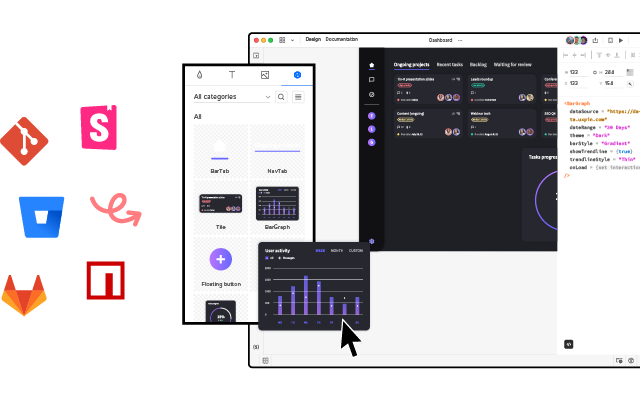
- UXPin Merge syncs your React component library into UXPin’s design editor. Designers drag and drop the exact same
<Button>,<Card>, and<DataTable>components that developers use in production. - Forge, UXPin’s AI design assistant, generates layouts using your actual React components — not generic placeholders. Every AI-generated design is constrained to your design system, ensuring brand consistency.
- The output is production-ready JSX, not a pixel-perfect image that needs to be rebuilt. Engineering teams can export and ship what the designer created.
This is how PayPal’s 5-person UX team supports 60+ products and 1,000+ developers — by designing with the same React components that power production.
8. The Strongest Job Market
React consistently ranks as the most in-demand front-end skill in job postings. The Stack Overflow Developer Survey and State of JS survey both confirm that React has the largest user base and the highest number of job opportunities among front-end libraries.
For developers choosing where to invest their learning time, React offers the best return: more job openings, higher average salaries, and transferable skills (React Native, Next.js, Remix) that multiply your career options.
9. First-Class TypeScript Integration
TypeScript has become the default for serious React projects. React’s type definitions are mature and well-maintained, providing:
- Auto-complete for component props in your IDE.
- Compile-time error checking that catches bugs before they reach production.
- Self-documenting component APIs that make it easier for teams to use each other’s code.
The React Compiler also leverages TypeScript types for better optimization, making the combination even more powerful in 2026.
10. AI Tooling Is Built for React First
The AI-assisted development wave in 2026 favours React heavily. Code-generation tools, AI design assistants, and prompt-to-UI products overwhelmingly target React as their primary output format because:
- React’s component model is easy for LLMs to understand and generate.
- The massive volume of open-source React code provides superior training data.
- JSX’s declarative syntax maps naturally to UI descriptions in prompts.
UXPin’s Forge is a prime example. It generates complete UI layouts from text prompts, uploaded images, or URLs — using your team’s actual React components rather than generic code. You can iterate conversationally (“make the sidebar narrower,” “swap the data table for cards”), and Forge modifies the design in place using production-ready components. The result is exportable as clean JSX.
React vs. Other Front-End Libraries in 2026
How does React compare to the alternatives? Here’s a practical comparison:
| Feature | React | Vue | Angular | Svelte |
|---|---|---|---|---|
| Learning curve | Moderate | Gentle | Steep | Gentle |
| Ecosystem size | Largest | Large | Large (built-in) | Growing |
| Job market | Dominant | Strong (Asia/EU) | Strong (enterprise) | Niche |
| Mobile solution | React Native (mature) | Capacitor/NativeScript | Ionic | Capacitor |
| Server rendering | RSC + Next.js/Remix | Nuxt | Angular Universal | SvelteKit |
| AI code generation | Best supported | Good | Moderate | Moderate |
| Design tool integration | UXPin Merge (code-backed) | Limited | Limited | Limited |
React’s advantage isn’t that it’s “better” at any single thing — it’s that the combined ecosystem of frameworks, libraries, design tools, AI tooling, and talent is deeper and more mature than any alternative.
Designing and Prototyping React UIs
One of React’s underappreciated strengths is how well it bridges the gap between design and development. Traditional design tools create static mockups that need to be manually rebuilt in code. But when your UI is built with React components, you can design with the real thing.
How UXPin Merge Works With React
UXPin Merge connects your React component library — whether it’s a custom design system or an open-source library like MUI, shadcn/ui, or Ant Design — directly into UXPin’s visual editor via Git integration or the Merge CLI tool.
Designers then drag and drop those components to build layouts, configure props (like variant, size, color, disabled state), and create fully interactive prototypes — complete with states, conditional logic, and real data. No code required from the designer, but the output is code.
The results speak for themselves: enterprise teams using Merge report a 50% reduction in engineering time because prototypes don’t need to be rebuilt — they’re already made of production components.
How Forge Accelerates React Design
Forge takes this further with AI. Instead of dragging components manually, you can:
- Describe the UI in a text prompt (“Create a settings page with a sidebar nav, profile form, and notification preferences”).
- Upload a screenshot or wireframe and have Forge recreate it with your React components.
- Paste a URL and have Forge reverse-engineer the layout using your design system.
Forge generates the layout using your real components, and you can iterate conversationally — refining the design without regenerating from scratch. Teams report 8.6x faster design-to-prototype cycles with Forge + Merge.
This workflow means React isn’t just a development choice — it’s a design choice that accelerates the entire product team. Try UXPin for free to see how it works with your React components.
Getting Started With React in 2026
If you’re new to React, here’s the recommended learning path:
- Learn JavaScript fundamentals — ES6+ syntax, async/await, array methods, destructuring.
- Complete the official React tutorial at react.dev — it teaches modern React with hooks and functional components.
- Pick a framework: Start with Next.js for full-stack web apps or Expo for mobile apps. These provide routing, server rendering, and build tooling out of the box.
- Build a small project — a task manager, a weather app, a personal dashboard. Apply what you learn immediately.
- Add TypeScript — it will improve your code quality and make collaboration with teams much easier.
For designers and product teams evaluating React as a design system foundation, explore how UXPin Merge connects your React components to the design process — or try one of the pre-built libraries like MUI or shadcn/ui to see code-backed design in action.
Frequently Asked Questions
Why is React still popular in 2026?
React remains popular because of its mature ecosystem, continuous innovation (Server Components, the React Compiler), strong job market demand, and unmatched library ecosystem. Its component model has also become the standard architecture for front-end development, making React skills highly transferable.
What is React used for?
React is used to build interactive user interfaces for web apps, single-page applications, mobile apps (via React Native), desktop apps (via Electron), and even 3D experiences. It excels at complex, data-driven interfaces like dashboards, e-commerce platforms, and SaaS products.
Is React better than Vue or Angular in 2026?
Each has strengths. React offers the largest ecosystem and job market. Vue provides a gentler learning curve. Angular is a complete framework for large enterprise applications. React’s flexibility and community size make it the most common choice for new projects, but the best option depends on your team and project.
Can designers use React components in design tools?
Yes. UXPin Merge lets designers drag and drop real React components from a production codebase directly onto a design canvas. Prototypes use the same components as the final product, and the output is exportable as production-ready JSX.
What are React Server Components?
React Server Components (RSC) allow components to render entirely on the server, sending pre-rendered HTML to the client with zero JavaScript overhead. This reduces bundle sizes, improves performance, and enables direct server-side data access. Next.js App Router uses RSC by default.
How do I get started with React in 2026?
Start with a React framework like Next.js (web) or Expo (mobile). Learn JavaScript fundamentals first, then work through the official React tutorial at react.dev. Build small projects to reinforce concepts, and add TypeScript early for better code quality.