Building UIs for enterprise tools like admin dashboards can be complex, but combining GPT-5.1, Ant Design, and UXPin Merge simplifies the process. Here’s how this trio works together:
- GPT-5.1: Automates layout creation and organizes components based on simple prompts, saving time.
- Ant Design: Provides a React-based library with 100+ pre-built components for enterprise-grade UIs.
- UXPin Merge: Connects design directly to production-ready code, eliminating manual handoffs and ensuring consistency.
The result? Faster workflows, fewer errors, and designs that match production from the start.
Key Benefits:
- Save Time: Skip manual prototyping with AI-assisted layouts.
- Consistency: Use live code components to avoid design drift.
- Efficiency: Deliver production-ready JSX code directly to developers.
This workflow is ideal for teams building scalable, data-heavy applications. Keep reading to learn how to set it up step-by-step.
UXPin Merge AI: Smarter UI Generation That Follows Your Design System
Understanding GPT-5.1, Ant Design, and UXPin Merge
This section breaks down how these tools come together to streamline a design workflow with code components.
What GPT-5.1 Does for UI Design
Think of GPT-5.1 as your design strategist, capable of generating wireframes and arranging components based on simple language inputs. For example, describe a dashboard with data tables, filters, and multi-step forms, and GPT-5.1 will outline the structure for you. It’s particularly skilled at handling complex enterprise UI needs, ensuring layouts align with patterns like filtering systems or locale-specific adjustments. While it doesn’t create the visuals itself, it excels at organizing components to fit your requirements.
Why Ant Design Works Well for Enterprise UIs
Ant Design is a React-based design system tailored for enterprise-level B2B platforms. With over 100 components – like cascading menus, tree selectors, and data visualization tools – it’s built to handle the intricate needs of data-heavy applications. Its design principles focus on clarity and efficiency, making it easier for users to navigate complex interfaces. For U.S. enterprise teams, Ant Design shines in creating admin dashboards, analytics tools, and internal systems where consistency and scalability are critical, rather than aesthetic experimentation.
What UXPin Merge Is and How It Functions
UXPin Merge bridges the gap between design and development by integrating production-ready code components directly into the design process. Instead of sketching placeholder shapes for buttons or menus, designers work with the exact React components developers use in production. For instance, adding an Ant Design button in Merge means you’re inserting the live, interactive component. Designers can tweak properties like size, color, and text in the Properties Panel, with changes instantly reflected as JSX code. This eliminates the back-and-forth translation process that often leads to design inconsistencies.
How These 3 Tools Work Together
Together, these tools create a seamless workflow that ensures a single source of truth for your product team. GPT-5.1 generates the layout, Ant Design provides the robust component library, and UXPin Merge integrates live components into the design. This synergy results in a prototype that’s not just a visual guide but a code-backed design ready for development. Since everything in Merge translates directly into JSX, designers and developers work with the same UI elements, eliminating discrepancies between design and production. Next, we’ll explore how to set up this integrated workflow step by step.
Step-by-Step: Setting Up UXPin Merge with GPT-5.1 and Ant Design
Combining GPT-5.1, Ant Design, and UXPin Merge creates a seamless design workflow. With UXPin Merge’s native support for Ant Design and GPT-5.1, you can work directly in the UXPin canvas without extra setup for design libraries. Here’s how to get started.
Setting Up Your UXPin Project
Begin by creating a new project in UXPin. From your dashboard, click New Prototype to open the canvas. Since Ant Design is already integrated as a global design library, you’ll find its components in the library panel.
If you’re using a custom component library instead, you can bring it into UXPin through the Merge Component Manager. Use the npm integration method, specifying antd as the package name and including the CSS path antd/dist/antd.css to ensure proper styling. Once imported, organize your components for easy reference. With that done, you’re ready to activate GPT-5.1 for AI-assisted layout creation.
Activating GPT-5.1 for AI-Assisted Design
With your project set up, it’s time to use GPT-5.1 to generate UI layouts. Open the AI Component Creator from the Quick Tools bar in UXPin. If required, enter your OpenAI API key to unlock GPT-5.1’s features.
Next, write clear prompts describing the interface you need. For example: "Create a dashboard with a data table, date range filter, and export button using Ant Design components." GPT-5.1 will generate interactive layouts using your active design system, avoiding generic placeholders. This process can speed up layout creation by up to 8.6x compared to traditional vector-based tools. Once your layout is ready, use Spec Mode to copy production-ready JSX code or export it directly to environments like Stackblitz.
Customizing Ant Design Components
To tailor components for your team’s needs, use the Merge Component Manager to map React props to the UXPin Properties Panel. For example, if you’re customizing button variants (like primary, ghost, or dashed), set the property type to enum and use a dropdown menu for selection. Use lowercase names for internal properties (e.g., type) and clear, user-friendly display names (e.g., Button Type).
When importing components, follow CamelCase naming (e.g., DatePicker) to align with the Ant Design API. This approach ensures compatibility with UXPin Merge, keeping your designs and development in sync as a single source of truth.
Building UIs with GPT-5.1 and Ant Design in UXPin Merge
Once your project setup is complete, you can dive into creating interfaces using GPT-5.1’s AI Component Creator paired with Ant Design’s enterprise-grade components. This combination streamlines the process, taking you from concept to fully functional, code-backed UI designs in no time.
Creating AI-Generated Layouts
Start by opening the AI Component Creator from the Quick Tools bar. Here, you can enter detailed prompts that outline user roles and specific tasks. For example, you might write: "Design an employee onboarding dashboard with a progress stepper, personal data fields, an upload section, and a submit button using Ant Design components." The AI will take this input and generate layouts with real Ant Design React components.
Another powerful feature is the ability to upload screenshots of existing enterprise dashboards. GPT-5.1 can analyze these images and recreate them using Ant Design’s component system. This image-to-UI capability is perfect for updating outdated designs or bringing consistency to your interfaces. By adhering to Ant Design’s component structures and design principles, the AI delivers layouts that are functional and visually polished from the get-go. You can then refine these layouts directly within the UXPin canvas to ensure they meet your specific design requirements.
Adjusting Designs in the UXPin Canvas
Once you have your AI-generated layout, the UXPin canvas allows you to fine-tune and customize every detail. Using the AI Helper, you can make changes with natural language commands. For example, instead of manually moving elements, you can type, "Switch this sidebar to a top navigation" or "Add a date range filter above the data table." The AI ensures that all adjustments remain consistent with Ant Design’s design system.
For more precise tweaks, you can work manually within the canvas. Adjust spacing, alignment, or accessibility features to meet your standards. Since you’re working with fully interactive React components, you can also test component states, set up conditional logic, and verify focus order – all without leaving the design environment. This approach ensures your designs remain aligned with Ant Design’s standards while allowing room for custom branding and personalization.
Making Sure Designs Are Production-Ready
After refining your layouts, you can validate their production readiness using UXPin Merge’s code-compatible components. This eliminates the risk of design drift by maintaining a single source of truth. With Spec Mode, you can either copy production-ready JSX code or export designs directly into development environments.
"When I used UXPin Merge, our engineering time was reduced by around 50%. Imagine how much money that saves across an enterprise-level organization with dozens of designers and hundreds of engineers." – Larry Sawyer, Lead UX Designer
To ensure GPT-5.1 uses the exact production components, connect your component library via Git. This guarantees consistency across your entire product ecosystem, keeping your designs and development perfectly aligned.
sbb-itb-f6354c6
Testing and Handoff: Preparing Your UI for Production
Once your designs are ready for production, the next step is to ensure everything works as expected and streamline the handoff process to development teams.
Testing Interactive Components in UXPin Merge
Before handing off your designs, it’s crucial to test every interactive element to confirm they work as intended. With UXPin Merge, which integrates real React components from Ant Design, your prototypes maintain functional states like form validations, table sorting, and dropdown behaviors. This means you’re not just working with static mockups – you’re testing actual HTML, CSS, and JavaScript. What you see in the UXPin canvas is what developers will build.
To ensure a smooth experience, test user flows, keyboard navigation, and conditional triggers directly in the UXPin canvas. For a deeper dive into rendering and debugging, you can use the Merge Experimental Mode or the Dev Environment Editor to catch potential issues early in the process.
Syncing with Development Teams
UXPin Merge simplifies the handoff process by creating a unified connection between design and code. When your component library is linked through Git repositories, any updates made on production servers automatically sync with design components. As CMS Critic Staff explains:
"Whenever something changes on your production servers, it automatically synchronizes with the components. Designers are always up-to-date".
To set up this automated synchronization, use CI/CD tools like CircleCI, Travis CI, GitLab, or Bitbucket. Generate an access token within the UXPin Design Editor to authorize updates, ensuring both designers and developers are working with the same assets. This approach not only keeps everyone aligned but also helps coordinate releases more effectively. For enterprise-level projects, this synchronization becomes even more critical to meet complex requirements.
Meeting Enterprise Requirements
Enterprise projects come with additional demands, such as compliance, scalability, and strict governance. UXPin Merge addresses these challenges by restricting design work to pre-approved, engineer-coded components. This minimizes the risk of deviations and ensures consistency across teams.
For accessibility compliance, add clear labels, tags, and descriptive copy to your designs. These annotations guide developers and should be included in your component specifications, making accessibility an integral part of the development process.
Interestingly, a survey of 3,157 companies revealed that 69% are using or building a design system. This standardized approach not only ensures visual and functional consistency but also helps meet accessibility and regulatory standards like HIPAA, GDPR, or SOC2. By integrating these practices, teams can deliver scalable and compliant solutions without sacrificing efficiency.
Benefits of Using GPT-5.1, Ant Design, and UXPin Merge
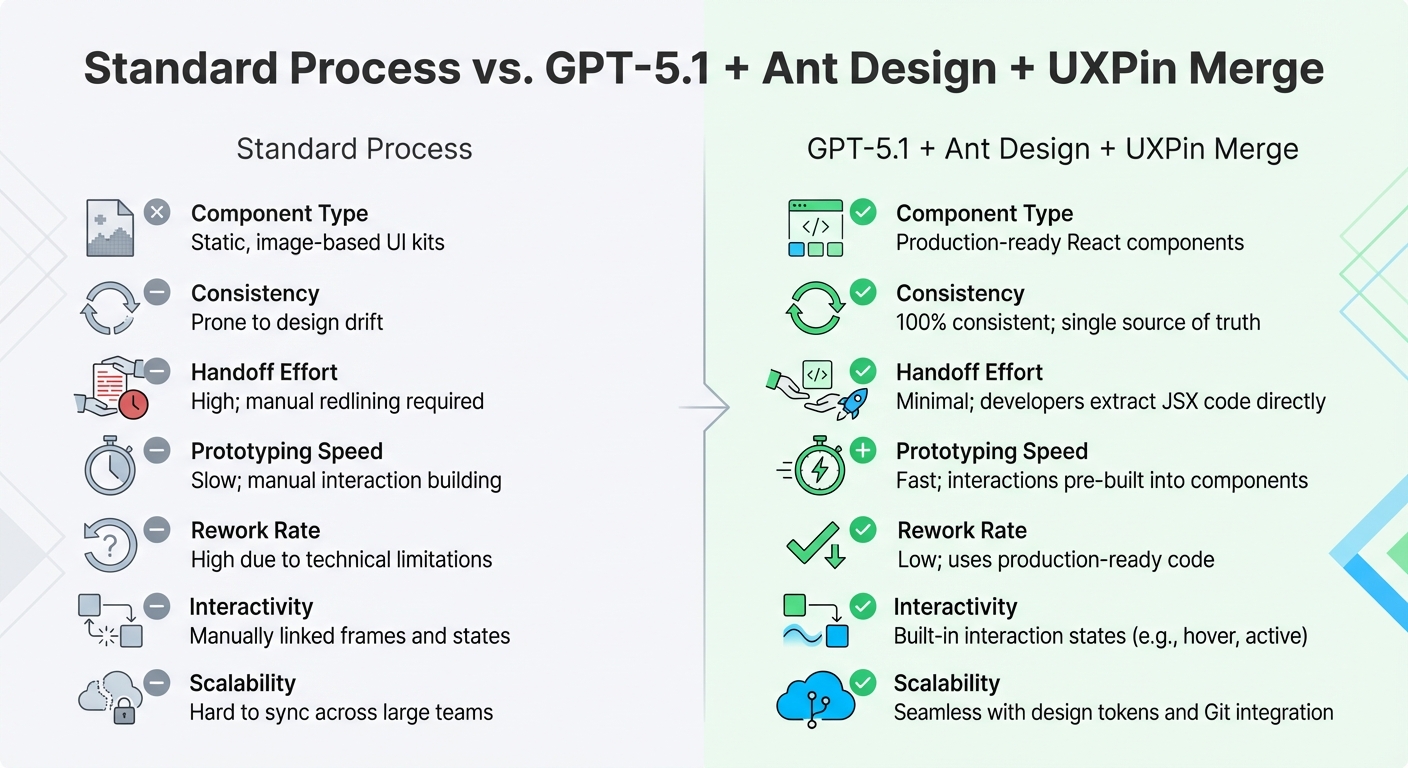
Standard UI Design Process vs GPT-5.1 + Ant Design + UXPin Merge Workflow Comparison
This workflow is a game-changer for enterprise teams building user interfaces. Instead of relying on static mockups that developers need to recreate from scratch, you’re working directly with production-ready code components. This eliminates the traditional gap between design and development, making the process smoother and more efficient.
By merging design and production, this approach simplifies UI workflows in a way that traditional methods can’t match. The advantages become clear when you compare this process to the standard workflow:
Comparison: Standard Process vs. GPT-5.1 + Ant Design + UXPin Merge
| Aspect | Standard Process | GPT-5.1 + Ant Design + UXPin Merge |
|---|---|---|
| Component Type | Static, image-based UI kits | Production-ready React components |
| Consistency | Prone to design drift | 100% consistent; single source of truth |
| Handoff Effort | High; manual redlining required | Minimal; developers extract JSX code directly |
| Prototyping Speed | Slow; manual interaction building | Fast; interactions pre-built into components |
| Rework Rate | High due to technical limitations | Low; uses production-ready code |
| Interactivity | Manually linked frames and states | Built-in interaction states (e.g., hover, active) |
| Scalability | Hard to sync across large teams | Seamless with design tokens and Git integration |
With UXPin Merge, designs are rendered as JSX, enabling developers to pull code straight from Spec Mode. No extra steps, no miscommunication.
Faster Delivery, Better Consistency, Easier Scaling
This integrated workflow doesn’t just boost consistency – it also speeds up delivery and simplifies scaling. Combining GPT-5.1’s AI capabilities, Ant Design’s enterprise-grade components, and UXPin Merge’s code-based design system results in tangible improvements. Every component includes built-in interactivity – hover states, click behaviors, form validations – so you’re testing real HTML, CSS, and JavaScript instead of faking it with linked frames.
For teams managing multiple products or platforms, this process ensures consistency without the need for constant oversight. Updates to component libraries stored in Git repositories automatically sync across all designs, keeping everyone on the same page. By working from a single source of truth, teams avoid accumulating design debt and eliminate the need for frequent audits to fix inconsistencies. This workflow not only accelerates time-to-market but also reduces the technical headaches that often slow down large organizations.
Conclusion: Start Using This Workflow Today
This integration reshapes how enterprise teams approach UI design and development, moving beyond outdated methods. By combining GPT-5.1, Ant Design, and UXPin Merge, the process eliminates the usual back-and-forth between designers and developers. Instead of static mockups, teams can now design directly with ready-to-use components – a game-changer for enterprise UI workflows.
And the impact is clear. Mark Figueiredo, Sr. UX Team Lead at T. Rowe Price, shared:
"What used to take days to gather feedback now takes hours. Add in the time we’ve saved from not emailing back-and-forth and manually redlining, and we’ve probably shaved months off timelines."
These aren’t just theoretical advantages – they’re tangible results that can directly improve efficiency and reduce costs.
Getting started is simple. This workflow fits smoothly into your current processes, offering consistency without the need for constant manual checks. If your enterprise uses a custom version of Ant Design, you can sync your Git repository with UXPin Merge technology to ensure everyone works from a unified design system. It’s a scalable solution that keeps large teams aligned while boosting productivity.
The tools, components, and AI are already set up to help your team move faster. Why wait? Take advantage of this workflow now to stay ahead of the competition.
FAQs
Do I need to know React to use this workflow?
No, you don’t need to know React to use this workflow. GPT-5.1 creates UI layouts from text prompts, and you can easily work with pre-built Ant Design components in UXPin Merge. These components can be arranged using drag-and-drop and customized through property adjustments. Even though the prototypes are made with actual React components, the process is designed to be simple and doesn’t require any coding skills.
How do I make GPT-5.1 use only Ant Design components?
To make sure GPT-5.1 relies solely on Ant Design components, start by integrating the Ant Design library into UXPin Merge. Once the library is set up, configure prompts to explicitly instruct GPT-5.1 to use only Ant Design components. This approach ensures that the JSX code generated by GPT-5.1 imports and implements Ant Design components directly. Afterward, you can refine the generated layouts in UXPin to match your design system and specific requirements.
How do teams keep the component library in sync with Git?
UXPin Merge lets teams connect their component library directly to Git, ensuring seamless updates and consistency. By linking UXPin to a Git repository, Storybook, or an npm package containing React components, any changes made in the repository automatically reflect in UXPin. This integration keeps the design library aligned with development. To get started, simply link your Git repository to UXPin Merge, and it will handle synchronization to maintain harmony between design and code.

